
CI/CD stands for Continuous Integration and Continuous Delivery — a pair of practices that help software teams ship updates faster, catch bugs earlier, and reduce the risk of broken releases. If you have ever wondered how large apps like Gmail or Spotify push new features without taking everything offline, CI/CD is usually the answer.
Many people hear CI/CD in tech conversations and assume it only matters to engineers. In reality, it directly shapes how quickly a business can respond to user feedback, fix problems, and stay competitive. This guide unpacks the concept in plain English — no jargon required — so you can understand what CI/CD is, how it works, and why it has become a standard part of modern software development.
What CI/CD Actually Means
The acronym covers two connected ideas. The first part — Continuous Integration (CI) — is about merging code changes into a shared project frequently, then running automated tests each time to catch problems early. Instead of waiting weeks to combine everyone’s work, developers integrate their changes daily or even multiple times a day.
The second part — Continuous Delivery or Continuous Deployment (CD) — extends that idea to the release process. These two terms are often confused, but they are slightly different:
- Continuous Delivery: Code is always kept in a state that could be released at any moment, but a human still decides when to push it live.
- Continuous Deployment: Every change that passes all automated tests is pushed directly to users without manual approval.
Most teams start with continuous delivery and move toward continuous deployment as their confidence in automated test coverage grows.
Why Software Teams Use CI/CD
Before CI/CD became common, software teams worked in long release cycles — collecting changes for weeks or months, then merging everything at once. This approach created what developers call integration hell: a painful period of resolving conflicts, chasing broken builds, and delaying releases.
CI/CD solves this by making integration a daily habit rather than a quarterly ordeal. The key benefits include:
- Faster releases: Teams can ship improvements in days instead of months.
- Fewer bugs in production: Automated tests catch regressions before they reach real users.
- Less manual work: Repetitive steps like building, testing, and packaging are handled by tools, not people.
- Better collaboration: Developers share code more frequently, reducing conflicting changes piling up.
- Lower release risk: Smaller, more frequent updates are easier to test and roll back when something goes wrong.
How Continuous Integration Works Day to Day
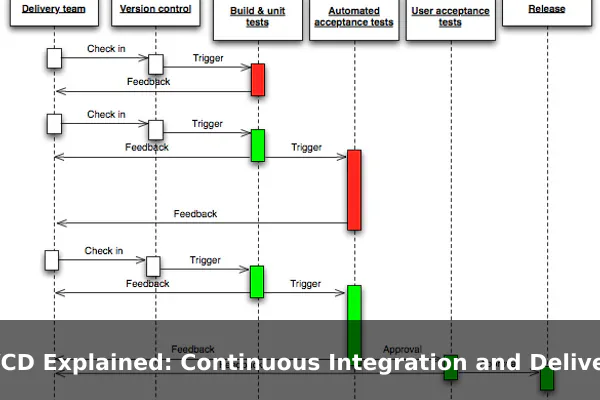
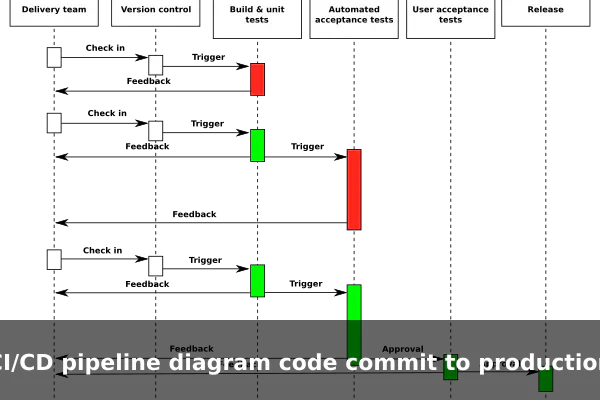
In practice, CI starts when a developer finishes a small piece of work and pushes their code to a shared repository — usually using a tool like Git. That push triggers an automated pipeline that runs a test suite: a set of scripts that check whether the new code behaves correctly and does not break anything that already worked.
What Happens During a CI Run
- A developer commits code and pushes it to the shared repository.
- The CI server detects the new commit and starts a fresh build.
- The code is compiled or packaged as needed.
- Automated tests run — unit tests, integration tests, and lint checks.
- The team is notified: a green result means everything passed; a red result pinpoints what broke.
If a test fails, the developer fixes it immediately while the context is still fresh. This tight feedback loop is what makes CI so valuable — problems are small and easy to resolve when caught early.
How Continuous Delivery Fits After CI
Once CI confirms the code is healthy, continuous delivery takes over. The goal is to move that tested, passing code through additional checks until it is fully ready to release — sitting in a staging environment that mirrors production closely.
The Role of Staging Environments
A staging environment is a near-identical copy of the live application used for final checks before anything touches real users. This is where QA teams, product managers, or automated acceptance tests verify that the feature works correctly in a realistic setting.
With continuous delivery, a human approval step sits between staging and production. A team member reviews the staged build and approves the release when satisfied. This preserves control while still automating all the preparatory work upstream.
CI/CD Pipeline Explained Step by Step
A CI/CD pipeline is the automated sequence of steps that takes code from a developer’s machine to a live environment. Think of it as an assembly line where each station performs a specific quality check before the product moves forward.

A Simple Pipeline in Order
- Source: A developer pushes code to the repository.
- Build: The pipeline compiles the code or installs dependencies.
- Test: Automated tests run to verify correctness.
- Package: The tested code is bundled into a deployable artifact, such as a Docker image.
- Staging deploy: The artifact is deployed to a staging environment for final checks.
- Production deploy: After approval — or automatically with continuous deployment — the artifact goes live.
Popular tools that power these pipelines include GitHub Actions, GitLab CI/CD, Jenkins, and CircleCI. Each integrates with code repositories and cloud platforms to run these steps without manual intervention.
CI/CD in a Real-World Example
Imagine a small team building a news app. A developer adds a new save-article button. Without CI/CD, that change might sit in a branch for two weeks, get merged with dozens of other changes, and ship as part of a big quarterly release — making it hard to trace bugs when something breaks.
With CI/CD, the developer’s change triggers a pipeline immediately. Tests confirm the save function works and does not break the existing article list. The code is automatically deployed to staging, where the product team notices the button is misaligned on small screens. The developer fixes it the same afternoon, the pipeline runs again, and the fix reaches users within 24 hours. That shorter feedback loop — from idea to user — is the core promise of CI/CD.
Common CI/CD Terms Beginners Should Know
CI/CD comes with its own vocabulary. Here are the terms you will encounter most often:
- Pipeline: The automated sequence of steps from code commit to deployment.
- Build: The step that compiles code or prepares it to run.
- Test suite: A collection of automated tests that verify code behavior.
- Artifact: The packaged output of a build, ready to be deployed.
- Staging: A test environment that closely mirrors the live system.
- Rollback: Reverting to a previous working version when a release causes problems.
- Green build: All tests passed — the pipeline succeeded.
- Red build: One or more tests failed — the pipeline stopped with an error.
When CI/CD Helps Most and What It Does Not Solve
CI/CD delivers the greatest value when a team ships frequently, maintains a solid set of automated tests, and uses version control consistently. It is especially powerful for web applications, mobile apps, and any software that can be updated incrementally without disrupting users.
Where CI/CD Works Best
- Teams releasing updates multiple times per week
- Products with established automated test coverage
- Services hosted on cloud platforms where deployments can be scripted
What CI/CD Does Not Fix
CI/CD is not a substitute for writing good code or maintaining a healthy team culture. If the codebase has no tests, the pipeline cannot catch real-world failures. If requirements change constantly, automating releases simply makes it faster to ship the wrong thing. CI/CD also does not automatically handle database migrations, infrastructure changes, or compliance sign-offs — those still require careful human planning.
In short, CI/CD is a powerful multiplier for teams that already have solid engineering practices. It removes friction from the release process, but it does not replace the judgment, planning, and collaboration that produce quality software. Understanding CI/CD is the first step toward appreciating why modern software teams can move so quickly — and why the apps you use keep getting better, week after week, without missing a beat.
