
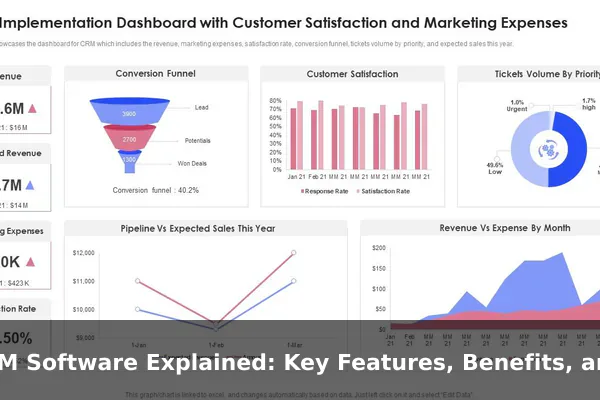
Managing customer relationships is at the heart of every successful business, yet many teams still rely on scattered spreadsheets, sticky notes, and disconnected email threads to stay organized. CRM software changes that by centralizing everything in one place — from first contact to repeat purchase. Whether you run a small startup or an established company, understanding how CRM tools work can help you build stronger relationships and close more deals with less friction.
This guide breaks down what CRM software actually is, what features to expect, the real benefits it delivers, and how businesses across different industries are putting it to use today. If you are comparing options or simply trying to understand the category before investing, this is the right starting point.
What CRM Software Means
CRM stands for Customer Relationship Management. As a concept, it refers to the overall strategy a business uses to manage interactions with current and potential customers. As a software category, CRM refers to the platforms that make that strategy actionable at scale.
At its core, a CRM system is a centralized database for all customer-related information. It stores contact details, communication history, purchase records, support notes, and activity logs in a structured, searchable format. This replaces the need for teams to maintain separate lists or piece together context from scattered emails. Salesforce, HubSpot, Zoho CRM, and Pipedrive are among the most recognized CRM platforms today.
CRM as a Strategy vs. CRM as a Tool
A CRM strategy is the mindset of prioritizing customer relationships — knowing who your customers are, understanding their needs, and delivering timely, relevant communication. CRM software is what enables that strategy to work consistently across a growing team without relying on individual memory or effort. The two concepts reinforce each other: better data leads to better decisions, which leads to stronger relationships.
How CRM Software Works in Daily Business Operations
When someone fills out a contact form, sends an inquiry, or calls your sales line, that interaction needs to be captured, organized, and followed up. CRM software handles this workflow automatically. A typical sequence looks like this:
- A new lead enters the system — either manually or automatically via a web form or email sync.
- The lead is assigned to a team member and placed in a pipeline stage such as New Lead, Contacted, or Proposal Sent.
- Every interaction — calls, emails, meetings, notes — is logged to the contact record.
- Automated reminders prompt the rep to follow up at the right time.
- When the deal closes, the contact transitions to a customer record and may move into the support or renewal workflow.
This structure keeps the entire team aligned. A sales manager can check deal progress in real time. A support agent can see a customer’s full history before picking up the phone. A marketer can segment contacts based on behavior and stage.
Key Features Found in CRM Software
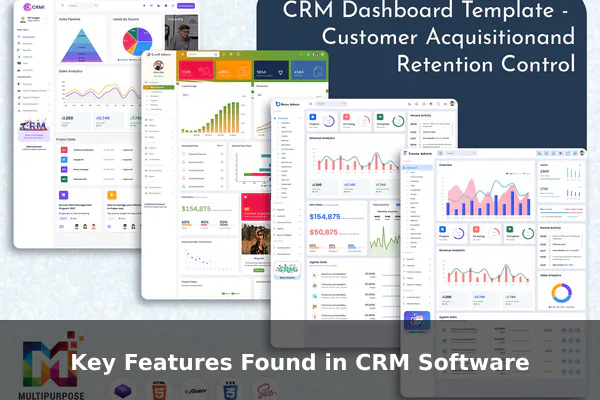
Most CRM platforms share a core set of features that define the category. Understanding these helps you evaluate any platform objectively.
Contact and Account Management
The foundation of any CRM is its ability to store and organize contact records — including names, companies, roles, communication history, and attached files. Account-level records group multiple contacts under a single company, which is especially useful in B2B sales.
Sales Pipeline and Lead Tracking
A visual pipeline — usually a Kanban-style board — shows every active deal organized by stage. Reps can move deals forward as they progress, flag stalled opportunities, and see their full workload at a glance. This replaces spreadsheets that go stale and miss context.
Task Automation and Email Integration
Most modern CRMs let users automate repetitive actions. When a deal moves to a new stage, the system can schedule a follow-up reminder automatically. Email integrations with Gmail or Outlook log every sent and received message to the relevant contact record without any manual copying.
Reporting and Analytics
Dashboards let managers track team performance, forecast revenue, and identify where prospects tend to drop off. Good CRM reporting turns raw activity data into insight — showing which lead sources convert best and which reps are closing the most deals.
Main Benefits of Using a CRM System
Adopting CRM software delivers benefits that go beyond simple organization. Here are the outcomes most businesses report after implementation:
- Better data organization: All customer information lives in one place, accessible to anyone without searching inboxes or shared drives.
- Improved sales visibility: Managers and reps see the full pipeline at a glance — no more guessing which deals need attention.
- Faster response times: Automated reminders and task queues ensure no follow-up is missed.
- Stronger customer retention: By tracking purchase history and past interactions, teams can personalize outreach and anticipate needs.
- More accurate forecasting: Pipeline data gives leadership a reliable basis for revenue projections.
- Scalability: A CRM handles thousands of contacts without the performance issues that come with spreadsheets.
Examples of How Different Businesses Use CRM Software
CRM software is not limited to large enterprises. Here is how different types of businesses use it in practice.
Small Business and Freelancers
A small digital agency might use a CRM to track every client proposal, log calls, and set reminders to follow up on outstanding invoices. Even with a team of five, having all active relationships visible in one dashboard saves hours each week.
B2B Sales Teams
A B2B software company’s sales team uses CRM to manage a complex pipeline that may span several months. Every demo call, proposal revision, and stakeholder interaction is logged — so when a rep goes on leave, someone else can pick up the account seamlessly.
E-Commerce and Retail Brands
An online retailer connects its CRM to its e-commerce platform to track purchase history and trigger personalized re-engagement campaigns for customers who haven’t bought in 90 days. The CRM becomes the engine behind automated loyalty programs and segmented promotions.
Popular Types of CRM Software
Not all CRM platforms are built for the same purpose. The three main categories are:
- Operational CRM: Focuses on automating and streamlining sales, marketing, and service workflows. This is the most common type — examples include HubSpot CRM and Salesforce Sales Cloud.
- Analytical CRM: Processes large volumes of customer data to identify trends, segment audiences, and measure lifetime value. Most useful for data-driven marketing and retention strategy.
- Collaborative CRM: Focuses on sharing customer information across departments — sales, marketing, and support — so every team works from the same complete picture.
Most commercial platforms blend elements of all three, with different emphasis depending on the pricing tier and target audience.
How to Choose the Right CRM Software
With dozens of options on the market, selection can feel overwhelming. These criteria will help narrow the field:
- Team size and budget: Entry-level plans from HubSpot and Zoho are free or low-cost. More advanced automation and reporting features require paid tiers.
- Ease of use: A CRM only works if the team actually uses it. Prioritize clean interfaces with short onboarding times.
- Integrations: Check whether the platform connects to your existing tools — email, calendar, helpdesk, accounting, or e-commerce systems.
- Scalability: Choose a platform that can grow with you. Switching CRMs later is costly and disruptive.
Starting with a free trial is almost always the right move. Most major CRM platforms offer 14- to 30-day trials with full feature access, which is enough time to judge whether the workflow fits your team.
Common Questions About CRM Software
Is CRM software only for large businesses?
No. CRM software is available at every price point, including permanently free plans. Small businesses and freelancers often benefit the most from adopting a CRM early, since it builds good habits before complexity grows.
Can spreadsheets replace a CRM?
Spreadsheets work for very small contact lists, but they do not scale. They break under simultaneous editing, offer no automation, provide limited reporting, and lose context when team members change. A CRM solves all of these problems.
What makes a good first CRM?
For most small teams, a good first CRM is free or inexpensive, integrates with Gmail or Outlook, and offers a clear visual pipeline. HubSpot CRM’s free tier is frequently recommended as a starting point because it includes strong contact management and email logging without a time limit.
CRM software is one of the most practical investments a business can make at any stage of growth. It replaces disorganized contact lists and fragmented communication with a single, structured system that keeps every team member informed and every customer relationship on track. The right platform depends on your team size, budget, and workflow — but the benefits of getting organized become clear within the first weeks of consistent use.
