
Serverless computing is one of the most talked-about ideas in modern software, but it is also one of the most misunderstood. The name sounds almost magical, as if applications now run without machines, operations, or architecture decisions. In reality, serverless is not about removing servers from the picture. It is about shifting more of the infrastructure work to a cloud provider so development teams can focus more directly on application logic, integrations, and user outcomes.
That shift can be extremely valuable. For many teams, serverless speeds up delivery, reduces day-to-day infrastructure administration, and makes it easier to handle unpredictable traffic. At the same time, it does not erase complexity. It changes where complexity lives. Instead of patching servers and tuning operating systems, teams must think more carefully about event design, execution limits, monitoring, latency behavior, and dependence on provider-specific services.
This balanced view matters because serverless is neither a universal upgrade nor an overhyped mistake. It is a powerful operating model that works best when its strengths match the workload. Understanding both the benefits and the practical limits helps businesses avoid the two most common errors: adopting serverless for the wrong reasons, or dismissing it before seeing where it genuinely fits.
What Serverless Computing Really Means
At its core, serverless computing is a cloud execution model in which the provider manages most of the underlying infrastructure needed to run code. Developers still write applications, define triggers, set permissions, and configure services, but they do not usually provision or maintain virtual machines in the traditional sense.
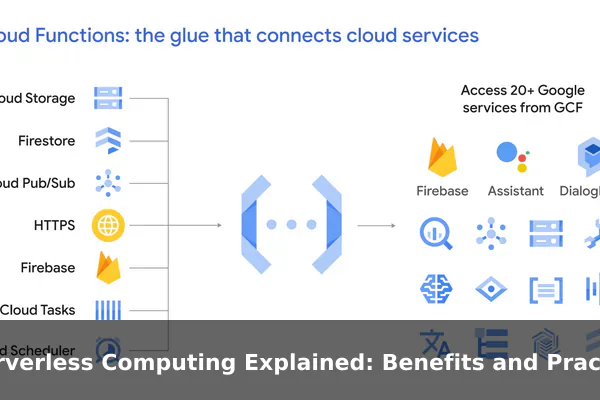
The term covers more than one pattern. Many people think of Functions as a Service first, where small units of code run in response to events. But serverless can also include managed databases, authentication services, message queues, API gateways, storage services, and workflow orchestrators. In practice, a serverless application often combines several managed services rather than relying on a single function runtime.
Why the Name Causes Confusion
The phrase serverless is useful marketing shorthand, but it is technically misleading. Servers still exist. CPU, memory, networking, and storage still exist. The difference is that the cloud provider handles much more of the provisioning, scaling, patching, and platform maintenance behind the scenes.
This is why serverless should be understood as a responsibility shift, not a physical change in computing. Your team no longer spends as much time deciding instance sizes, updating base images, or keeping idle servers available just in case traffic spikes. Instead, you spend more time defining application behavior, service boundaries, and event-driven workflows.
The Core Idea Behind the Model
The central promise of serverless is simple: run code or deliver backend capabilities on demand. Rather than keeping a full server running all day whether anyone uses it or not, the platform can execute work when a request, file upload, database change, queue message, or scheduled event occurs.
That design makes serverless especially attractive for workloads that are intermittent, bursty, or highly variable. If an application is quiet for long periods and then suddenly busy, a serverless platform can often adapt faster and with less wasted capacity than a fixed server setup.
How the Serverless Model Works in Practice
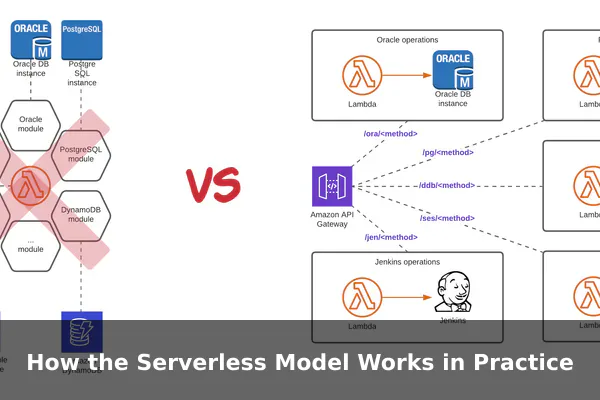
In a typical serverless architecture, a user action or system event triggers a managed service, which then activates the necessary code or workflow. For example, a web form submission might call an API gateway, which invokes a function, which writes data to a managed database, and then sends a message to a queue for follow-up processing.
The developer focuses on the behavior of each step. The cloud provider focuses on starting the runtime, allocating resources, routing the request, scaling instances, and shutting them down when they are no longer needed. This separation is what makes serverless feel lightweight from an operational perspective.
Functions, Events, and Managed Backends
Most serverless systems revolve around three building blocks:
- Functions: small execution units that run code for a limited time.
- Events: signals that trigger work, such as HTTP requests, file uploads, timer schedules, or queue messages.
- Managed services: databases, storage, authentication, logging, and messaging components operated by the provider.
Together, these pieces support an event-driven style of architecture. Instead of building one large, always-running application, teams often split behavior into smaller tasks that react to specific events.
Auto Scaling and Pay-for-Use Billing
One major appeal of serverless is automatic scaling. If ten users hit an endpoint, the platform can serve ten requests. If ten thousand users arrive within seconds, the platform may spin up many more execution environments without the team manually adding servers. This elasticity is one reason serverless works well for unpredictable traffic patterns.
Billing also works differently from many traditional deployments. Instead of paying mainly for reserved server uptime, teams often pay for measurements such as number of invocations, execution duration, memory allocation, requests, or data transfer. That usage-based billing can be cost-efficient for lightweight or irregular workloads, though it is not automatically cheap in every scenario.
What Developers Still Need to Manage
Serverless reduces infrastructure work, but it does not remove engineering responsibility. Teams still need to manage application code, access control, secrets, deployment pipelines, observability, failure handling, data design, and service dependencies. In many environments, they also need to manage concurrency limits, timeout settings, retry behavior, and cost monitoring.
In other words, serverless lowers some operational burdens while raising the importance of architectural discipline. Poorly designed workflows can still become fragile, slow, or expensive even when no one is managing servers directly.
Key Benefits for Development Teams and Businesses
The strongest argument for serverless is not that it is fashionable. It is that, in the right context, it aligns technology effort with business value more efficiently than older deployment patterns.
Faster Delivery and Smaller Operational Surface Area
When infrastructure setup becomes less central, teams can deliver features faster. A developer can often build and deploy a new endpoint, webhook handler, or automation task without creating and maintaining a full application server stack. That shorter path from idea to production can be especially helpful for startups, internal tools teams, and product groups that need to iterate quickly.
Operationally, there is also less routine care around server patching, operating system maintenance, and idle capacity planning. This does not eliminate DevOps practices, but it often narrows the operational surface area enough that small teams can support useful systems with fewer moving parts.
Elasticity for Uneven Demand
Many real applications do not receive smooth, predictable traffic. They experience lunch-hour peaks, seasonal surges, campaign spikes, background import bursts, or sudden partner API callbacks. Serverless platforms are well suited to this pattern because they can scale up during demand spikes and scale down when activity fades.
This matters both technically and financially. Performance stays available during busy periods, and the business does not necessarily pay for idle machines during quiet periods. For companies with inconsistent traffic, that flexibility can be more valuable than raw control.
Cost Efficiency for the Right Workloads
Serverless is often described as cheaper, but the accurate claim is more specific: it can be more cost-efficient for workloads that are event-driven, intermittent, or difficult to size in advance. Paying only when code runs is attractive when long idle windows would otherwise leave servers sitting mostly unused.
Examples of cost-friendly serverless patterns include:
- Occasional API endpoints for internal tools
- Scheduled report generation
- Image or document processing after uploads
- Notification workflows triggered by events
- Low-to-medium traffic applications with uneven activity
For these cases, the economics can be compelling because the platform absorbs most standby overhead.
Built-In Integration with Cloud Services
Another practical advantage is that serverless offerings often connect naturally with other managed services. Object storage can trigger processing jobs. Queues can decouple slow tasks from user-facing requests. Managed identity services can simplify login flows. Monitoring, logs, and permissions can plug into the same cloud ecosystem.
This ecosystem effect is one reason teams can move fast with serverless. They are not just avoiding server management. They are assembling solutions from managed building blocks that are already designed to work together.
Where Serverless Fits Best
Serverless works best where responsiveness, flexibility, and operational simplicity matter more than constant full-stack control. It is especially strong when work can be broken into independent, event-driven steps.
APIs, Webhooks, and Lightweight Application Logic
Many teams use serverless for API endpoints, backend handlers, and webhook receivers. These workloads are often short-lived, stateless, and tied to clear triggers. A payment callback, contact form submission, or user profile update is usually a good match because each request can be handled independently.
This is also common in modern web applications where the frontend is hosted separately and the backend consists of narrow functions rather than one large monolithic server.
Background Jobs and Automation
Serverless is excellent for backend tasks that do not need to run inside a permanent process. Scheduled cleanups, file conversions, thumbnail generation, email notifications, invoice creation, and periodic sync jobs all benefit from on-demand execution.
These jobs are often good candidates because they have clear inputs and outputs, limited execution windows, and no need for a continuously running host.
Data Pipelines and Event Processing
Another strong use case is event processing. When files arrive in storage, logs stream in, transactions occur, or messages land in a queue, serverless functions can validate, enrich, transform, and route that data. This works particularly well in distributed systems where tasks can be divided into smaller stages.
Common patterns include:
- Processing uploaded images or documents
- Responding to database record changes
- Transforming incoming telemetry data
- Moving messages through validation pipelines
- Triggering alerts from monitoring events
Prototypes, MVPs, and Internal Tools
Because the platform handles so much of the infrastructure, serverless is also attractive for minimum viable products, experiments, and internal business tools. A small team can launch useful functionality quickly without designing a full operations model on day one.
That does not mean prototypes should ignore architecture. It means serverless can reduce the amount of undifferentiated infrastructure work required to test an idea and get feedback.
The Practical Limits You Need to Understand
The most important part of any serverless discussion is where the model starts to push back. These limits do not make serverless bad. They simply define the boundary conditions where a different architecture may be better.
Cold Starts and Latency Variability
One of the best-known issues is the cold start. If a function has not been used recently, the platform may need extra time to initialize the runtime before it can handle the next request. In some workloads this delay is tiny. In others, especially those with heavier startup requirements, it can be noticeable.
For user-facing systems that demand highly consistent low latency, this matters. A traditional always-on service may deliver more predictable performance because the process is already warm and ready. Serverless can still work well, but teams need to measure startup behavior rather than assume it is invisible.
Execution Time, Memory, and Runtime Constraints
Serverless platforms typically enforce limits on execution duration, memory, package size, local storage, concurrency, and network behavior. Those limits help providers operate the platform efficiently, but they can be restrictive for long-running or resource-heavy tasks.
Workloads that may struggle in pure serverless form include:
- Large batch jobs that run for a long time
- High-memory processing tasks
- Applications that require custom low-level system access
- Persistent socket-heavy services
- Software that depends on stable local state between requests
These cases often fit better on containers, virtual machines, or hybrid designs where serverless handles event-driven edges and other platforms handle sustained compute.
State Management Is Harder Than It Looks
Serverless functions are usually designed to be stateless. That is excellent for scaling and fault isolation, but it means application state must live elsewhere, such as in a database, cache, queue, or object store. Teams moving from traditional app servers sometimes underestimate how much design work this requires.
Stateless execution changes how sessions, workflows, transactions, and multi-step business processes are modeled. If the application depends heavily on shared in-memory state or long-lived process context, serverless can feel awkward unless the architecture is rethought carefully.
Observability and Debugging Can Become More Complex
Debugging a distributed serverless workflow is often harder than debugging a single long-running application. A user action might cross an API gateway, multiple functions, a queue, a database trigger, and an external service. If something fails, the team needs strong logging, tracing, correlation IDs, and alerting to see the full path.
This is one of the most underestimated tradeoffs. Operational visibility does not disappear with serverless. In many cases, it becomes more important because the system is made of smaller, more loosely connected parts.
Vendor Lock-In and Architectural Coupling
Serverless platforms frequently encourage deep use of provider-specific triggers, permissions, monitoring tools, workflow engines, and database integrations. That convenience is real, but it can also increase lock-in. Migrating to another platform later may require more than moving code. It may require redesigning how the system is assembled.
Lock-in is not always a problem worth avoiding at all costs. Many businesses accept it in exchange for speed. The key is to make that tradeoff consciously. Teams should know whether they are optimizing for fast delivery now or portability later.
Costs Can Rise at Scale or Under Poor Design
The phrase pay only for what you use sounds efficient, but usage-based pricing can become expensive when invocation counts explode, memory settings are oversized, or data transfer grows unexpectedly. A serverless design with many small steps may also create hidden cost multiplication across requests, logs, queues, and downstream services.
This means cost control in serverless depends on good design. Teams need to watch invocation patterns, retry storms, idle polling, chatty workflows, and data movement. In some stable, high-throughput scenarios, a well-tuned always-on service can be cheaper than a purely serverless implementation.
Serverless vs Traditional Servers and Containers
Choosing serverless makes more sense when it is compared against the realistic alternatives. Most teams are not deciding between modern cloud and no cloud. They are choosing among serverless functions, containers, and traditional virtual servers, each with a different balance of control and convenience.
Traditional Servers
Traditional servers offer the most direct control over the runtime environment. Teams can customize the operating system, run persistent processes, tune background services, and keep applications continuously available. This model works well for legacy systems, predictable workloads, and software that needs stable long-running behavior.
The downside is higher operational burden. Capacity planning, patching, monitoring, failover, scaling, and environment maintenance usually require more sustained effort.
Containers
Containers sit between traditional servers and serverless. They package applications consistently and can run on managed orchestration platforms, giving teams portability and more control than serverless while still supporting automation and cloud-native scaling.
Containers are often a better fit when applications need custom runtimes, longer execution times, or more predictable performance, but the team still wants modern deployment workflows.
Serverless
Serverless offers the least infrastructure management and often the fastest route to event-driven delivery. It shines when code can be short-lived, stateless, and triggered by clear events. It is weaker when workloads need long runtime windows, low-level customization, or highly consistent performance characteristics.
A practical comparison looks like this:
- Choose serverless when you want speed, elasticity, and minimal server operations.
- Choose containers when you need portability and control without fully managing raw servers.
- Choose traditional servers when the application demands persistent environments and deep system-level control.
Many mature platforms use all three where each model fits best.
A Simple Decision Framework for Choosing Serverless
Instead of asking whether serverless is good or bad, ask whether it matches the workload, the team, and the business constraints. The following framework helps make that decision more concrete.
- Look at traffic shape. If demand is irregular or bursty, serverless becomes more attractive. If traffic is constant and heavy, compare costs carefully against always-on options.
- Measure execution style. Short, stateless, event-driven tasks fit well. Long-running jobs or persistent connection-heavy services usually fit less well.
- Assess team capacity. Small teams often benefit from reducing infrastructure operations. Larger platform teams may prefer containers when they want more standardization and control.
- Check latency tolerance. If the application can tolerate some variability, serverless is easier to justify. If predictable low latency is mandatory, test carefully.
- Map integration needs. If the workload benefits from managed storage, queues, auth, and triggers in one cloud ecosystem, serverless offers strong leverage.
- Consider portability goals. If multi-provider portability is a strategic requirement, heavy use of provider-specific services may be a concern.
- Model real costs. Estimate invocation volume, memory, data transfer, logging, and downstream service usage before assuming serverless is the cheapest option.
When a Hybrid Approach Makes More Sense
Many organizations get the best result from a hybrid model rather than a pure one. They run APIs, automation, and event handlers on serverless platforms while keeping long-running processing, streaming systems, or specialized services on containers or virtual machines.
This mixed approach reflects reality: modern architectures rarely need a single deployment style for every component. The goal is not ideological purity. The goal is workload fit.
Common Misconceptions and Final Takeaways
Several myths continue to distort conversations about serverless:
- Myth: Serverless means no servers exist. Reality: Servers still exist, but the provider manages far more of them.
- Myth: Serverless automatically lowers all costs. Reality: Cost depends heavily on workload shape and system design.
- Myth: Serverless removes operational complexity. Reality: It shifts complexity toward architecture, observability, and service integration.
- Myth: Serverless is only for tiny apps. Reality: It can power serious production systems when the workload matches the model.
- Myth: If serverless has limits, it is not worth using. Reality: Every compute model has limits; good engineering comes from matching tools to requirements.
The most useful way to understand serverless computing is to see it as a practical tradeoff. You give up some control over runtime behavior and platform details in exchange for speed, elasticity, and reduced infrastructure management. That trade can be excellent for APIs, automations, event processing, and many modern application backends. It becomes weaker for heavy, persistent, highly customized, or ultra-latency-sensitive workloads.
For businesses and development teams, the lesson is straightforward. Do not adopt serverless because it sounds modern, and do not reject it because it is not universal. Evaluate the shape of the work, the skill of the team, the cost profile, and the performance requirements. When those factors align, serverless computing can be one of the clearest ways to deliver software faster without carrying unnecessary infrastructure overhead.
Conclusion
Serverless computing is best understood not as a replacement for every server-based system, but as an execution model that changes how software is built, operated, and paid for. Its biggest benefits appear when applications are event-driven, demand is uneven, and teams want to move quickly with fewer infrastructure chores. Its limits appear when workloads need long runtimes, strict predictability, deep customization, or clean portability across providers.
Used thoughtfully, serverless is neither hype nor magic. It is a strong architectural option with clear strengths and clear boundaries. Teams that understand both sides can use it confidently, combine it with other models where needed, and make better long-term technology decisions.
