
Platform as a Service (PaaS) is a cloud model that gives developers a ready-made environment to build, run, test, and deploy applications without managing the underlying servers themselves. Instead of spending time setting up machines, installing runtimes, patching operating systems, or configuring deployment pipelines from scratch, teams can focus on writing code and shipping features.
That is why PaaS matters. Modern software projects move quickly, and many teams do not want to become infrastructure specialists just to launch a web app, internal tool, or API. A good PaaS platform reduces operational work, shortens setup time, and creates a more consistent way to move from development to production.
This guide explains PaaS in plain English, but from a distinctly practical angle. Rather than covering cloud computing in broad terms, it focuses on how Platform as a Service fits into the real software development workflow: what it includes, how it works behind the scenes, where it shines, where it creates trade-offs, and how it compares with IaaS and SaaS.
What Platform as a Service Means
PaaS stands for Platform as a Service. In simple terms, it is a managed cloud platform where the provider supplies the technical foundation needed to run an application, while the customer supplies the application code and business logic.
A beginner-friendly way to think about it is this: with PaaS, you are not renting an empty piece of land and building everything yourself. You are renting a prepared workspace that already has electricity, tools, safety systems, storage, and maintenance. You still create the product, but you do not need to build the workshop first.
PaaS in one sentence
PaaS is a cloud service model that lets you build and deploy software on a managed platform instead of managing raw infrastructure.
This makes PaaS especially attractive for teams that want a balance between convenience and control. It gives you more freedom than a finished software product, but less operational burden than a fully self-managed server setup.
What you still control in a PaaS model
PaaS does not mean the provider does everything. You still make important choices, including:
- The application code and its features
- The programming language or framework, when supported
- Database structure and application-level queries
- User authentication logic and permissions inside the app
- Deployment timing, release process, and versioning
- Performance improvements in the application itself
In other words, PaaS removes much of the platform maintenance work, but it does not remove software engineering responsibility. You still design, build, test, secure, and improve the product.
How PaaS Works Behind the Scenes

To understand why PaaS is useful, it helps to look at what happens underneath. When you deploy an app to a PaaS provider, your code runs on infrastructure that the provider already prepared. That usually includes servers, storage, networking, operating systems, middleware, runtime environments, deployment tools, and monitoring basics.
Instead of configuring all of those layers one by one, you interact with a simpler interface. Depending on the provider, that interface might be a web dashboard, a command-line tool, a Git-based deployment workflow, or an automated CI/CD pipeline.
The building blocks the provider usually handles
Most PaaS platforms manage the parts that are repetitive, fragile, or time-consuming for development teams:
- Servers: physical or virtual machines that run the application
- Operating systems: installation, updates, and security patching
- Runtime environments: tools needed to run languages such as Node.js, Python, Java, PHP, or Ruby
- Middleware: software layers that help applications communicate with databases, queues, or services
- Networking: routing, ports, load balancing, and public access
- Scaling tools: adding or reducing compute resources as traffic changes
- Monitoring basics: logs, metrics, uptime information, and alerts
- Deployment systems: mechanisms for pushing code into a live environment
From the user side, the experience feels much cleaner. You tell the platform what app to run, what environment variables to use, what database to attach, and what amount of compute you need. The platform does the lower-level coordination.
A typical PaaS deployment flow
A simple PaaS workflow often looks like this:
- A developer writes code locally.
- The code is pushed to a repository or directly to the platform.
- The platform detects the application type.
- It installs dependencies and builds the app.
- It provisions the runtime environment.
- It deploys the new version and exposes it through a URL or domain.
- It collects logs and basic health information after deployment.
This is one of the biggest reasons Platform as a Service feels approachable. The developer thinks in terms of application delivery, not in terms of manually preparing servers for every release.
What Is Typically Included in a PaaS Offering
Not every provider offers the same toolkit, but most PaaS platforms bundle a set of services meant to make app development faster and more consistent. The goal is not just hosting code. The goal is supporting the full journey from development to deployment.
Core services many teams expect
- Application hosting for websites, APIs, or background services
- Managed databases such as PostgreSQL, MySQL, or document databases
- Runtime support for popular programming languages and frameworks
- Environment variable management for secrets and configuration
- Domain and SSL support for secure public access
- Auto-scaling options for handling traffic changes
- Logging and monitoring dashboards for troubleshooting
- Backup or recovery features depending on the provider
Developer productivity features
Many PaaS products go further by improving team workflow, not just infrastructure management. These additions are often what make the platform valuable day to day:
- One-click deployments or Git-based deployments
- Preview environments for testing changes
- CI/CD integrations
- API access for automation
- Role-based team access
- Staging and production environment separation
- Integrated add-ons such as caching, queues, or email services
Some platforms also include opinionated defaults. That means they encourage a certain way of structuring applications, deployments, or scaling. For beginners, this can be helpful because it reduces decision overload. For advanced teams, it can feel restrictive if the defaults do not match their architecture.
Well-known examples of PaaS offerings or PaaS-like developer platforms include services such as Heroku, Google App Engine, Azure App Service, AWS Elastic Beanstalk, Render, and Railway. Each handles the details differently, but the shared idea is the same: provide a managed application platform so developers can ship software faster.
Why Teams Use PaaS
The strongest argument for Platform as a Service is simple: it removes a large amount of operational friction. Teams choose PaaS because they want to spend less time maintaining infrastructure and more time creating user value.
Faster development and launch speed
Setting up servers from scratch takes time. So does configuring operating systems, deployment scripts, firewalls, runtime versions, monitoring, and scaling rules. PaaS compresses those steps into a smaller, more repeatable workflow. A team can go from idea to working deployment much faster than with a fully self-managed environment.
This matters for startups, internal business tools, prototypes, and any project where speed of iteration matters more than deep infrastructure customization. If a product team wants to test demand quickly, PaaS can remove days or weeks of setup work.
Lower operational burden
Every server introduces maintenance. Patches need to be applied. Services need to be restarted. Security updates need attention. Capacity has to be watched. A PaaS provider handles much of that routine platform work. The result is not zero operations, but far fewer manual tasks for the customer.
That reduction in operational burden is especially useful for small teams. A two-person or five-person engineering team often cannot afford to divide attention between product development and infrastructure administration. PaaS helps such teams act larger than they are.
Better focus on product code
When developers are constantly dealing with deployment failures, server configuration mismatches, or environment drift, feature work slows down. PaaS creates a more standardized path from development to production. That frees mental energy for the application itself: user experience, reliability, performance, and business logic.
For many organizations, this is the real value. PaaS is not just about convenience. It is about focus. It shifts attention toward the software problems that are unique to the business and away from the platform tasks that are mostly similar across projects.
Easier scaling for predictable growth
As traffic increases, an app may need more compute, more memory, more instances, or stronger database support. Many PaaS platforms make that process easier than traditional server management. Instead of manually provisioning new machines, you may be able to scale with a configuration change or a higher service tier.
This does not make scaling magically simple, but it usually makes it simpler. The platform handles more of the coordination work, which reduces the risk of basic deployment mistakes during growth.
The Limits and Risks of PaaS
PaaS is useful, but it is not perfect. Every managed service makes trade-offs. If a team ignores those trade-offs, the convenience of Platform as a Service can turn into frustration later.
Vendor lock-in
One of the most common concerns is vendor lock-in. The more your application depends on platform-specific deployment patterns, configuration styles, or bundled services, the harder it may be to move elsewhere. A migration from one PaaS provider to another can require code changes, workflow changes, and operational redesign.
This does not mean you should avoid PaaS. It means you should understand the cost of convenience. Sometimes faster delivery is worth that cost. Sometimes it is not.
Reduced infrastructure control
With PaaS, you usually cannot tune every part of the environment. You may have limited access to operating system settings, networking layers, background service behavior, or low-level performance controls. If your workload needs custom system packages, unusual networking patterns, or specialized runtime behavior, the platform may become a bottleneck.
This is where advanced teams sometimes outgrow PaaS. As systems become more complex, the need for precise infrastructure control can increase.
Pricing surprises
PaaS can be cost-effective at small and medium scale, but costs can rise unexpectedly if traffic grows, logs spike, background jobs multiply, or managed add-ons become necessary. A setup that looks cheap early can become expensive once the app becomes busy or more production-grade.
That is why cost evaluation should include more than the monthly starting price. Teams should also consider:
- How scaling is billed
- How databases are priced
- Whether staging environments cost extra
- How bandwidth, storage, and logs are charged
- What happens when you need higher reliability tiers
Compliance and security boundaries
Although PaaS providers handle parts of security, customers still remain responsible for application-level security, user data handling, access control, and safe coding practices. In addition, some industries have compliance requirements that limit which managed platforms can be used or where data can be stored.
For highly regulated workloads, the question is not just whether the app can run on a PaaS platform. The question is whether the platform gives enough visibility, region control, auditability, and policy support for the organization.
PaaS vs IaaS vs SaaS
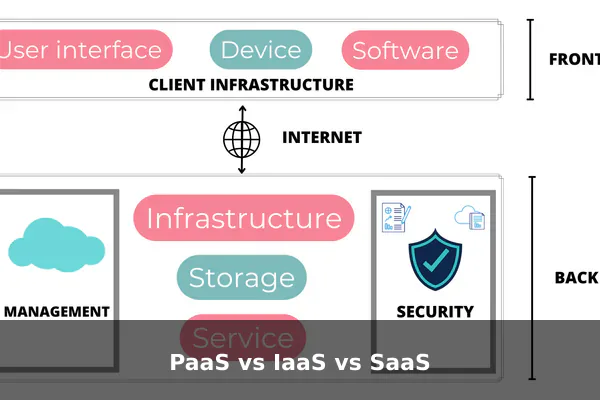
These three cloud models are often discussed together because they describe different levels of abstraction. Understanding the differences is one of the best ways to understand what PaaS really is.
A simple mental model
- IaaS (Infrastructure as a Service): you rent infrastructure such as virtual machines, storage, and networking, then manage much of the software stack yourself.
- PaaS (Platform as a Service): you use a managed application platform, while the provider handles most infrastructure and platform setup.
- SaaS (Software as a Service): you use a finished software product delivered over the internet, such as email software, CRM software, or collaboration tools.
So the main difference is about who manages what. The more you move from IaaS to PaaS to SaaS, the less infrastructure responsibility you have, but the less low-level control you keep.
Who typically manages each layer
With IaaS, the provider usually manages the hardware and virtualization layer, while you manage the operating system, runtime, application stack, scaling logic, patches, and deployment design.
With PaaS, the provider usually manages hardware, virtualization, operating system, runtime support, middleware, and core deployment environment. You mainly manage the app, data model, settings, and release flow.
With SaaS, the provider manages almost everything. You simply configure the software and use it.
Which model fits which need
- Choose IaaS when you need flexibility, custom architecture, and more infrastructure control.
- Choose PaaS when you want to build your own application but avoid most server management.
- Choose SaaS when you do not need to build the software at all and only need to use it.
This is why PaaS occupies an important middle position. It is not raw infrastructure, and it is not a finished application. It is a managed foundation for building your own software.
Common Real-World Uses of PaaS
PaaS is not for every workload, but it is extremely practical for a wide range of common software projects. Its sweet spot is usually applications that need to be built and shipped quickly without unusual infrastructure demands.
Strong use cases
- Web applications: customer portals, dashboards, booking systems, and content-driven web tools
- APIs: backend services for mobile apps, web apps, or third-party integrations
- Internal business tools: admin panels, workflow systems, reporting tools, and lightweight automation apps
- Prototypes and MVPs: products that need market testing before heavy investment
- Student and learning projects: practical deployments without deep infrastructure knowledge
- Small-to-medium SaaS products: especially when teams want speed and predictable workflows
Imagine a startup building a scheduling app. The founders need authentication, a database, background jobs, secure hosting, and reliable deployments. They do not want to spend early months designing a custom infrastructure layer. PaaS is often ideal for that stage because it supports fast product learning.
Where PaaS may be a weaker fit
Platform as a Service can be less suitable for workloads that need:
- Highly customized networking
- Very specialized system dependencies
- Strict infrastructure-level compliance controls
- Unusual performance tuning at the OS or hardware level
- Massive scale economics that justify custom platform engineering
In those cases, a team may prefer IaaS, containers with deeper orchestration control, or a hybrid architecture. The key is not whether PaaS is good or bad in general. The key is whether its trade-offs match the project.
How to Decide If PaaS Is Right for You
Choosing a cloud model is not only a technical decision. It is also a business decision about speed, staffing, ownership, and future flexibility. If you are deciding whether to use PaaS, ask practical questions rather than abstract ones.
Signs PaaS is a good fit
- Your team is small or product-focused. If you do not have dedicated infrastructure engineers, a managed platform can remove major friction.
- You need to launch quickly. PaaS is excellent when setup speed and time to market matter.
- Your app uses common frameworks. Standard web stacks fit PaaS better than highly unusual architectures.
- You want simpler deployments. Repeatable deployment workflows are one of PaaS’s biggest strengths.
- You expect moderate scaling. Many products grow comfortably on a PaaS platform before needing deeper customization.
- You want developers focused on features. If product work is the main priority, PaaS helps protect that focus.
Signs you may need something else
- You require deep infrastructure customization. That usually points toward IaaS or custom container orchestration.
- Your compliance requirements are strict. Some environments demand tighter infrastructure visibility and control.
- Your cost model depends on extreme optimization. Large-scale workloads may eventually justify more direct infrastructure management.
- You need portability above all else. If avoiding platform dependence is critical, PaaS may feel too opinionated.
A practical rule of thumb is this: if your main challenge is building the product, PaaS is often a smart starting point; if your main challenge is controlling the platform, PaaS may not be enough.
Many successful teams begin on PaaS, validate the product, and only migrate later if scale, cost, or technical constraints demand it. That is not failure. It is often the sensible path. Early convenience can be worth far more than early optimization.
Conclusion
PaaS, or Platform as a Service, is one of the most useful cloud models for modern software development because it sits in the middle of convenience and control. It gives developers a managed environment for building and deploying applications, while removing much of the repetitive work involved in maintaining servers, runtimes, and deployment infrastructure.
For beginners, the main idea is straightforward: you still build the software, but you do not have to build the platform from scratch. That makes PaaS especially valuable for web apps, APIs, internal tools, prototypes, and growing digital products. At the same time, it comes with real trade-offs such as vendor lock-in, reduced low-level control, and the possibility of higher long-term costs for some workloads.
If you want faster delivery, simpler operations, and a more developer-friendly path to production, PaaS is often worth serious consideration. If you need custom infrastructure control above everything else, another model may fit better. The right choice depends less on buzzwords and more on one practical question: what should your team spend its time building, the application or the platform underneath it?
