
Running a growing business often means juggling a patchwork of tools: one system for accounting, another for inventory, a spreadsheet for HR, and a separate platform for sales. When these tools cannot talk to each other, data gets duplicated, reports become unreliable, and decisions slow down. Enterprise Resource Planning software—commonly called ERP—was built to solve exactly that problem.
ERP software brings multiple business functions together into one integrated platform. Instead of each department working in isolation, everyone draws from the same pool of data and follows connected workflows. For businesses trying to scale without losing operational control, ERP is often the turning point. This guide explains what ERP software actually is, how it works across a real organization, what the common challenges are, and how to decide whether your business is ready for it.
What ERP Software Means in Practice
ERP stands for Enterprise Resource Planning. Despite the corporate-sounding name, the concept is straightforward: it is a software platform that connects the core processes of a business—finance, supply chain, human resources, sales, and more—into one unified system.
The defining feature of ERP is a shared database. Every department works from the same central data store, which means when a sale is recorded in the sales module, inventory updates automatically, and the finance team sees the revenue change in real time. There is no need to manually reconcile separate spreadsheets or wait for batch exports between systems.
A Single Source of Truth
The phrase single source of truth is used frequently in ERP discussions because it captures the software’s main promise. Without ERP, different teams often hold different versions of the same data, leading to confusion and costly errors. With ERP, there is one authoritative record that all teams reference, audit, and act on.
How ERP Systems Work Across a Business
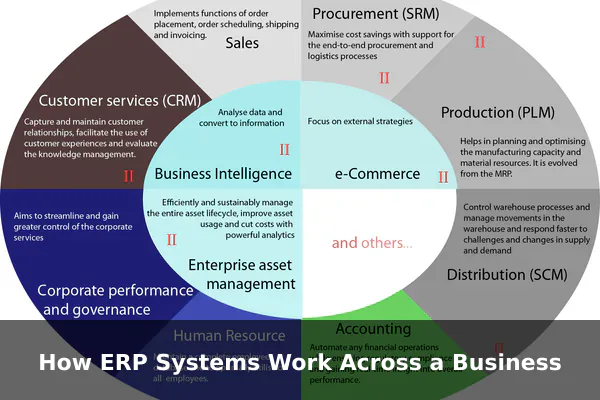
ERP works by building integrated modules for each business function. These modules are not separate products—they are purpose-built components of the same platform, designed to share data with each other automatically. A typical ERP flow might look like this:
- A customer places an order, which is logged in the sales module.
- The system checks inventory levels and triggers a warehouse pick request.
- If stock is low, the procurement module raises a purchase order automatically.
- When goods arrive, inventory is updated and the supplier invoice is matched in the finance module.
- Revenue from the fulfilled order posts to the general ledger without any manual entry.
Each step feeds into the next, and every action is traceable. This kind of automated, cross-department workflow is what makes ERP more than software—it becomes the operational backbone of a business.
Core Modules Found in ERP Software
Most ERP platforms are built from configurable modules. A company can activate the ones relevant to its operations and add more as it grows. The most common ERP modules include:
- Finance and Accounting – General ledger, accounts payable and receivable, budgeting, and financial reporting.
- Inventory and Warehouse Management – Stock tracking, bin locations, receiving, and fulfillment workflows.
- Procurement – Purchase orders, vendor management, and spend tracking.
- Human Resources – Employee records, payroll, time tracking, and benefits administration.
- Sales and CRM – Quotes, customer orders, customer records, and pipeline management.
- Manufacturing – Bills of materials, production scheduling, and work orders.
- Project Management – Task tracking, resource allocation, and project costing.
Not every business needs every module. Smaller companies often start with finance, inventory, and sales, then expand their ERP footprint as operations grow more complex.
Main Benefits of Using ERP
Operational Efficiency
When departments work from a shared system, manual handoffs and redundant data entry disappear. Information entered once flows automatically across all related functions, freeing staff time for higher-value work and reducing the risk of human error.
Better Decision-Making
Because ERP consolidates data across the entire business, leadership can generate accurate reports without chasing down figures from multiple sources. Real-time dashboards show cash flow, inventory levels, sales performance, and key operational metrics in one place.
Process Standardization and Scalability
ERP enforces consistent workflows across the organization. When every team follows the same process, audits become simpler, compliance improves, and new employees onboard faster because there is one system to learn. As the business grows—adding locations, product lines, or headcount—a well-implemented ERP scales alongside it without requiring a complete overhaul of tools.
Common ERP Challenges and Limitations
ERP is powerful, but implementing it is not simple. Understanding the challenges upfront helps businesses plan realistically and avoid the most common failure points.
- High upfront cost – Licensing, implementation services, hardware (for on-premise deployments), and training all add up. Enterprise-grade ERP projects can range from tens of thousands to millions of dollars depending on scale.
- Long implementation timelines – A full rollout for a mid-sized company typically takes six months to two years, depending on complexity and the extent of customization required.
- Data migration complexity – Moving historical data from legacy systems into ERP requires careful cleaning, mapping, and validation. Poor data migration is one of the most common causes of ERP project failure.
- Change management – ERP changes how people work day to day. Staff resistance is real. Without strong training and leadership buy-in, adoption rates suffer even when the software itself is well-chosen.
- Over-customization risk – Heavily modifying ERP to replicate old workflows defeats the purpose of standardization and makes future upgrades far more expensive.
Cloud ERP vs On-Premise ERP
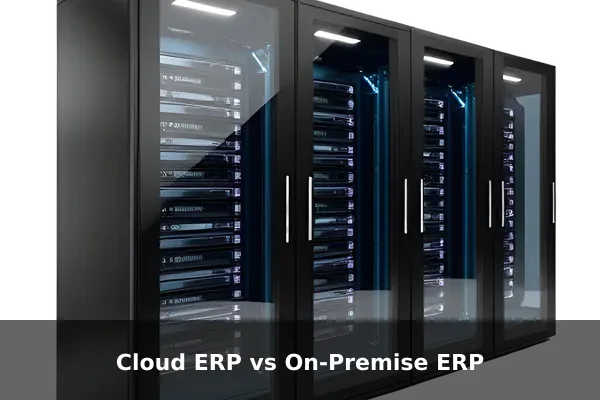
One of the most important decisions in selecting ERP is where it runs. Both deployment models have distinct tradeoffs worth understanding before committing to a vendor.
Cloud ERP
Cloud ERP is hosted by the vendor and accessed through a web browser. It runs on a subscription model, typically priced per user per month. Updates are handled automatically by the vendor, which lowers the internal IT burden significantly. This model has lower upfront cost, faster deployment timelines, and is accessible from any device or location. Most small and mid-sized businesses today lean toward cloud ERP for its lower barrier to entry.
On-Premise ERP
On-premise ERP is installed on the company’s own servers. The business owns the license outright and manages its own infrastructure. This gives more control over data security, customization depth, and system availability, but requires a larger initial investment and a dedicated internal IT team for ongoing maintenance. Larger enterprises or organizations in heavily regulated industries sometimes prefer on-premise for data sovereignty and compliance reasons.
| Factor | Cloud ERP | On-Premise ERP |
|---|---|---|
| Upfront cost | Lower | Higher |
| Ongoing cost | Subscription fees | Maintenance and IT staff |
| Deployment speed | Faster | Slower |
| Data control | Vendor-managed | Full internal control |
| Customization | Limited | Extensive |
| Scalability | Easy | Hardware-dependent |
Who Needs ERP and When It Makes Sense
ERP is not the right fit for every business. A small team with simple operations does not need an enterprise platform. But as organizations grow and complexity increases, the signs that ERP might be needed become harder to ignore:
- Teams are maintaining separate spreadsheets that regularly go out of sync.
- Generating a financial report requires pulling data from four or five different systems.
- Customer orders are sometimes lost or delayed because there is no clear tracking system.
- The business is expanding into new locations or markets and current tools cannot keep pace.
- Audits or compliance checks are painful because records are scattered and inconsistent.
Typically, companies with 20 or more employees, meaningful inventory, or multi-department operations start seeing the clearest return on ERP investment.
How to Choose the Right ERP Software
Choosing ERP is a significant commitment, and the wrong choice is expensive to undo. A practical evaluation approach includes these steps:
- Map your business processes first – Document how the business actually works today before evaluating any software. This prevents buying a solution before fully understanding the problem.
- Define must-have modules – Identify which functions are critical on day one versus which can be added later. A focused initial scope reduces implementation risk.
- Set a realistic total budget – Include software licensing, implementation services, data migration, training, and a contingency buffer. Most ERP projects exceed initial estimates.
- Evaluate vendor track record – Look for vendors with proven experience in your industry and company size. Ask for references from businesses of similar complexity.
- Test usability with real users – Request a live demo and involve actual end users in the evaluation. If staff struggle to navigate the system in a demo, adoption will be difficult in production.
- Check integration capabilities – Confirm the ERP can connect cleanly to tools already in use, such as e-commerce platforms, payment processors, or logistics systems.
- Plan a phased rollout – Going live with core modules first, then expanding, reduces risk compared to a big-bang launch where everything changes at once.
Key Takeaways Before Adopting ERP
ERP software is one of the most impactful investments a growing business can make, but it demands careful planning and honest self-assessment. When implemented well, it replaces a fragmented collection of tools with one unified platform that improves efficiency, reporting visibility, and operational control across every department.
The most common reason ERP projects fail is not the software itself—it is poor preparation, underestimated complexity, or insufficient change management. Businesses that invest in process mapping, realistic budgeting, and genuine user training consistently see better outcomes and faster returns.
If your organization is outgrowing its current tools and spending too much time bridging gaps between disconnected systems, ERP is worth a serious evaluation. The goal is not to buy the most feature-rich platform on the market—it is to find the system that matches how your business actually works today and supports where it is going tomorrow.
