
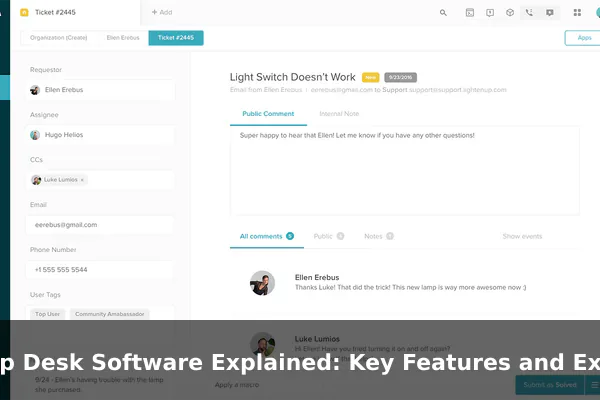
When people hear the term help desk software, they often think of a simple inbox for support emails. In practice, it is much more than that. A help desk system is the operational center for handling service requests, support questions, technical issues, and follow-up communication in a structured way. It turns scattered messages into trackable tickets, helps teams assign work, and gives managers a clearer view of service quality.
That makes help desk software important for both customer-facing support teams and internal IT departments. Instead of relying on personal inboxes, chat threads, and spreadsheets, organizations can use one platform to capture requests from email, forms, live chat, phone calls, or self-service portals. The result is usually faster responses, fewer missed issues, and a more consistent experience for the people asking for help.
This article explains what help desk software is, how it works day to day, which features matter most, and what real-world examples look like. If you want a plain-English guide that helps you compare tools intelligently, this is the place to start.
What Help Desk Software Actually Does
At its core, help desk software is designed to manage support requests from the moment they arrive until the moment they are resolved. It creates a system around service work so teams can organize, prioritize, respond, and measure their performance without losing track of individual cases.
More Than a Shared Inbox
A normal inbox shows messages in chronological order. A help desk platform converts those messages into tickets. Each ticket becomes a tracked record with status, priority, requester details, conversation history, internal notes, deadlines, and ownership. That structure is what separates help desk software from ordinary email tools.
For example, if three customers email about billing errors and two employees report login issues through an internal portal, the system can categorize those requests automatically, route them to the right team, and show which ones are overdue. Without a help desk platform, that same work might be scattered across different mailboxes and messaging apps.
Used by Customer Support and IT Teams
Help desk software is not limited to one department. It is commonly used in two major contexts:
- Customer service help desks handle product questions, refunds, account issues, delivery concerns, and service complaints.
- Internal IT help desks manage device problems, password resets, software access requests, network issues, and employee onboarding tasks.
The underlying workflow is similar in both cases: someone submits a request, the request is logged, the team works on it, and the system records the outcome.
Why Businesses Depend on It
Organizations adopt help desk software because support work becomes difficult to manage once request volume grows. A small team may cope with ten messages a day in a regular inbox. A growing company dealing with hundreds of tickets across several channels usually cannot.
Help desk software improves control in a few important ways:
- It centralizes conversations from multiple channels.
- It prevents requests from being forgotten or duplicated.
- It makes ownership clear so every ticket has a responsible agent.
- It creates service data that managers can analyze later.
- It supports consistent responses through templates, automation, and knowledge articles.
In short, help desk software does not just help teams answer questions. It creates a repeatable service process.
How a Help Desk System Works Day to Day
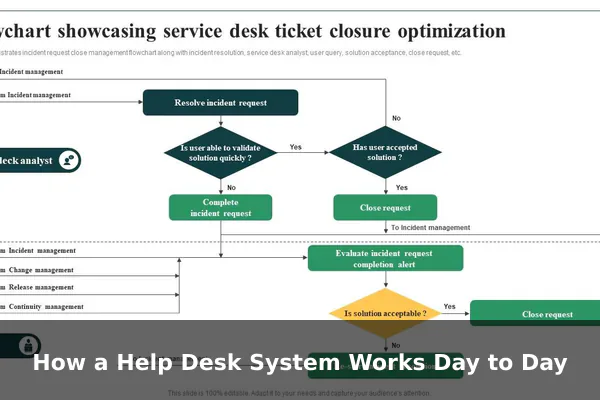
Most help desk platforms follow the same basic operating pattern. The exact interface may vary, but the daily lifecycle of a ticket is fairly predictable.
1. Request Intake
A ticket usually begins when a user reaches out through one of several channels:
- Website contact form
- Live chat
- Self-service portal
- Phone support logged by an agent
- Messaging app integration
The software captures that request and creates a ticket with a unique identifier. This gives the team something trackable from the beginning.
2. Classification and Prioritization
Once a ticket exists, the system or the agent assigns useful metadata. That may include category, urgency, product area, location, customer tier, or issue type. A ticket marked as service outage should obviously be handled differently from one marked general question.
Prioritization is one of the most practical uses of help desk software. It helps teams answer the right requests first instead of simply responding in the order they arrived.
3. Assignment and Collaboration
Tickets are then routed to the correct person or queue. Some teams assign manually, while others use automation rules. A billing issue might go to finance support, a broken integration might go to a technical specialist, and a password reset might go to the IT service queue.
Many tools also support internal collaboration features such as:
- Private notes between agents
- Mentions and internal comments
- Escalation workflows
- Linked tickets for related problems
- Approval steps for sensitive actions
This is especially useful when several departments contribute to the same resolution.
4. Response and Resolution
Agents reply to the requester from inside the system, and all communication stays attached to the ticket. If the issue is solved, the ticket is marked resolved or closed. If the customer does not respond, the system may send reminders or automatically close the ticket after a defined period.
Resolution is not just the final message. A good help desk process also records what happened, how long it took, and whether similar issues can be prevented in the future.
5. Reporting and Continuous Improvement
After the ticket is closed, the data still matters. Managers use reports to understand:
- Average first response time
- Average resolution time
- Backlog size
- Most common issue categories
- Agent workload
- Customer satisfaction scores
This is where help desk software becomes a management tool rather than just a communication tool. It reveals whether the service operation is improving or struggling.
Key Features to Look For
Not every help desk product offers the same depth, but certain features are central to a capable system. If you understand these features, comparing platforms becomes much easier.
Ticket Management
This is the foundation. Good ticket management includes clear status tracking, ownership, tags, categories, priorities, searchable history, and conversation threading. The system should make it easy to see what is open, what is waiting, and what is overdue.
If a platform cannot manage tickets cleanly, extra features will not compensate for that weakness.
Automation and Rules
Automation reduces repetitive manual work. Common examples include:
- Automatically assigning tickets based on category
- Applying priority levels to urgent keywords
- Sending acknowledgment emails when tickets are created
- Escalating unanswered tickets after a time limit
- Closing inactive tickets automatically
These rules save time, but they also create consistency. That matters when support volume increases and the team can no longer rely on memory alone.
Shared Inbox and Omnichannel Support
Many organizations receive support requests through more than one channel. A strong help desk platform brings those conversations together so agents do not have to monitor separate systems all day.
The goal is not simply to offer more channels. The goal is to avoid fragmented service. A customer who starts with chat and continues by email should still be part of the same support history when possible.
Service Level Agreements and Response Targets
SLAs, or service level agreements, define how quickly tickets should be answered or resolved. Even when there is no formal contract, internal response targets help teams stay disciplined.
A useful help desk system can:
- Track deadline timers
- Warn agents when a breach is approaching
- Apply different rules to different ticket types
- Report on SLA performance over time
This is especially important for managed service teams, enterprise support, and internal IT departments with business-critical responsibilities.
Knowledge Base and Self-Service
One of the most valuable help desk features is a knowledge base. Instead of forcing users to contact support for every small issue, teams can publish answers to common questions, setup guides, troubleshooting steps, and policy information.
Self-service helps everyone:
- Users get answers faster.
- Agents handle fewer repetitive tickets.
- The organization captures knowledge in reusable form.
Some platforms also suggest knowledge articles automatically while users type a request, which can prevent unnecessary ticket creation.
Reporting and Analytics
Without reporting, service quality is mostly guesswork. Strong analytics help teams understand both operational efficiency and user experience. Important metrics often include:
- First response time
- Resolution time
- Reopen rate
- Ticket volume by channel
- Backlog trend
- Customer satisfaction score
- Agent productivity
Reporting is one of the biggest differences between basic and mature help desk systems. It turns support from a reactive function into something measurable and improvable.
Integrations With Other Business Tools
Help desk software becomes more useful when it connects with the rest of the software stack. Common integrations include:
- CRM systems for customer history
- Billing tools for account status
- E-commerce platforms for order lookup
- Identity systems for employee access management
- Developer tools for bug tracking
- Communication apps such as Slack or Microsoft Teams
Integrations reduce context switching and help agents solve problems faster because they do not need to open five separate platforms to understand one ticket.
Common Types of Help Desk Software
Although the phrase help desk software sounds singular, the market includes several categories. Understanding them helps narrow down the right fit.
Cloud-Based vs On-Premise
Cloud-based help desk software is hosted by the vendor and accessed through a web browser. This model is common because it is faster to deploy, easier to update, and usually requires less in-house infrastructure management.
On-premise help desk software is installed and maintained on the organization’s own servers. Some companies prefer it for data control, security policy reasons, or specialized customization needs. The tradeoff is usually more internal maintenance work.
For most small and mid-sized teams, cloud-based tools are the easier starting point. Larger enterprises or highly regulated environments may evaluate on-premise or private-hosted options more seriously.
Internal IT Help Desk vs External Customer Support Desk
An IT help desk focuses on employee support. Tickets may involve hardware, access rights, printers, software installations, cybersecurity alerts, or workplace systems. These tools often include asset tracking, approval workflows, and IT service management features.
A customer support help desk focuses on external users. It usually emphasizes omnichannel communication, satisfaction surveys, ecommerce or CRM integrations, and public-facing self-service portals.
Some products serve both use cases well, but others are clearly stronger in one direction.
Basic Help Desk vs Full Service Management Platform
Some tools concentrate on essential ticketing and communication. Others expand into broader service management with change requests, problem management, asset management, workflow builders, and detailed service catalogs.
That distinction matters because not every team needs an enterprise-grade system. A company can overbuy just as easily as it can underbuy.
- A small startup might only need email-to-ticket conversion, a shared inbox, and simple automation.
- A large IT department may need incident management, approvals, asset records, and compliance reporting.
The best choice is not the product with the longest feature list. It is the one that matches the team’s real operating complexity.
Examples of Help Desk Software
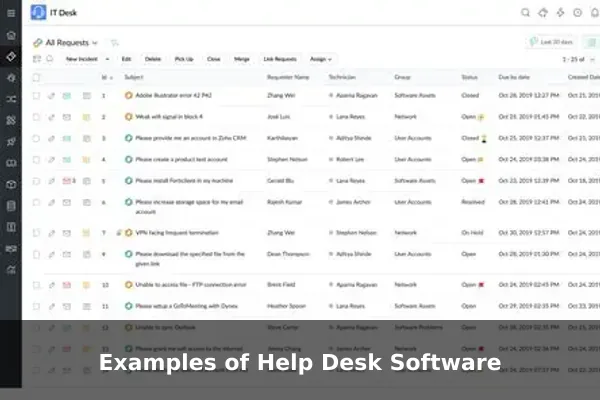
There is no single best help desk platform for every team, but several well-known products illustrate the range of options available. These examples are useful because they show how different tools are positioned.
Zendesk
Zendesk is one of the most recognizable names in customer support software. It is often chosen by organizations that want a mature cloud platform with ticketing, knowledge base tools, automation, and multichannel support. It tends to suit companies that expect structured support operations and room to scale.
Freshdesk
Freshdesk is popular with teams that want an accessible interface and a broad feature set without excessive complexity at the start. It is commonly used by small to mid-sized businesses and offers ticketing, automation, self-service options, and collaboration tools.
Jira Service Management
Jira Service Management is frequently adopted by IT teams and technology organizations, especially those already working inside the Atlassian ecosystem. It is strong where support workflows connect closely with engineering, incident handling, and operational processes.
Zoho Desk
Zoho Desk is often considered by businesses that already use other Zoho products or want a help desk tool with a balance of features and affordability. It supports automation, context-aware ticket handling, and customer support workflows suitable for growing teams.
Help Scout
Help Scout is known for a cleaner, more conversation-oriented support experience. It appeals to teams that want email-style simplicity while still benefiting from ticket organization, shared visibility, documentation, and light automation.
ServiceNow
ServiceNow is more commonly associated with enterprise IT service management than basic support ticketing. Large organizations use it when they need highly structured workflows, governance, internal service processes, and deep operational control across departments.
HubSpot Service Hub
HubSpot Service Hub is often considered by companies that want support data connected closely with sales and customer relationship information. For teams already using HubSpot, that unified view can be a practical advantage.
Open-Source and Free Options
Some organizations explore open-source or free help desk tools to reduce upfront costs. These can be useful for technical teams willing to manage setup and maintenance themselves. The tradeoff is that ease of use, polished reporting, or vendor support may be more limited than in commercial products.
These examples are not interchangeable. Some are better for internal IT, some are stronger for external customer service, and some are built for larger organizations with more formal service operations.
Benefits and Limitations to Understand
Help desk software can significantly improve service quality, but it is not magic. It works best when teams understand both the advantages and the operational tradeoffs.
Main Benefits
- Better organization: Every request is captured, tracked, and assigned instead of getting buried in personal inboxes.
- Faster response times: Queues, automation, and routing help teams act more quickly.
- Improved consistency: Templates, workflows, and knowledge articles reduce uneven support quality.
- Greater visibility: Managers can see backlog, workload, and response performance clearly.
- Scalability: As support volume grows, the process remains manageable.
- Stronger self-service: A knowledge base reduces repetitive questions and empowers users.
These benefits are especially noticeable once a company grows beyond informal support habits.
Common Limitations
- Setup effort: Categories, automations, SLAs, and user roles need planning.
- Training needs: Agents must learn the workflow, not just the interface.
- Ongoing administration: Reports, rules, and knowledge content need maintenance.
- Cost expansion: Per-agent pricing, advanced features, and add-ons can raise the total cost.
- Process rigidity: Overconfigured systems can feel bureaucratic if the team is small.
The software does not solve poor service culture by itself. If replies are slow because staffing is too low or internal knowledge is weak, a new platform may expose the problem more clearly, but it will not remove the root cause alone.
Where Teams Go Wrong
One common mistake is choosing a platform based only on feature count. Another is copying enterprise workflows into a small team that does not need them. A third is neglecting the knowledge base and then wondering why ticket volume stays high.
The most successful help desk implementations usually share three traits:
- The workflow is simple enough for agents to follow consistently.
- The automation rules reflect real priorities rather than hypothetical ones.
- The reporting metrics are tied to service goals, not vanity numbers.
How to Choose the Right Help Desk Tool
Choosing help desk software is easier when you compare tools against practical operating needs instead of marketing language. The following checklist helps keep that decision grounded.
Start With Your Support Model
Ask basic questions first:
- Are you supporting customers, employees, or both?
- Do requests arrive mainly by email, chat, form, or phone?
- Do you need simple ticketing or full service management?
- Will support agents need to collaborate with engineering, billing, or HR?
Your support model should determine the category of tool you evaluate.
Match the Tool to Team Size and Complexity
A five-person support team does not need the same system as a multinational IT department. Look at the number of agents, expected ticket volume, approval requirements, and reporting expectations. Buying a platform designed for far more complexity can slow teams down rather than help them.
Evaluate Essential Features First
Separate must-have features from nice-to-have features. For many teams, the must-have list includes:
- Reliable ticket management
- Email integration
- Automation rules
- Knowledge base support
- Reporting dashboards
- User permissions
- Useful integrations
If those basics are weak, flashy AI or advanced workflow modules will not matter much.
Check Reporting Quality Carefully
Many buyers underestimate reporting until after deployment. Review whether the tool can answer questions your managers will actually ask, such as:
- How many tickets are open right now?
- Which categories generate the most work?
- How often are SLA targets missed?
- Which agents or teams are overloaded?
- What patterns appear in customer satisfaction feedback?
If reporting is limited, the team may struggle to improve operations later.
Consider Total Cost, Not Just Entry Price
Help desk pricing can look simple at first, then become more complex with add-ons for automation, extra channels, analytics, or knowledge base features. Evaluate the long-term cost based on realistic usage, expected growth, and feature tiers.
It is also worth considering internal costs such as setup time, training effort, and system administration.
Use a Shortlist and Real Test Scenarios
Before committing, test a shortlist of tools using realistic support scenarios. For example:
- Create a ticket from email.
- Assign it automatically to the correct queue.
- Add an internal note.
- Escalate it to another team.
- Search for a related knowledge article.
- Run a report on response time.
A tool that looks impressive in a sales demo may feel awkward in actual daily use. Practical testing exposes that quickly.
When Help Desk Software Delivers the Most Value
Help desk software produces the biggest return when support work is frequent, multi-channel, and important enough that delays or confusion create visible business problems. That could mean unhappy customers, slow internal operations, repeated technical downtime, or poor visibility into recurring issues.
Best-Fit Scenarios
- Growing companies moving beyond personal inbox support
- E-commerce businesses handling order and account questions at scale
- SaaS companies managing onboarding, technical issues, and renewals
- Internal IT teams supporting many employees and devices
- Service organizations that need measurable response commitments
In those environments, help desk software becomes part of operational infrastructure rather than an optional convenience.
Signs a Team Has Outgrown Informal Support
If your team is asking questions like these, a help desk platform is probably warranted:
- Who owns this request?
- Did anyone reply to that customer?
- Why are urgent issues waiting behind minor ones?
- How many open support cases do we actually have?
- Why are we answering the same question over and over?
Those are not just communication problems. They are process problems, and help desk software is designed specifically to address them.
Conclusion
Help desk software is best understood as a structured system for managing service work, not merely a tool for answering messages. It captures requests, turns them into tickets, routes them to the right people, supports collaboration, tracks deadlines, and generates the data needed to improve support performance over time.
The right platform depends on your use case. A small customer support team may need clean ticketing, a shared inbox, and a knowledge base. A larger IT department may need asset tracking, approvals, and formal service workflows. In both cases, the core question is the same: does the software help the team deliver faster, clearer, and more consistent support?
If you compare help desk tools through that operational lens, the category becomes much easier to understand. Features matter, examples matter, and pricing matters, but the real goal is simple: create a support process that people can trust.
