
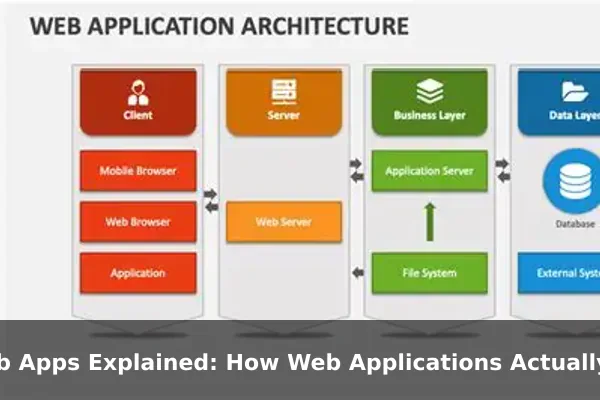
Every time you check your email, scroll through a social feed, or transfer money online, you are using a web application. These tools run entirely inside a browser, yet they behave like full software products — responding to your clicks, saving your data, and updating in real time.
Most people never think about the layers working behind the scenes. Understanding how web applications function can help you make smarter decisions as a user, a business owner, or anyone curious about the technology powering modern life. This guide walks through the full picture in plain English.
What Makes a Web App Different From a Website?

A traditional website is like a printed brochure — it displays information that rarely changes and looks the same for every visitor. A web application, by contrast, is interactive. It responds to your input, stores information about you, and can present entirely different content to different users at the same moment.
Consider the difference in practice:
- Static website: A restaurant menu page that always shows the same text and images regardless of who visits.
- Web application: Gmail, where every user sees a personalized inbox that updates live as new messages arrive.
The key distinction is dynamic behavior. Web apps process user input, communicate with servers, and change what they display based on logic and stored data — not just pre-written HTML files sitting on a server.
The Core Parts of a Web Application
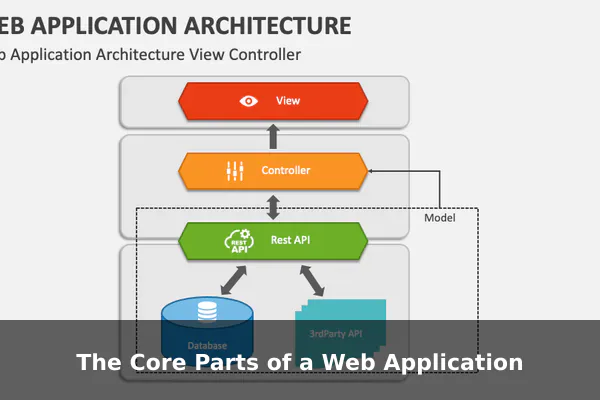
A web app is not a single program. It is a system of interconnected layers, each with a specific responsibility. Understanding those layers is the first step to understanding how the whole thing works.
Frontend (What You See)
The frontend is everything rendered in your browser: buttons, text fields, navigation menus, and page layouts. It is built with HTML for structure, CSS for visual styling, and JavaScript for interactivity. When you click, scroll, or type inside a web app, you are always working with the frontend.
Backend (What Processes Your Request)
The backend is a server-side program that handles logic. When you submit a login form or place an order, the backend checks your input, applies business rules, and decides what to send back to your browser. Users never see this layer directly — they only see its results.
Database (Where Data Lives)
The database stores all persistent information: account details, messages, purchase history, and settings. The backend reads from and writes to the database depending on what the user is doing. Without a database, a web app could not remember anything between visits.
APIs (The Connector)
APIs (Application Programming Interfaces) let the frontend and backend communicate in a structured way. When you click a button, the frontend sends a request to an API endpoint; the backend processes it and returns a structured JSON response that the frontend uses to update the display.
What Happens When You Click a Button?
Every user action triggers a chain of events that most people never see. Here is what happens during a typical web app interaction, from start to finish:
- Your browser sends a request to the server, describing the action you want to perform.
- The server receives the request and runs the appropriate backend logic.
- If data is needed, the server queries the database to read or write information.
- The database returns the result to the server.
- The server packages a response and sends it back to your browser.
- Your browser updates the display — often changing just one section of the page without a full reload.
This entire cycle typically completes in under one second. The speed and reliability of that cycle is what separates a smooth web app experience from a frustrating one.
How Frontend and Backend Work Together
Modern web apps use a technique called AJAX (Asynchronous JavaScript and XML) or newer Fetch APIs to request data in the background. This means clicking a button can update just one section of the page — such as loading more comments or refreshing a notification count — without reloading everything the user sees.
Popular frontend frameworks like React, Vue, and Angular are designed to make this communication efficient and predictable. On the backend, technologies like Node.js, Django, and Laravel handle incoming requests, process data, and return structured responses. Together, they create the seamless, app-like experience that users now expect from any browser-based tool.
Where Data Lives and How It Stays Secure
Databases and Sessions
Your data is stored in databases — either relational databases like MySQL or PostgreSQL for structured tables, or non-relational databases like MongoDB for flexible document-style records. When you log in, the server creates a session: a temporary record that confirms you are authenticated and tracks your activity during that visit.
HTTPS and Encryption
All traffic between your browser and the server is encrypted using HTTPS. Even if someone intercepts the data in transit, they cannot read it. The padlock icon in your browser’s address bar confirms the connection is encrypted — an essential baseline for any web app handling personal data.
Cookies and Authentication Tokens
Web apps use cookies or tokens such as JWTs (JSON Web Tokens) to keep you logged in between page visits. These small pieces of data stored in your browser tell the server who you are without requiring you to re-enter your password on every page. Security here is not optional — poor handling of sessions and tokens is one of the most common causes of data breaches in web applications.
Common Features Users Expect From Modern Web Apps
Today’s users arrive with high expectations. A web app needs more than basic input and output to feel complete and trustworthy:
- Search: Real-time search suggestions powered by server-side filtering and indexing.
- Notifications: Push alerts or in-app badges triggered by backend events as they happen.
- File uploads: The ability to send photos, documents, or media that get stored securely in cloud storage.
- Responsive design: Layouts that adapt cleanly to phone, tablet, and desktop screens without a separate mobile app.
- Real-time updates: Live chat, live scores, or collaborative document editing — powered by WebSocket connections that keep a persistent channel open between browser and server.
All of these features sit on top of the same core request-response architecture, extended with additional tools and protocols to handle specific user needs.
Why Web Apps Matter for Businesses and Users
Web applications solve problems that traditional desktop software cannot easily match. The advantages flow in both directions — toward the business delivering the product and toward the user consuming it.
- No installation required: Users open a browser and start immediately — no downloads, no setup wizard, no compatibility checks.
- Automatic updates: Developers push changes to the server and every user instantly gets the latest version without doing anything on their end.
- Cross-device access: The same app works on a laptop, tablet, or phone with no extra effort required from the user.
- Scalability: Cloud hosting allows a web app to serve thousands or millions of users simultaneously with the right infrastructure in place.
For businesses, this lowers distribution costs and radically simplifies maintenance. For users, it means fewer downloads, fewer version conflicts, and far more flexibility in how and where they get work done.
A Simple Mental Model to Remember
Think of a web application as a restaurant. The dining room is the frontend — it is what you see and interact with. The kitchen is the backend — it takes your order, applies the logic, and prepares a response. The pantry is the database — it holds all the ingredients, meaning your stored data. The waiter is the API — the messenger that carries requests from your table to the kitchen and brings responses back.
Every time you use a web app, this system runs invisibly in the background to serve you in real time. You do not need deep technical knowledge to understand it — you just need to see the layers clearly and recognize what each one contributes.
Web applications are the backbone of the modern internet. From productivity dashboards and e-commerce platforms to social networks and banking portals, they all rely on the same essential architecture: a frontend users interact with, a backend that processes logic, a database that persists data, and APIs that connect everything together. Understanding that system gives you a sharper, more informed view of the technology you rely on every single day.
