
Every time you turn on your laptop, unlock your phone, or send a document to the printer, a quiet layer of software is already working before you open a single app. This layer is called system software, and it is the foundation that makes everything else on a device possible. Without it, hardware is just an expensive collection of chips and circuits with nothing to do.
Most people never think about system software because it runs silently in the background. Yet it shapes every interaction you have with a device. Understanding what system software is — and why it matters — helps you make smarter choices about updates, drivers, and device performance in everyday life.
What System Software Means in Simple Terms
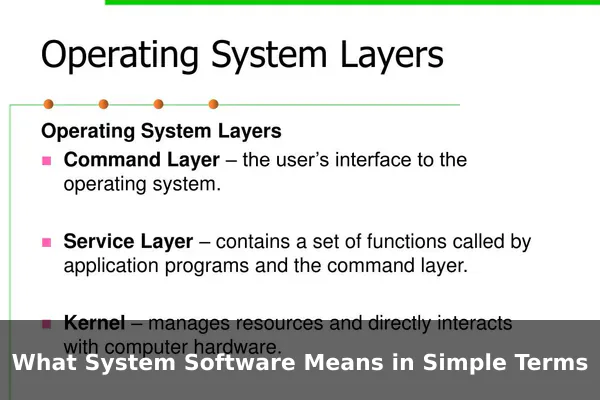
System software is a category of software designed to manage a computer’s hardware and provide a stable platform on which application software can run. Think of it as the translator and traffic controller between physical hardware — the CPU, memory, storage, and display — and the programs you actually open and use.
Without system software, a browser could not request memory from the processor, a game could not send audio signals to speakers, and your keyboard input would never reach the document you are typing. Every action you take on a device passes through system software first.
The Core Jobs of System Software
- Resource management: Allocating CPU time, memory, and storage to different programs simultaneously.
- Hardware communication: Letting software “talk” to physical components through drivers.
- Security and access control: Managing which programs and users can access what data.
- Boot and startup: Initializing the device and loading the environment so applications can run.
How System Software Differs From Application Software
A common source of confusion is the boundary between system software and application software. The difference comes down to purpose. Application software is what you open intentionally to complete a task — a word processor, a music streaming app, a photo editor, or a game. System software runs underneath those apps and makes them possible. You do not launch system software the way you open a browser; it is already running.
Side-by-Side Examples
- Windows 11 vs. Microsoft Word: Windows is system software; Word is an application that runs on top of it.
- Android vs. WhatsApp: Android is the operating system (system software); WhatsApp is an app that lives on Android.
- macOS vs. Safari: macOS manages the Mac’s hardware environment; Safari is an application for browsing the web.
- BIOS/UEFI vs. any app you open: BIOS runs before your OS even loads — no application runs before it.
Main Types of System Software
System software is not a single program. It is a family of different tools, each with a specific role in keeping your device running smoothly.
Operating Systems
The most visible type. An operating system (OS) manages the entire device environment, including the file system, memory, user accounts, network connections, and the interface you see on screen. Examples include Windows, macOS, Linux, Android, and iOS.
Device Drivers
Drivers are small programs that allow the OS to communicate with specific hardware components. Your printer, graphics card, webcam, and Bluetooth chip all need a driver. Without the correct driver, the OS cannot recognize what the hardware is or how to use it.
Firmware
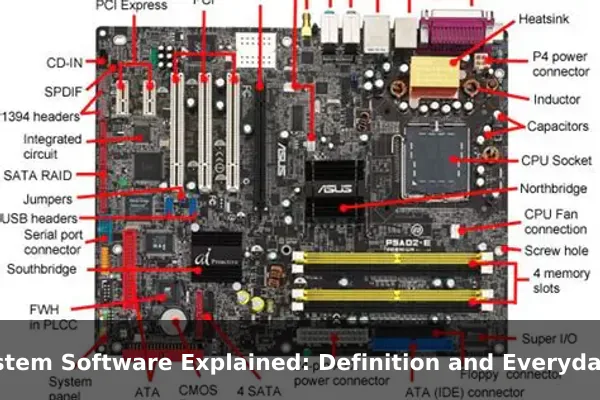
Firmware is low-level software stored directly on hardware chips. It is the first code that runs when a device powers on. The BIOS or UEFI on a PC motherboard is firmware — so is the software inside a router, a smart TV, or a digital camera.
Utility Programs
Utilities are helper tools that maintain, optimize, or protect the system. Disk management tools, backup programs, antivirus software, and file compression applications are all system utilities running at the system level.
Language Translators
Compilers and interpreters convert human-readable programming code into machine code the processor can execute. These are system-level tools that make all modern software development possible.
Everyday Examples You Already Use

System software surrounds you in daily life, even if you never see it labeled that way. Here are the most common real-world examples:
- Windows / macOS / Linux: The operating system on every laptop and desktop is system software. It boots the machine, manages the desktop, and runs every app you open.
- Android / iOS: Your smartphone runs an OS. Android and iOS handle calls, notifications, battery management, and touch input behind every app you use.
- Printer drivers: When you click “Print,” a driver translates that instruction into precise commands the printer’s hardware can execute.
- BIOS / UEFI: Every PC contains firmware that starts before Windows or Linux. It checks hardware health and hands control to the OS during boot.
- Antivirus tools: Programs like Windows Defender run at the system level, monitoring processes and files in real time — not as a regular app you open.
- ATM software: ATMs run a dedicated OS (often a locked-down version of Windows or a Linux variant) that manages the card reader, cash dispenser, and touchscreen.
- Smart TV firmware: The interface on your smart TV is powered by firmware and an embedded OS that manages streaming apps like Netflix and YouTube.
Why System Software Matters for Performance and Security
Keeping system software up to date is one of the highest-impact habits for any device user, with effects on speed, stability, and safety.
Performance
OS updates often include memory management improvements, driver optimizations, and scheduler tweaks that make the whole device feel faster. An outdated GPU driver, for example, may not take full advantage of a game’s graphics engine, causing unnecessary slowdowns.
Security
System software is the first target for attackers because controlling the OS means controlling everything on the device. Security patches in OS and firmware updates close vulnerabilities that malware could exploit. Skipping updates leaves known attack paths open to anyone who knows about them.
Compatibility
When developers release new applications or hardware accessories, they test against current OS versions. Running an outdated OS means apps may stop working correctly, and new peripherals may lack driver support entirely.
Common Questions About System Software
Is a web browser system software?
No. A browser like Chrome or Firefox is application software. You open it intentionally to complete a task, and it runs on top of the OS rather than managing hardware or system resources directly.
Does firmware count as system software?
Yes. Firmware is a subset of system software. It is more tightly bound to specific hardware chips, but it serves the same core purpose: enabling hardware to operate and communicate with higher-level software layers above it.
Why do users rarely see system software directly?
System software is deliberately designed to be invisible. Its job is to handle complexity so that application developers and end users do not have to. The goal is a seamless experience where hardware and apps work together without the user ever needing to think about the layer in between.
Understanding system software helps explain why devices sometimes need a restart after updates, why drivers matter when you plug in a new peripheral, and why the choice of operating system affects which apps you can run. It is the unseen engine powering every digital interaction — from the moment you press the power button to the moment you close the screen.
