
Virtualization is one of the most important ideas in modern computing, yet many people use services built on it without realizing what it does. In simple terms, virtualization lets one physical computer act like many separate computers or lets software resources be divided, grouped, and managed more flexibly than the underlying hardware would normally allow. That single idea has changed how companies run servers, how developers test software, how IT teams improve reliability, and how businesses scale their systems without constantly buying new machines.
If you have ever heard of a virtual machine, a virtual desktop, or cloud servers that can be created in minutes, you have already seen virtualization in action. This article explains virtualization in plain English, shows how it works, covers the main types, and gives practical examples that connect the concept to everyday technology decisions. By the end, you should understand not only the definition of virtualization, but also why it matters for cost, efficiency, security, flexibility, and long-term IT planning.
What Is Virtualization?
Virtualization is the process of creating a virtual version of a computing resource instead of relying only on its physical form. That resource might be a server, an operating system, a storage system, a network, or even a single application. Rather than dedicating one piece of hardware to one task, virtualization introduces a software layer that allows the same hardware to be shared more intelligently.
A useful way to think about it is to compare a physical computer with its virtual equivalents. A physical server is a real machine with processors, memory, storage, and networking hardware. A virtual server, by contrast, is a software-defined environment that behaves like an independent computer, even though it may be sharing the same physical hardware with several other virtual servers.
Physical Resources vs. Virtual Resources
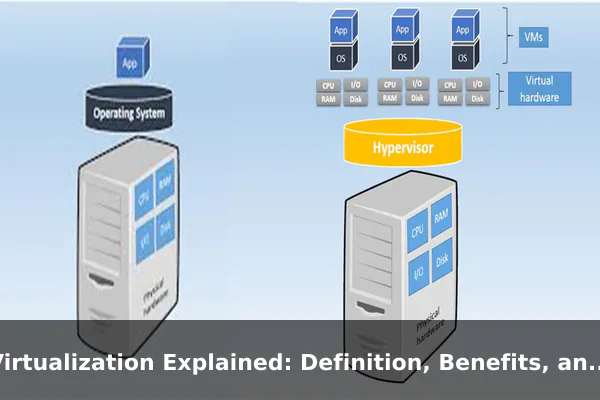
Without virtualization, one physical machine usually runs one operating system and a limited set of workloads. That approach can leave large amounts of processing power and memory sitting unused. With virtualization, the hardware is abstracted into pools of resources that can be allocated where needed. Each virtual environment feels separate to the user or application, even though the real hardware is shared behind the scenes.
This abstraction is the core of virtualization. Instead of seeing only the physical machine, software sees a flexible, isolated environment that can be started, stopped, copied, resized, or moved more easily than physical hardware.
Why the Idea Matters
The importance of virtualization comes from efficiency and control. It helps organizations do more with the hardware they already own. It also improves agility because creating a new virtual machine is far faster than ordering, installing, and configuring a new physical server. In modern IT, that speed can directly affect development cycles, service availability, and operating costs.
- Efficiency: multiple workloads can share one physical system.
- Isolation: separate virtual environments reduce interference between tasks.
- Flexibility: resources can be adjusted without replacing hardware.
- Scalability: teams can create or remove environments quickly.
For beginners, the simplest definition is this: virtualization is a way to make computing resources more flexible by separating software environments from the physical hardware underneath them.
How Virtualization Works
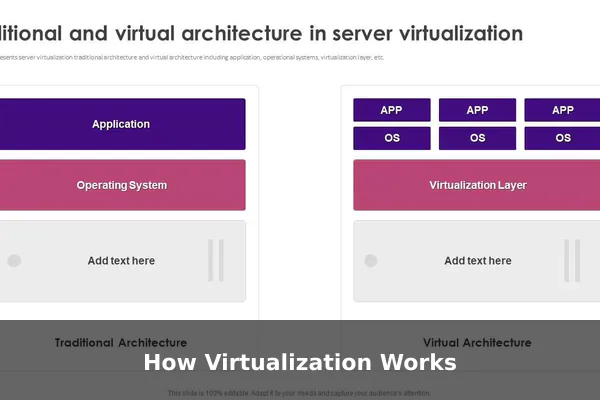
Virtualization works by placing a management layer between the physical hardware and the operating systems or applications that use it. That management layer controls how processing power, memory, storage, and networking are divided and presented to virtual environments.
The Role of the Hypervisor
The most common technology behind virtualization is the hypervisor. A hypervisor is software, firmware, or a specialized platform that creates and runs virtual machines. It allows multiple guest systems to share one host system while keeping them logically separate.
There are two broad hypervisor models:
- Type 1 hypervisor: runs directly on the physical hardware. This is often used in data centers and enterprise server environments because it is efficient and designed for large-scale management.
- Type 2 hypervisor: runs on top of an existing operating system. This is common for personal use, software testing, and learning because it is easier to install on a regular desktop or laptop.
In both cases, the hypervisor decides how much CPU time, RAM, storage space, and network access each virtual machine receives.
Host Machines and Guest Machines
The physical device is usually called the host. The virtual environments running on it are called guests. Each guest machine can have its own operating system, settings, applications, users, and security rules.
For example, one host server might run:
- a Linux virtual machine for web hosting
- a Windows virtual machine for internal business software
- a separate testing virtual machine for developers
Even though these guests share hardware, they operate as if they are independent computers. If one guest crashes, it does not automatically bring down the others. That isolation is one reason virtualization is so valuable.
Resource Sharing and Abstraction
Virtualization depends on resource abstraction. The hypervisor does not expose the raw hardware directly to every guest. Instead, it presents virtual CPUs, virtual memory, virtual disks, and virtual network adapters. Each guest works with these virtual components as if they were real dedicated devices.
This design offers several practical advantages:
- hardware can be used more fully
- workloads can be balanced more easily
- backup and recovery become more manageable
- new environments can be cloned from templates
In larger environments, administrators can move virtual machines between physical servers, allocate more memory during peak demand, or snapshot a system before making changes. Those capabilities are difficult or slow to achieve with physical-only infrastructure.
Main Types of Virtualization
Virtualization is not limited to virtual machines on servers. It applies to several layers of computing. Understanding the main types helps explain why the concept appears in so many IT discussions.
Server Virtualization
Server virtualization divides one physical server into multiple virtual servers. Each virtual server can run its own operating system and applications. This is one of the most common forms of virtualization because it improves hardware utilization and reduces the number of physical machines a business must maintain.
Instead of running ten underused physical servers, an organization may run ten virtual servers on two or three more powerful hosts. That can reduce power use, cooling needs, rack space, and maintenance overhead.
Desktop Virtualization
Desktop virtualization separates the desktop environment from the physical endpoint device. In many setups, the desktop runs on a central server while the user accesses it from a thin client, laptop, or other device. This model can simplify management because IT teams update and secure desktops from one place rather than handling every machine individually.
Desktop virtualization is often used by companies with remote workers, call centers, schools, and organizations that need standardized user environments.
Storage Virtualization
Storage virtualization combines physical storage resources from multiple devices into what appears to be a single storage pool. Users and applications do not need to know exactly where the data is physically stored. This improves flexibility, makes expansion easier, and can simplify backup and disaster recovery planning.
Instead of managing many separate disks or appliances one by one, administrators manage a more unified storage layer.
Network Virtualization
Network virtualization creates logical network segments, switches, routers, or security controls in software rather than depending entirely on fixed physical network hardware. This allows faster configuration, better isolation between systems, and more adaptable traffic management.
It is especially useful in large environments where networks need to be segmented for security, compliance, or performance reasons.
Application Virtualization
Application virtualization allows an application to run in a virtual layer separated from the full underlying operating system. In some cases, the application is streamed or packaged so it can run more cleanly across devices without full traditional installation. This can reduce software conflicts and simplify deployment.
For businesses, application virtualization is helpful when older software must be supported or when centralized management is important.
Operating System-Level Virtualization
Some environments use operating system-level virtualization, where multiple isolated user spaces run on the same kernel. This approach is lighter than full virtual machines and is often associated with containers. While containers and traditional virtualization are not identical, they share the goal of isolating workloads and using hardware more efficiently.
That is why discussions about modern infrastructure often mention both virtualization and containerization together.
Key Benefits of Virtualization
The biggest reason virtualization became so widely adopted is that it solves real operational problems. It is not just a technical trick. It changes how hardware is used, how systems are managed, and how quickly teams can respond to new needs.
Better Hardware Utilization
Many physical servers historically ran at low average usage. A machine with large processing capacity might spend much of its time idle if it had only one dedicated role. Virtualization allows many workloads to share the same host, making better use of available resources.
That means businesses can often reduce server sprawl and get more value from each machine they buy.
Lower Costs
Virtualization can reduce costs in several ways:
- fewer physical servers to purchase
- lower power and cooling expenses
- less space needed in offices or data centers
- reduced hardware maintenance requirements
- faster provisioning, which lowers labor time for routine tasks
Cost reduction is one of the easiest benefits for decision-makers to understand. If the same workload can be run on fewer machines without sacrificing reliability, the economics are compelling.
Faster Provisioning and Scaling
Creating a physical server may take days or weeks when procurement, delivery, installation, and configuration are involved. Creating a virtual machine can take minutes if templates and automation are already in place.
This speed matters for growing businesses, development teams, seasonal traffic spikes, and projects that need temporary environments. Virtualization makes infrastructure more responsive to actual demand.
Safer Testing and Development
Developers and IT teams often need isolated environments for testing updates, patching systems, trying new software, or reproducing bugs. Virtualization makes this easy. A team can create a test machine, run experiments, take a snapshot, and roll back if something goes wrong.
That reduces risk to production systems and encourages more controlled experimentation.
Improved Backup and Disaster Recovery
Because virtual machines are software-defined, they are often easier to back up, replicate, and restore than traditional physical systems. Entire machine states can be captured, copied, and moved. In a disaster recovery scenario, this can help organizations bring critical systems back online faster.
Virtualization does not eliminate disaster recovery planning, but it gives teams better tools to implement it.
Greater Flexibility and Portability
A virtual machine is not tied to a single physical box in the same way a traditional server is. In many cases, it can be migrated to another host, duplicated for testing, or resized to support changing workloads. That portability helps IT teams avoid rigid infrastructure designs and respond more quickly to change.
For many organizations, this flexibility is just as important as raw cost savings.
Examples of Virtualization in Real Use
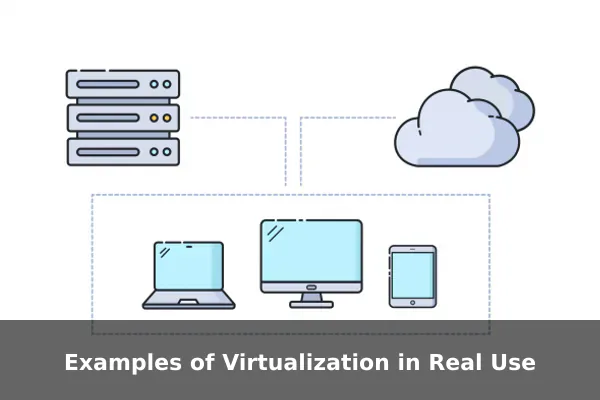
Virtualization can sound abstract until you connect it to real-world situations. The following examples show where it appears in everyday business and technology operations.
Running Multiple Operating Systems on One Computer
A developer using a laptop might run Windows as the main operating system while using a Linux virtual machine for web development and a second virtual machine for security testing. Instead of buying three separate devices, the developer uses one physical computer with isolated environments for different tasks.
This is one of the clearest beginner examples because it shows the main benefit immediately: one device, multiple independent systems.
Server Consolidation in a Business
A small company may once have used separate physical servers for email, file sharing, customer databases, and internal applications. Over time, those servers become expensive to maintain and are underused. By moving those workloads into virtual machines, the company can run them on fewer physical hosts while still keeping each service separate.
The result is simpler infrastructure, lower operating costs, and often easier backup planning.
Cloud Hosting Platforms
Many cloud services rely on virtualization to deliver flexible computing resources to customers. When a user rents a server instance from a cloud provider, that instance is often a virtualized environment running on shared physical infrastructure. The user experiences it as an independent server, but the provider manages the underlying hardware pool.
This example is useful because it shows how virtualization acts as a foundation for services that appear simple on the surface.
Virtual Desktop Infrastructure for Remote Work
Organizations with remote staff may provide virtual desktops hosted in a central environment. Employees log in from different devices but access a standardized desktop with company-approved applications and security settings. If a laptop fails, the employee can often continue working from another device because the desktop environment is not tied to one physical machine.
This supports consistency, remote access, and tighter IT control.
Software Testing and Sandboxing
Virtual machines are commonly used to test software in isolated conditions. If a team needs to evaluate a risky program, verify compatibility with an older operating system, or simulate a customer environment, a virtual machine is ideal. It can be reset after testing, duplicated for repeated experiments, or disconnected from sensitive systems.
This is also valuable for cybersecurity training, malware analysis, and safe troubleshooting.
Education and Training Labs
Schools, training centers, and certification programs often rely on virtual labs. Instead of building full physical labs for every scenario, they can give learners temporary virtual environments that mimic real servers, desktops, or networks. That lowers equipment costs and makes it easier to reset lab environments between sessions.
For training purposes, virtualization offers both realism and convenience.
Virtualization vs. Cloud Computing
Virtualization and cloud computing are closely related, but they are not the same thing. This distinction matters because people often use the terms as if they were interchangeable.
Virtualization Is a Technology
Virtualization is the technical method of creating virtual versions of computing resources. It focuses on abstraction, isolation, and resource sharing. A company can use virtualization entirely inside its own office or data center without using any public cloud service at all.
Cloud Computing Is a Delivery Model
Cloud computing is a way of delivering computing services over a network, usually on demand. Users can access servers, storage, platforms, or software without managing all of the physical infrastructure directly. Many cloud platforms use virtualization heavily behind the scenes, but cloud computing also includes automation, self-service provisioning, metering, remote access, and service management models.
The Relationship Between the Two
A simple way to compare them is this:
- Virtualization makes resources flexible.
- Cloud computing delivers flexible resources as a service.
In other words, virtualization is often one of the building blocks that helps make cloud computing possible. But a virtualized environment is not automatically a cloud. If a business runs virtual machines on its own on-premises servers, that is virtualization. If a provider offers instantly provisioned virtual servers over the internet with usage-based billing, that is cloud computing built on top of virtualization and related technologies.
Understanding this difference helps readers avoid a common mistake: assuming virtualization is only relevant in public cloud environments. In reality, it remains useful in offices, schools, labs, enterprise data centers, and developer workstations.
Common Challenges and Limitations
Virtualization offers major advantages, but it is not perfect. A balanced explanation should also cover the tradeoffs.
Performance Overhead
Because resources are being abstracted and shared, some workloads may experience overhead compared with running directly on dedicated physical hardware. In many cases the performance impact is small, but for highly specialized or extremely demanding applications, direct physical deployment may still be preferred.
Management Complexity
Virtualization can simplify some tasks while making others more complex. Once many virtual machines exist, administrators must track configurations, updates, storage usage, network policies, and lifecycle management. Without discipline, virtual environments can multiply quickly and create what some teams call VM sprawl.
That means good governance is important, not just good technology.
Licensing Considerations
Software licensing in virtual environments is not always straightforward. Some vendors license by machine, some by user, some by processor, and some by usage model. Organizations need to understand how virtualization affects compliance and cost before scaling widely.
Shared Risk on a Host
Although virtual machines are isolated, they still share the same physical host. If that host fails and no failover plan is in place, multiple virtual workloads can be affected at once. Virtualization improves flexibility, but it does not replace the need for redundancy, backup strategy, and sound infrastructure design.
Security Responsibilities
Virtualization can help with isolation, but it also introduces new layers that must be secured. Hypervisors, management consoles, storage systems, and virtual networks all require proper access control and monitoring. Security is not automatic simply because a system is virtualized.
The practical lesson is clear: virtualization is powerful, but it works best when combined with planning, monitoring, and consistent operational standards.
When Virtualization Makes Sense
Not every workload needs virtualization, but many do benefit from it. The best use cases usually involve efficiency, isolation, flexibility, or fast deployment needs.
For Businesses
Virtualization makes sense for businesses that want to reduce hardware costs, consolidate servers, simplify disaster recovery, or support remote users with centralized environments. It is especially useful when workloads are important but do not each need their own dedicated physical machine.
For Developers and Test Teams
Developers often need repeatable environments, different operating systems, and safe testing spaces. Virtual machines allow them to build, test, and reset systems quickly. This is one of the most practical and widely understood uses of virtualization outside large data centers.
For Schools and Training Environments
Educational institutions benefit from virtualization because they can provide realistic lab environments without maintaining large numbers of separate physical devices. Labs can be reproduced consistently and restored after each class.
For IT Operations and Infrastructure Teams
IT teams use virtualization to improve provisioning speed, separate workloads, and manage growth more effectively. It is often a strong fit when an organization needs better hardware utilization but still wants control over its environments.
Questions to Ask Before Adopting It
If you are deciding whether virtualization is appropriate, these questions help:
- Are physical machines underused?
- Do you need multiple isolated environments?
- Would faster deployment improve your workflow?
- Do you want simpler backup, cloning, or recovery options?
- Can your team manage the additional software layer responsibly?
If the answer to several of those questions is yes, virtualization is often worth serious consideration.
Conclusion
Virtualization is the practice of turning physical computing resources into flexible virtual environments that can be shared, isolated, and managed more efficiently. It matters because it helps organizations use hardware better, lower costs, deploy systems faster, test software more safely, and recover more effectively when problems occur.
The concept may sound technical at first, but its real value is practical. Whether it is a developer running multiple operating systems on one laptop, a company consolidating servers, or an IT team delivering secure virtual desktops to remote staff, virtualization solves everyday computing problems with a smarter use of resources. Once you understand the definition, benefits, and examples, it becomes easier to see why virtualization remains a core technology behind modern software and infrastructure.
