
Every developer has heard the phrase “it works on my machine” — and lived to regret it. One developer builds a feature on their laptop, it runs perfectly, then the same code breaks on a colleague’s computer or crashes on a production server. The root cause is almost always differences in the environment: different operating system versions, missing libraries, or mismatched settings. Docker was built specifically to solve that problem.
Docker is a platform that packages your application and everything it needs to run — code, runtime, libraries, and configuration — into a single portable unit called a container. That container behaves identically whether it runs on your laptop, a teammate’s computer, or a cloud server on the other side of the world. This guide walks you through what Docker is, how containers work, and how you can start using Docker even if you have never touched it before.
What Docker Is and Why It Matters
Docker is an open-source platform released in 2013 that uses containerization technology to make it easy to create, deploy, and run applications. Docker Inc. popularized containers by making them accessible to everyday developers, not just system administrators.
Before Docker, shipping software reliably meant carefully documenting every dependency, manually setting up servers, and hoping nothing was missed. Docker replaced that fragile process with a single command that sets up the entire environment automatically, every time, on any machine.
The Problem Docker Solves
Software depends on many things beyond just its own code:
- A specific version of a programming language runtime, such as Python 3.9 or Node.js 18
- System libraries installed at the operating system level
- Environment variables and configuration files
- Other services like databases or message queues
Without Docker, each developer and each server must be configured manually to match. With Docker, all of that is captured inside the container itself. One file describes the environment; Docker builds it.
What a Software Container Actually Is
A container is a lightweight, standalone package that holds an application and all its dependencies. Think of it like a shipping container on a cargo ship: it holds everything needed to deliver the goods and works the same way regardless of where it travels.
Unlike a full computer, a container does not include its own operating system kernel. Instead, containers share the host operating system’s kernel while keeping their own isolated file system, processes, and network settings. This sharing is why containers start in seconds and use far less memory than running a separate virtual machine for every application.
What Goes Inside a Container
- Your application’s code
- The runtime it needs, such as Node.js, Python, or Java
- Any library or package dependencies
- Environment configuration settings
- A minimal file system
Everything outside that list — the OS kernel, hardware drivers, and system services — comes from the host machine and is shared across all running containers.
Docker vs. Virtual Machines
Virtual machines and Docker containers both isolate software, but they do it very differently. A virtual machine emulates an entire computer, including its own full operating system. That makes VMs powerful but resource-heavy. A container, by contrast, shares the host OS kernel and isolates only what the application needs.
Side-by-Side Comparison
- Startup time: A VM can take minutes to boot; a Docker container starts in seconds or less.
- Size: VM images are often several gigabytes; Docker images are typically tens to hundreds of megabytes.
- Resource use: VMs reserve dedicated CPU and RAM; containers share host resources and use only what they need.
- Isolation: VMs offer stronger OS-level isolation; containers offer application-level isolation suitable for most development and deployment scenarios.
- Portability: Both are portable, but Docker images are faster to transfer and simpler to version-control.
For most development workflows and cloud deployments, Docker’s lightweight model is the preferred choice. VMs remain valuable for workloads requiring strict OS-level separation or a completely different guest operating system.
The Core Docker Building Blocks
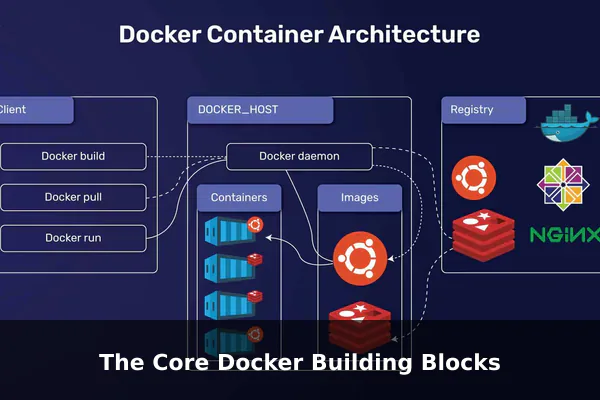
Understanding Docker means knowing four key concepts. Once these click, everything else becomes easier to follow.
Docker Image
An image is a read-only template that defines what a container will look like when it runs. Think of it as a recipe. The image specifies the base operating system layer, installed packages, copied files, and the startup command. Images are built once and reused to launch many containers.
Docker Container
A container is a running instance of an image. When you tell Docker to run an image, Docker creates a live container from it. You can run dozens of containers from the same image simultaneously, each fully isolated from the others.
Dockerfile
A Dockerfile is a plain text file with step-by-step instructions for building a Docker image. It is the source of truth for your environment. A simple Dockerfile might say: start from the official Python image, copy my app files in, install dependencies, and run the app.
Docker Registry
A registry is a storage location for Docker images. Docker Hub is the default public registry, hosting thousands of official and community images. Organizations often run private registries to store internal images securely.
Volumes
Volumes are how Docker persists data. Because containers are temporary by design, any files written inside a container disappear when it stops. Volumes attach a folder on the host machine to a folder inside the container, keeping data safe between restarts.
How Docker Works in a Typical Development Workflow
Here is a straightforward example of Docker in action for a web application:
- Write a Dockerfile — Define the base image, install dependencies, and set the startup command.
- Build the image — Run
docker buildto turn the Dockerfile into a reusable image stored locally. - Run a container — Execute
docker runto start a container from that image. The app is now live locally. - Test and iterate — Make changes, rebuild the image, and spin up a fresh container. Every run starts from the same clean state.
- Push to a registry — Share the image by pushing it to Docker Hub or a private registry so teammates can pull it.
- Deploy anywhere — Pull the same image onto a staging server, a cloud instance, or a colleague’s laptop. The behavior is identical every time.
This repeatable loop eliminates the environment mismatch problem because everyone runs the exact same packaged environment.
Common Use Cases for Beginners
Docker is not just for large engineering teams. Beginners and solo developers benefit from it every day in these practical scenarios:
Local Web Development
Run a web server, database, and backend API together using Docker Compose, a tool that defines multi-container setups in a single file. With one command, your entire local stack starts up — no manual installation of MySQL or Nginx required.
Onboarding New Developers
Instead of a multi-page setup guide, a new team member clones the repository, runs docker compose up, and the full development environment is ready in minutes. Docker removes onboarding friction dramatically.
Testing in Isolation
Run automated tests inside a container where dependencies are fixed and predictable. After the test run, destroy the container and start fresh next time — no leftover state, no test pollution.
Running Multiple App Versions
Need to test your app against both Python 3.9 and Python 3.11? Run two containers simultaneously, each with a different version, without installing multiple Python versions on your host machine.
Benefits, Limits, and What Docker Does Not Do
Key Benefits
- Portability: Runs on any machine with Docker installed — Windows, macOS, Linux, or a cloud provider.
- Speed: Containers start in seconds; rebuilding images is incremental thanks to layer caching.
- Consistency: Eliminates environment drift between developer machines, CI pipelines, and production servers.
- Isolation: Each container has its own dependencies, so conflicting library versions between projects are never a problem.
- Community: Docker Hub offers thousands of ready-made official images for popular software like PostgreSQL, Redis, Nginx, and WordPress.
Honest Limitations
- Learning curve: Docker has its own vocabulary and command set that takes time to learn properly.
- Storage growth: Images accumulate on disk quickly if you do not regularly prune unused ones.
- Not built for scale alone: Managing hundreds of containers at scale requires an orchestration tool like Kubernetes — Docker alone is not designed for that.
- Security is not automatic: Containers share the host kernel, so they offer less isolation than full VMs in high-security environments.
Getting Started with Docker Without Feeling Overwhelmed
Docker’s getting-started process is simpler than it looks. Here is a beginner-friendly path to build confidence quickly:
- Install Docker Desktop — Download from the official Docker website. Docker Desktop works on Windows and macOS and includes a graphical interface to manage containers and images visually.
- Run your first container — Open a terminal and run
docker run hello-world. Docker downloads a tiny image and prints a success message. That is your first container running. - Explore Docker Hub — Browse the Docker Hub website to see official images for tools you already use, like Postgres, Node, or Python.
- Write a simple Dockerfile — Take a small personal project and write a Dockerfile for it. The official Docker documentation includes beginner-friendly templates to copy and adapt.
- Learn five commands first — Focus on
docker build,docker run,docker ps,docker stop, anddocker pullbefore exploring anything else.
Resist the urge to learn everything at once. Docker’s depth is vast, but you only need five commands and one Dockerfile to start solving real problems today.
Conclusion
Docker changed how software is built, tested, and deployed by making environments as portable as the code itself. Containers package everything an application needs into one consistent unit, eliminating the classic environment mismatch that slows teams down. Whether you are a solo developer building a weekend project or joining a professional engineering team, understanding Docker gives you a foundation that applies across virtually every modern development workflow.
The concepts — images, containers, Dockerfiles, and registries — are straightforward once you run your first container. Start small, learn by doing, and within a few hours you will have a working understanding of one of the most important tools in modern software development.
