
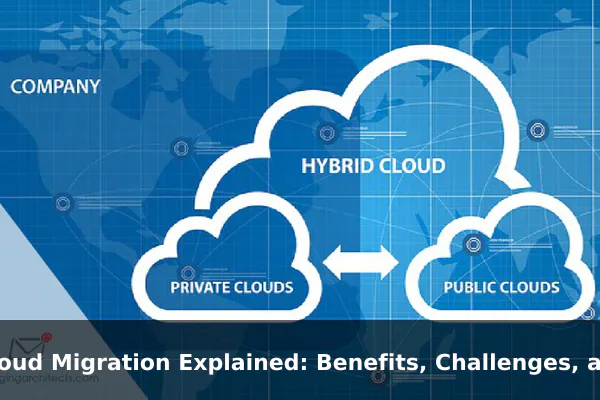
Cloud migration is the process of moving digital business assets from one environment to another, most commonly from on-premises servers to cloud infrastructure. In plain English, it means shifting applications, data, databases, and supporting systems out of hardware that a company manages itself and into computing services delivered over the internet. For many organizations, this is not just a technical upgrade. It is a business decision that affects cost, speed, security, operations, and long-term flexibility.
That is why cloud migration matters so much today. Companies want systems that can scale faster, teams want better remote access, and leaders want to reduce the strain of maintaining aging infrastructure. At the same time, moving to the cloud is rarely as simple as copying files from one place to another. A successful migration requires planning, testing, risk management, and a clear understanding of what should move, what should stay, and what should be redesigned.
This guide explains cloud migration in a practical, beginner-friendly way. You will learn what the term means in real business settings, why organizations invest in migration projects, the most common obstacles they face, the main migration strategies, and the step-by-step process teams usually follow. If you are evaluating a future migration or trying to understand why companies talk about moving workloads to the cloud, this article will give you a clear framework.
What Cloud Migration Means in Practice
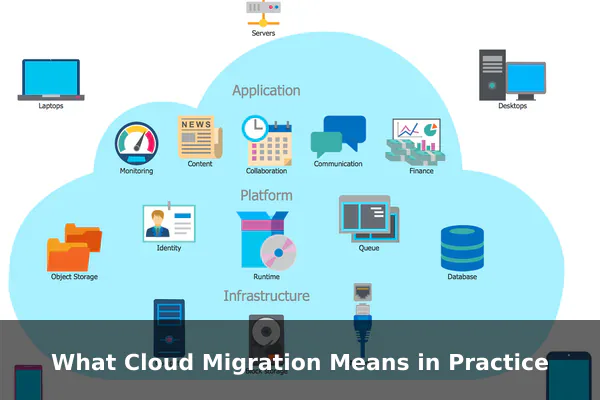
In practice, cloud migration is broader than simply uploading documents to an online service. It can involve moving:
- Applications, such as customer portals, internal tools, or e-commerce systems
- Data, including files, databases, backups, and analytics records
- Workloads, meaning the computing tasks that run on servers or virtual machines
- Development environments, such as testing, staging, and deployment pipelines
- Security and monitoring tools, which help protect and manage the new environment
A company may migrate from its own data center to a public cloud platform, from one cloud provider to another, or from a traditional setup into a hybrid cloud model that mixes local and cloud resources. The exact definition depends on what is being moved and why.
On-Premises to Cloud
This is the most familiar type of migration. An organization replaces locally hosted servers, storage systems, or applications with cloud-based infrastructure. Instead of buying and maintaining physical hardware, the business rents computing power, storage, and services as needed.
Cloud to Cloud
Some companies already use the cloud but still need migration. They may move from one provider to another for better pricing, stronger tools, improved regional coverage, or fewer technical limitations. This is still cloud migration because the workloads and data are changing environments.
Hybrid and Multi-Cloud Moves
Not every system should leave a local environment immediately. Some workloads remain on-site for compliance, latency, or integration reasons, while others move to the cloud. In a hybrid setup, both environments work together. In a multi-cloud setup, a company uses more than one cloud provider to spread risk or match different tools to different workloads.
Migration Is Also Organizational Change
Cloud migration is not only about servers and software. It changes how teams deploy updates, control costs, manage access, recover from outages, and monitor performance. That is why mature migration planning includes operations, security, finance, and business stakeholders, not just IT staff.
A useful way to think about cloud migration is this: it is the transition of business computing from one operating model to another. The technology moves, but the larger goal is usually better agility, resilience, and efficiency.
Why Businesses Move to the Cloud
Businesses pursue cloud migration for different reasons, but most goals fall into a few major categories. The cloud can offer technical advantages, financial flexibility, and faster execution when used well.
Scalability Without Constant Hardware Purchases
One of the biggest benefits of cloud migration is scalability. Traditional infrastructure often requires planning for peak demand in advance, which means buying more hardware than is needed most of the time. Cloud environments let teams increase or decrease resources more quickly. If website traffic jumps during a promotion or a service expands into a new market, the infrastructure can grow with it.
Cost Flexibility and Better Budget Control
On-premises environments usually involve large up-front spending on hardware, networking equipment, storage, cooling, maintenance, and replacement cycles. Cloud services shift much of that into operating expenses. Instead of paying for fixed capacity years ahead of time, companies can pay for what they use. This does not automatically make the cloud cheaper, but it can make costs more flexible and easier to align with actual demand.
Faster Deployment and Innovation
In a cloud environment, teams can launch servers, databases, development environments, and automation tools far faster than in a traditional setup. That speed supports faster experimentation, shorter release cycles, and more responsive product development. Businesses that want to build features quickly often see cloud migration as a foundation for modern software delivery.
Improved Remote Access and Collaboration
Cloud-hosted systems are generally easier to access securely from multiple locations. For distributed teams, branch offices, and remote employees, that can improve collaboration and reduce dependence on a single physical office or data center. It also helps external partners, contractors, and managed service providers work within controlled access models.
Disaster Recovery and Business Continuity
Cloud providers typically offer replication, backup, geographic redundancy, and recovery features that would be expensive for smaller organizations to build on their own. A migration can strengthen resilience by making it easier to restore systems after hardware failure, cyber incidents, or site outages.
Performance and Global Reach
When a business serves customers in multiple regions, cloud infrastructure can place services closer to users. That can reduce latency and improve experience. It also supports content delivery networks, load balancing, managed databases, and other tools that improve performance at scale.
Reduced Infrastructure Maintenance Burden
Internal teams spend less time managing physical hardware when more services run in the cloud. That does not remove operational work, but it changes its focus. Instead of replacing drives and handling rack-level maintenance, teams can spend more time on automation, security policies, optimization, and application improvement.
For many businesses, these benefits add up to a strong case: the cloud can support growth, modernize operations, and reduce dependency on aging systems. Still, those outcomes only happen when migration is planned carefully.
The Most Common Cloud Migration Challenges
Cloud migration offers clear benefits, but it also introduces serious risks. Many migration problems happen not because the cloud is a poor fit, but because teams underestimate complexity.
Security and Access Control Concerns
Moving systems to the cloud changes the security model. Identity management, permissions, encryption, network segmentation, and monitoring must be redesigned for the new environment. A poorly configured cloud system can expose sensitive data just as easily as an outdated local server. Security improves when cloud controls are used correctly, but misconfiguration is a common migration risk.
Downtime and Service Disruption
Applications that support customers, employees, or transactions cannot simply disappear during a migration weekend. Cutovers must be timed carefully. If dependencies are missed or performance is not validated, the business may face outages, broken integrations, or degraded user experience. High-availability planning is essential for critical systems.
Legacy Application Compatibility
Older applications often depend on specific operating systems, hardware assumptions, fixed IP patterns, or tightly coupled databases. These systems may not run well in a cloud environment without modification. In some cases, the real issue is not migration difficulty but application design age.
Unexpected Costs
A common misconception is that every cloud migration reduces spending immediately. In reality, costs can rise if workloads are overprovisioned, storage is poorly managed, data transfer charges are ignored, or unused resources remain active. A rushed migration can also produce a double-cost period in which the business pays for both old and new environments at the same time.
Compliance and Data Governance
Organizations in finance, healthcare, education, and other regulated sectors must consider data residency, retention, auditability, and legal obligations. A cloud migration plan must account for where data is stored, who can access it, how it is logged, and how it is protected across environments.
Skills Gaps and Change Resistance
Cloud platforms introduce new tools, workflows, and responsibilities. Teams may need training in infrastructure as code, cloud security, cost management, observability, and containerized deployment. Resistance can also come from business units that fear disruption or from technical teams that are comfortable with legacy systems.
Hidden Dependencies
Many business systems rely on connections that are not fully documented. An application may depend on a shared file path, a local authentication service, a scheduled script, or a database that supports several tools at once. If those links are not discovered early, migration can create cascading failures.
These challenges are manageable, but they prove an important point: cloud migration is a transformation project, not a simple hosting change.
The Main Types of Cloud Migration Strategies
Not every workload should be moved in the same way. The right strategy depends on the age of the application, business urgency, available budget, performance requirements, and long-term goals.
Rehosting
Often called lift and shift, rehosting means moving an application to the cloud with minimal changes. This is one of the fastest strategies and is useful when a company wants to exit a data center quickly or reduce hardware maintenance. The drawback is that the application may not take full advantage of cloud-native capabilities.
Replatforming
Replatforming involves making limited optimizations without completely redesigning the application. For example, a team might move an app to the cloud and replace its self-managed database with a managed database service. This can improve performance and reduce maintenance while keeping the migration effort moderate.
Refactoring or Re-Architecting
This strategy redesigns the application to work better in the cloud. Teams may break a monolithic system into services, adopt containers, add automation, or rebuild around modern architectures. Refactoring can deliver major long-term benefits, but it requires more time, stronger engineering capacity, and higher short-term investment.
Repurchasing
Sometimes the best migration is not to move the existing software at all, but to replace it with a cloud-native product, often a SaaS tool. A company might retire a self-hosted CRM or collaboration system and adopt a service designed to run fully in the cloud. This can simplify operations but may require process changes and data migration into a new platform.
Retaining
Some workloads should stay where they are for now. Reasons include licensing constraints, low business value, hardware dependency, or pending retirement. Retaining part of the environment is normal and often part of a practical hybrid strategy.
Retiring
Migration planning often reveals systems that are no longer useful. Shutting down unused applications, duplicate tools, or outdated services can reduce complexity before any move happens. This is one of the easiest ways to lower migration risk and cost.
Hybrid Migration
Hybrid migration combines approaches. A business may rehost some systems, replatform others, and leave a few in place temporarily. This is common because real environments contain a mix of modern apps, legacy systems, and business-critical tools with different needs.
The key lesson is simple: cloud migration strategy is not one-size-fits-all. A smart migration roadmap matches each workload to the approach that makes technical and financial sense.
Step-by-Step Cloud Migration Process
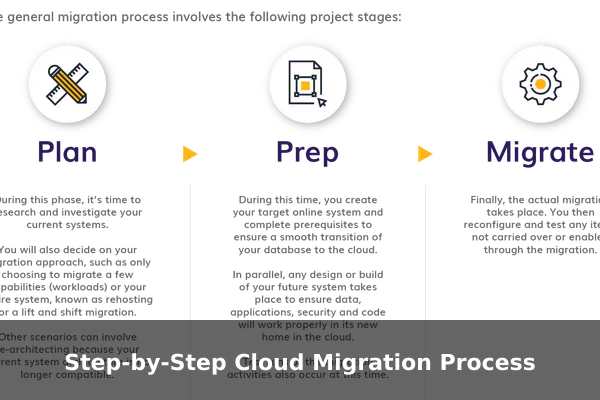
A successful cloud migration usually follows a structured process. The exact sequence varies, but the logic is consistent: assess first, move carefully, validate thoroughly, and optimize after launch.
1. Assess the Current Environment
Start by creating a clear inventory of applications, databases, servers, integrations, storage, and user dependencies. Teams need to know what exists before deciding what to move. This stage should also classify workloads by business importance, technical complexity, compliance sensitivity, and expected performance requirements.
Useful assessment questions include:
- Which systems are business-critical?
- Which applications depend on each other?
- What are the current operating costs?
- Which workloads suffer from capacity, reliability, or maintenance issues?
- Which systems are near end-of-life?
2. Define Business Goals and Success Metrics
A migration should solve specific problems. Goals might include improving uptime, speeding up releases, enabling remote work, reducing data center costs, or preparing for global expansion. Define measurable success criteria early, such as target response times, recovery objectives, cost thresholds, or migration deadlines.
3. Choose the Right Cloud Model and Provider
At this stage, teams decide whether they need public cloud, private cloud, hybrid cloud, or multi-cloud architecture. They also evaluate providers based on security features, geographic regions, compliance support, pricing, managed services, ecosystem tools, and internal skill alignment. The best provider is not just the one with the most features, but the one that fits the business use case.
4. Select a Migration Strategy for Each Workload
Now the team maps workloads to strategies such as rehosting, replatforming, refactoring, retaining, or retiring. This is where the migration plan becomes practical. High-value but low-complexity systems are often moved first to generate momentum and reduce risk.
5. Prepare the Cloud Landing Zone
Before moving production workloads, the target environment needs structure. This usually includes account setup, network design, identity and access controls, logging, backup policies, monitoring, encryption standards, and cost governance. Skipping this foundation creates confusion later.
6. Back Up Data and Build a Rollback Plan
Every migration step should include protection against failure. Teams need current backups, restoration procedures, and rollback paths if the new environment does not perform as expected. A rollback plan is not a sign of doubt. It is a sign of discipline.
7. Test With Pilot Workloads
Instead of moving everything at once, start with a pilot. A smaller, lower-risk application can reveal networking issues, identity problems, performance gaps, or monitoring blind spots. Pilot migrations help the team refine its process before larger cutovers.
8. Migrate Data, Applications, and Dependencies
Once testing is successful, the team begins full migration waves. This may involve data replication, application deployment, DNS changes, integration updates, and coordinated cutovers. Timing matters, especially for systems with live transactions or 24-hour use.
9. Validate Performance, Security, and Functionality
After migration, teams verify that the application works as expected. That includes user access, transaction completion, latency, logging, alerting, and security controls. A workload is not truly migrated just because it is running. It must also be stable, secure, and usable.
10. Optimize and Operate
Migration is not the finish line. Once workloads are live, teams review usage patterns, rightsize resources, automate scaling, tune storage, improve dashboards, and adjust cost controls. Many of the strongest cloud benefits appear during this optimization phase, not on day one.
A simplified migration sequence looks like this:
- Discover and assess current systems
- Set goals and success metrics
- Choose architecture and provider
- Match workloads to migration strategies
- Build a secure cloud foundation
- Test with pilots
- Execute phased migration waves
- Validate, optimize, and monitor
Best Practices for a Smoother Migration
Strong migrations are rarely the result of luck. They are usually the result of good habits applied consistently.
Prioritize Workloads Instead of Moving Everything at Once
Phased migration reduces risk. Start with systems that are valuable but manageable, then apply lessons learned to more complex workloads. This creates progress without exposing the business to unnecessary disruption.
Document Dependencies Early
Application maps, data flows, identity relationships, and integration diagrams help teams avoid surprises. If a migration depends on undocumented assumptions, risk rises sharply.
Design Security From the Start
Security should not be added after the move. Identity policies, least-privilege access, encryption, logging, network controls, and continuous monitoring must be part of the landing zone and migration workflow.
Train Teams Before Cutover
Operations staff, developers, support teams, and even finance personnel may need new cloud knowledge. Training before launch improves confidence and reduces operational mistakes after migration.
Monitor Costs as Closely as Performance
Cloud cost management is an operational discipline. Tagging resources, setting budgets, reviewing usage, and shutting down idle services are just as important as monitoring response time or uptime.
Automate Repetitive Tasks
Infrastructure as code, scripted deployments, policy automation, and standardized templates make migration more consistent. Automation also helps teams rebuild environments quickly and reduce manual error.
Communicate With Stakeholders
Migration affects more than engineers. Business teams need to understand timing, expected changes, support plans, and risk windows. Clear communication reduces friction and helps secure cooperation when migration events affect operations.
Practical best practices include:
- Set a clear migration scope
- Use realistic deadlines
- Keep backups current
- Test failover and rollback procedures
- Measure results against business goals
- Review post-migration lessons after each wave
When Cloud Migration Makes Sense
Cloud migration is not automatically the right choice for every organization or every system. The decision should be based on business needs, technical realities, and long-term operating goals.
It Often Makes Sense When Infrastructure Is Aging
If servers are near replacement, maintenance costs are rising, or hardware capacity is becoming a bottleneck, migration may be more sensible than another expensive refresh cycle. The cloud can offer a cleaner path forward than continuing to invest in legacy infrastructure.
It Makes Sense When Agility Matters
Businesses that need to launch faster, scale quickly, support remote teams, or improve service reliability often benefit from cloud capabilities. If growth or change is a strategic priority, cloud migration can enable that pace.
It Makes Sense When Recovery and Availability Need Improvement
Organizations with weak backup strategies, limited disaster recovery, or single-site dependence may gain resilience by moving to well-architected cloud environments with better redundancy and recovery tooling.
It May Not Make Sense for Every Workload
Some systems have strict latency needs, hardware dependencies, or compliance requirements that make immediate migration impractical. In those cases, a hybrid approach or delayed migration may be smarter than forcing a full move too early.
It Requires a Business Case, Not Just a Trend
The strongest migration decisions are tied to specific outcomes. If the move will improve performance, reduce operational drag, support product growth, or lower risk, the case is easier to justify. If the only reason is that “everyone is moving to the cloud,” the project is more likely to drift.
Decision-makers should ask:
- What business problem will this migration solve?
- Which workloads benefit most from cloud capabilities?
- What will success look like in one year?
- What new skills and processes will be required?
- What should remain on-premises for now?
Conclusion
Cloud migration is the structured move of applications, data, and workloads from one computing environment to another, usually from on-premises infrastructure into cloud services. Its appeal is clear: better scalability, more flexible costs, improved resilience, faster deployment, and support for modern ways of working. But those benefits are not automatic. Migration also brings challenges around security, downtime, legacy compatibility, compliance, cost control, and team readiness.
The most effective migrations begin with a realistic assessment, a clear business case, and a workload-by-workload strategy. Rather than treating the cloud as a magic solution, strong teams treat it as a platform that must be designed, governed, and optimized carefully. When organizations match the right migration approach to the right systems, cloud adoption becomes less about hype and more about building an infrastructure model that fits how the business wants to operate in the future.
