
Payroll is one of the most routine business processes, but it is also one of the easiest to get wrong. Every pay run depends on accurate employee details, hours worked, salary data, overtime rules, deductions, taxes, payment timing, and records. When those moving parts are handled with spreadsheets or manual calculations, payroll can quickly become slow, stressful, and vulnerable to mistakes.
Payroll software is designed to make that process more organized. In simple terms, it is a business application that helps calculate, process, record, and report employee pay. It turns payroll from a repeated manual task into a structured workflow where data flows from time records and employee profiles into gross pay, deductions, tax calculations, net pay, pay stubs, reports, and payment files.
This guide explains payroll software from a practical technology and business perspective. It focuses on how payroll systems streamline business pay, where they support tax and wage compliance, what they cannot do automatically, and how companies can choose a system that fits their size, workforce, and risk profile.
What Payroll Software Does
Payroll software acts as a central system for paying employees correctly and documenting how each payment was calculated. The software stores employee records, applies payroll rules, calculates wages, subtracts deductions, organizes tax withholdings, creates pay statements, and keeps payroll history available for reporting.
At its most basic level, a payroll system answers a practical question: What should each worker receive on payday, and what must the business record, withhold, deposit, or report because of that payment? The answer depends on several types of information.
Employee and Job Data
Payroll starts with employee data. A payroll platform usually stores names, addresses, Social Security numbers or other worker identifiers, job titles, departments, pay rates, salary amounts, tax forms, bank details, benefit elections, and employment status. For hourly employees, it may also store work schedules or connect to a time tracking system.
This data matters because payroll calculations depend on the worker’s pay type, tax setup, work location, benefit deductions, and employment classification. A salaried employee, hourly employee, tipped employee, contractor, commission-based worker, and multi-state employee may all require different payroll handling.
Gross Pay, Deductions, and Net Pay
Payroll software calculates gross pay first. For salaried employees, this may be based on an annual salary divided by the payroll frequency. For hourly employees, it may be based on approved hours multiplied by the hourly rate, with overtime or premium pay applied when relevant. Other earnings can include bonuses, commissions, reimbursements, tips, shift differentials, or paid time off.
After gross pay is calculated, the software applies deductions and withholdings. These may include payroll taxes, benefit premiums, retirement contributions, wage garnishments, charitable deductions, or other authorized deductions. The amount left after required and voluntary deductions is net pay, which is the amount the employee actually receives.
Pay Stubs and Payroll Records
Most payroll systems generate pay stubs showing earnings, deductions, taxes, employer contributions, and year-to-date totals. These records help employees understand their pay and help employers maintain documentation for audits, employee questions, accounting, and year-end reporting.
In this sense, payroll software is not just a calculator. It is also a recordkeeping tool. A useful system preserves the details behind each pay run so the business can see who was paid, how much they earned, what was withheld, what benefits were deducted, and which reports were created.
How It Streamlines the Payroll Cycle
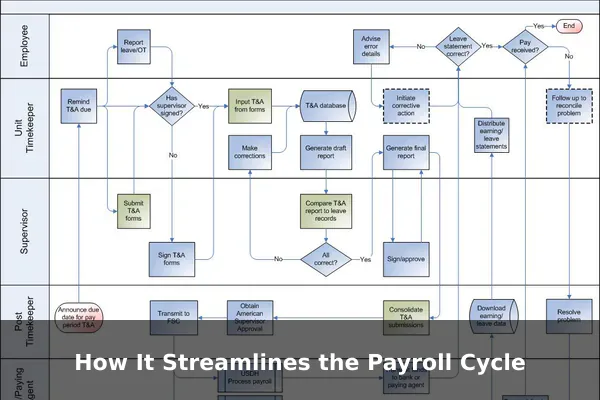
The payroll cycle includes the repeated steps a company performs before, during, and after payday. Payroll software streamlines that cycle by reducing duplicate data entry, automating repetitive calculations, applying saved rules, and guiding payroll administrators through approvals and deadlines.
From Time Entry to Payroll Review
For hourly teams, the payroll process often begins with time data. Employees clock in, submit timesheets, or record project hours. Managers approve the hours, and payroll uses those approved records to calculate wages. When payroll software integrates with time tracking, the system can import hours automatically instead of requiring manual retyping.
This improves speed, but it also improves data quality. Manual copying from a timesheet into a spreadsheet can introduce simple errors: missed hours, duplicate rows, wrong pay rates, or incorrect overtime totals. A connected payroll workflow gives administrators a clearer review process before money leaves the business.
Recurring Pay Runs
Many employees are paid on a regular schedule such as weekly, biweekly, semimonthly, or monthly. Payroll software can save those schedules, remind administrators when payroll is due, and prepare recurring pay runs with the latest approved data. For stable salaried teams, much of the process may repeat from one cycle to the next, with changes only for new hires, terminations, bonuses, unpaid leave, or deduction updates.
Automation does not mean payroll should be ignored. The best practice is to review each pay run before submission. Payroll software helps by highlighting exceptions such as missing hours, unusually high or low pay, negative deductions, inactive employees, or incomplete bank details.
Direct Deposit and Payment Preparation
Payroll platforms often support direct deposit by preparing payment instructions or working through a payroll provider that initiates employee payments. Some systems also support printed checks or pay cards, depending on the provider and business setup. The advantage is consistency: once banking details and pay schedules are set up, the system can prepare payments using the approved payroll results.
This is one reason payroll software can save administrative time. Instead of calculating pay in one file, preparing bank transfers in another tool, and creating pay stubs separately, the business can manage the entire pay run from one system or connected workflow.
Payroll Taxes, Withholding, and Filing Support
Payroll taxes are one of the biggest reasons businesses adopt payroll software. Employers may need to withhold federal income tax from employee wages, calculate Social Security and Medicare taxes, handle employer payroll tax obligations, deposit employment taxes, and prepare payroll forms. Rules can vary by employee type, jurisdiction, deposit schedule, and business situation, so the details should be verified against current official guidance.
For U.S. employers, IRS Publication 15, Employer’s Tax Guide, is a primary source for federal payroll tax topics such as withholding, employment taxes, deposits, and employer reporting basics. Payroll software can help organize and calculate these tasks, but it should not be treated as a substitute for understanding employer responsibilities.
Withholding Calculations
Payroll systems use employee tax information, wage amounts, pay frequency, and current tax tables or provider rules to estimate required withholdings. Employees may provide withholding information through forms such as Form W-4 in the United States, and payroll administrators must keep that data current.
The software can make withholding more consistent by applying the same calculation logic across pay periods. However, incorrect employee setup can still create incorrect results. If an employee’s tax form is missing, outdated, or entered incorrectly, the software may calculate based on bad data. This is why payroll review and employee self-service updates are important.
Tax Deposits and Payment Systems
Payroll software may remind businesses of deposit deadlines, calculate deposit amounts, produce reports for payroll liabilities, or connect with a payroll provider that handles tax payments. In the United States, the Electronic Federal Tax Payment System is an official federal system used for tax payments. Some employers use it directly, while some payroll providers use payment processes on behalf of clients.
Businesses should confirm what their payroll provider actually does. Some systems calculate taxes but do not file or deposit them. Others offer full-service payroll tax filing. The difference is important because the employer may remain responsible for accuracy, timeliness, and account setup even when software or a service provider assists.
Year-End Forms and Wage Reporting
Payroll software can also support year-end reporting. In the United States, employers often need wage and tax statements such as Form W-2 for employees. The Social Security Administration’s employer W-2 filing information provides official guidance for wage reporting and electronic filing.
A payroll system can make year-end work easier because it stores wages, taxes, deductions, and employee information throughout the year. Instead of reconstructing annual totals from multiple spreadsheets, the business can generate reports and forms from payroll history. Still, year-end reporting depends on accurate data collected during the year, including employee names, identifiers, addresses, taxable wages, and benefit information.
Wage, Hour, and Recordkeeping Compliance
Payroll software also supports wage and hour administration. This is different from payroll tax compliance. Wage and hour rules relate to topics such as minimum wage, overtime, work hours, youth employment, and required records. In the United States, the U.S. Department of Labor’s Fair Labor Standards Act information is an authoritative source for federal wage and hour topics, while state and local rules may add further requirements.
Overtime and Pay Rules
For hourly employees, overtime can be one of the most error-prone payroll calculations. Payroll software can help apply overtime rules when hours are tracked correctly and employee classifications are set up accurately. It can also help separate regular hours, overtime hours, holiday pay, paid leave, unpaid time, and other earning types.
The key word is configured. Software only applies the rules it has been given. If an employee is classified incorrectly, if a work location is wrong, or if a custom pay policy is not configured, payroll results may be wrong even though the system is functioning normally. Companies with complex schedules, multiple locations, union rules, shift premiums, or tipped employees should pay special attention during setup and testing.
Minimum Wage and Work Location Data
Payroll systems often store work location and pay rate data. This can help businesses review whether wages align with applicable rules, especially when employees work in different cities, states, or countries. For remote and multi-location teams, location data becomes more important because payroll and wage rules may vary.
However, payroll software should be seen as a support tool rather than an automatic legal decision-maker. Businesses should confirm which federal, state, local, or industry-specific rules apply. A system can flag obvious problems, but it may not catch every local requirement or special employment arrangement.
Recordkeeping Requirements
Payroll records are not optional administrative clutter. They help prove what was paid, when it was paid, how it was calculated, and which hours or earnings were involved. The U.S. Department of Labor recordkeeping and reporting guidance explains wage and hour recordkeeping topics that employers may need to understand.
Payroll software supports recordkeeping by storing pay runs, employee earnings, deductions, tax amounts, time records, pay stubs, and reports. Good systems also offer export options, audit logs, and role-based access so sensitive records are protected but still available when needed.
Employee Self-Service and Better Pay Visibility
One of the most practical benefits of payroll software is employee self-service. Instead of asking HR or accounting for every pay stub, tax form, bank update, or leave balance, employees can use a secure portal to view and update approved information.
Pay Stubs, Tax Forms, and Profile Updates
Employee portals commonly provide access to current and past pay stubs, year-end tax forms, personal details, direct deposit information, and tax withholding forms. This reduces repetitive questions for payroll staff and gives employees more immediate access to their own records.
Self-service also improves accuracy when used carefully. Employees can spot outdated addresses, incorrect bank details, or tax form issues before those errors cause payroll problems. Many systems include approval workflows so sensitive changes, such as bank account updates, can be reviewed or verified before taking effect.
Leave Balances and Time-Off Requests
Some payroll platforms include leave tracking, while others integrate with HR or workforce management systems. Employees may be able to request vacation, sick leave, or personal time, and managers can approve those requests before payroll calculates paid time off.
This creates clearer visibility for both sides. Employees can see available balances, managers can plan staffing, and payroll can use approved leave records instead of interpreting separate emails or spreadsheets.
Integrations That Make Payroll More Accurate
Payroll software becomes more valuable when it connects with the systems that feed payroll data or use payroll results. Payroll rarely exists in isolation. It touches accounting, HR, time tracking, benefits, attendance, banking, and sometimes project costing.
Accounting Software
Payroll creates accounting entries for wages, payroll taxes, benefit costs, reimbursements, and liabilities. When payroll connects with accounting software, the business can post payroll expenses more consistently. This reduces manual journal entries and makes financial reports more timely.
The distinction from general accounting software is important. Accounting software records financial activity across the business, while payroll software focuses on paying workers and documenting employment-related compensation. Integrating the two helps the company keep payroll accurate without turning accounting staff into payroll data entry clerks.
HR and Benefits Systems
HR systems hold employee lifecycle data such as hiring, job changes, compensation updates, terminations, and benefits enrollment. When HR data flows into payroll, the risk of paying the wrong rate or missing a deduction goes down. For example, a promotion entered in HR can update payroll compensation after the proper approvals, and a benefits election can create the correct employee deduction.
Without integration, the same change may need to be entered in multiple places. Duplicate entry increases the chance that one system is updated while another is forgotten. Integration helps keep payroll aligned with official employee records.
Time Clocks and Attendance Tools
Time tracking integration is especially useful for hourly, shift-based, field, retail, hospitality, healthcare, and manufacturing teams. Approved time data can flow into payroll with fewer manual steps. Some systems also support geolocation, job codes, break tracking, or project codes, depending on the business need and applicable privacy rules.
The goal is not simply faster payroll. It is cleaner payroll. When time, attendance, approvals, and pay calculations are connected, administrators spend less time correcting avoidable mistakes and more time reviewing exceptions.
Common Risks and Limits to Understand
Payroll software can reduce payroll workload and error risk, but it does not remove employer responsibility. A business still needs accurate setup, timely review, secure data practices, and awareness of the rules that apply to its workforce.
Misconfiguration
Many payroll problems begin during setup. Examples include wrong pay frequencies, incorrect overtime rules, missing tax IDs, wrong work locations, outdated deduction settings, inactive employees left on payroll, or benefit deductions mapped to the wrong category. A system can automate a mistake just as consistently as it automates a correct process.
Before going live, businesses should run test payrolls, compare results against prior payroll records, verify tax settings, review deduction codes, and confirm that reports match accounting needs. For complex teams, phased rollout or parallel payroll testing can be worth the effort.
Changing Rules and Provider Coverage
Payroll rules can change. Federal tax guidance, state rules, local requirements, wage thresholds, filing procedures, and agency systems may be updated over time. Reliable payroll vendors update their systems, but businesses should still verify important obligations through official sources and professional advice when needed.
Provider coverage also varies. A payroll vendor may support some states, countries, tax filings, payment types, or employee categories better than others. A business with remote employees, contractors, international workers, tipped staff, union rules, or multiple legal entities should confirm fit before signing a contract.
Data Security and Access Control
Payroll data is highly sensitive. It can include Social Security numbers, home addresses, bank accounts, salary details, tax forms, and benefit information. Payroll software should provide strong security controls such as multi-factor authentication, role-based permissions, encryption, audit logs, and secure employee access.
Access should be limited to people who need it. A manager may need to approve hours but not view bank details. An accountant may need payroll totals but not every personal document. A well-designed payroll system supports these boundaries through permissions and reporting controls.
How to Choose Payroll Software for a Business
Choosing payroll software is not just a feature checklist. The right system depends on the company’s workforce, locations, pay complexity, compliance needs, internal skills, budget, and existing software stack. A small business with ten salaried employees has different needs from a multi-location company with hourly workers, shift premiums, contractors, and benefit deductions.
Start With Workforce Complexity
Before comparing vendors, document how payroll actually works in the business. This prevents buying a tool that looks simple in a demo but cannot handle real payroll details.
- Employee count: Consider current headcount and expected growth.
- Worker types: Identify salaried, hourly, tipped, commissioned, seasonal, contractor, and temporary workers.
- Locations: Note states, cities, countries, remote work arrangements, and tax jurisdictions.
- Pay rules: List overtime, shift differentials, bonuses, commissions, reimbursements, and paid leave policies.
- Benefits: Include health plans, retirement contributions, deductions, employer contributions, and eligibility rules.
- Reporting needs: Identify accounting, management, audit, job costing, and compliance reports.
Evaluate Features That Matter Most
Useful payroll software should make routine payroll easier while still giving administrators control. Look for features that match real workflows instead of relying only on broad marketing promises.
- Accurate payroll calculations: The system should handle gross pay, deductions, taxes, benefits, and net pay clearly.
- Tax support: Confirm whether the vendor calculates, files, deposits, or only reports payroll taxes.
- Employee self-service: Employees should be able to access pay stubs, forms, and profile updates securely.
- Time tracking integration: Hourly teams need a reliable path from approved hours to payroll.
- Accounting integration: Payroll costs should flow cleanly into the general ledger.
- Reporting: Administrators should be able to export payroll registers, tax reports, deduction summaries, and labor cost reports.
- Security: The system should support multi-factor authentication, permissions, and audit trails.
- Support quality: Payroll is deadline-driven, so responsive support matters when issues arise.
Understand Total Cost
Payroll software pricing can depend on base subscription fees, per-employee charges, contractor payments, tax filing services, year-end forms, multi-state payroll, benefits administration, time tracking, HR features, implementation, and support tiers. Because pricing changes often, businesses should verify current fees directly with vendors and read contract terms carefully.
Total cost should be compared against time saved, error reduction, reduced administrative work, and improved employee experience. The cheapest system may become expensive if it requires heavy manual work or fails to support important payroll rules.
Ask Practical Vendor Questions
Good vendor evaluation includes specific questions, not just feature comparisons. Ask whether the provider supports your states or countries, how tax updates are handled, what happens if a filing error occurs, how payroll data can be exported, how permissions work, what support hours are available, and how implementation is managed.
Also ask about data migration. Historical payroll records, employee profiles, year-to-date wages, tax data, and deduction balances may need to move into the new system. Migration quality affects the first payroll run and year-end reporting, so it deserves careful planning.
Best Practices for a Smooth Payroll Software Setup
Implementation is where payroll software succeeds or fails. A system can have strong features, but poor setup can create confusion and errors. Businesses should treat payroll implementation as a controlled project with clear ownership, testing, and sign-off.
Clean the Data First
Before importing data, review employee names, addresses, tax forms, pay rates, bank details, benefit elections, leave balances, departments, and employment status. Remove duplicate records and confirm terminated employees are handled correctly. Clean data makes every later step easier.
Run Parallel Payroll When Possible
For higher-risk payrolls, run the new system alongside the old method for at least one cycle. Compare gross pay, taxes, deductions, net pay, employer costs, and reports. Differences should be explained before the new system becomes the official source of payroll.
Create Review Checklists
Even with automation, payroll needs review. A simple checklist might include confirming new hires, terminations, pay changes, approved hours, overtime, bonuses, benefit changes, tax alerts, direct deposit totals, and payroll funding. Checklists make the process repeatable and reduce reliance on memory.
The Bottom Line for Business Pay
Payroll software streamlines business pay by bringing payroll data, calculations, approvals, records, employee access, and reporting into one organized workflow. It reduces repetitive manual work, improves visibility, supports payroll tax tasks, strengthens recordkeeping, and helps employees understand their pay.
Its real value is practical consistency. Instead of rebuilding payroll from scratch each pay period, a business can rely on configured rules, connected time data, stored employee profiles, automated calculations, and structured review steps. That makes payroll faster and easier to audit.
Still, payroll software is not a replacement for responsibility. Employers should configure systems carefully, review payroll before submission, keep employee data current, protect sensitive information, and verify obligations using official sources such as IRS, Department of Labor, Social Security Administration, and applicable state or local agencies. Used well, payroll software becomes more than an administrative tool. It becomes a reliable operating system for paying people accurately, on time, and with better control over the details that matter.
Official references
- IRS Publication 15, Employer's Tax Guide – Primary U.S. guidance for employer payroll tax withholding, deposits, employment taxes, and payroll reporting basics.
- U.S. Department of Labor Fair Labor Standards Act – Authoritative source for minimum wage, overtime, youth employment, and wage-hour compliance topics payroll systems often help track.
- U.S. Department of Labor Recordkeeping and Reporting – Explains employer wage and hour recordkeeping obligations that payroll software may support.
- Social Security Administration Employer W-2 Filing Instructions – Primary source for employer W-2 filing requirements and electronic wage reporting.
- Electronic Federal Tax Payment System – Official federal system used by employers and payroll providers to make employment tax payments.
