
Modern software rarely runs as a single program on a single machine anymore. Applications are broken into smaller services, packaged into containers, and spread across many servers that may live in different data centers or cloud regions. Once that happens, someone has to decide where each container runs, how it scales, how it talks to other services, and what happens when a machine fails. That is exactly the problem Kubernetes was built to solve.
This guide explains what Kubernetes is, how its architecture fits together at a high level, where teams commonly use it, and the real benefits it brings to software delivery. It also covers the honest trade-offs, because Kubernetes is powerful but not always the simplest answer. The goal is a clear, source-grounded explanation you can use whether you are evaluating it for the first time or trying to explain it to a teammate.
What Is Kubernetes?
According to the official Kubernetes documentation, Kubernetes is an open source system for automating the deployment, scaling, and management of containerized applications. It is often abbreviated as K8s, where the number 8 represents the eight letters between the K and the s. The project is hosted by the Cloud Native Computing Foundation (CNCF), which describes it as a portable, extensible platform for managing containerized workloads and services.
To understand Kubernetes, it helps to first picture a container. A container packages an application together with everything it needs to run, such as code, libraries, and configuration. Containers are lightweight and start quickly, which makes them perfect for running many small services on shared infrastructure. The problem is that once you have dozens or hundreds of containers across many machines, you need something to coordinate them. That coordinator is called a container orchestrator, and Kubernetes is the most widely adopted one.
Kubernetes itself is not a programming language, a cloud provider, or an application runtime. It does not replace your database or your code. Instead, it acts as a control system: you describe the desired state of your application, and Kubernetes works continuously to make the actual state match that description.
How Kubernetes Works at a High Level
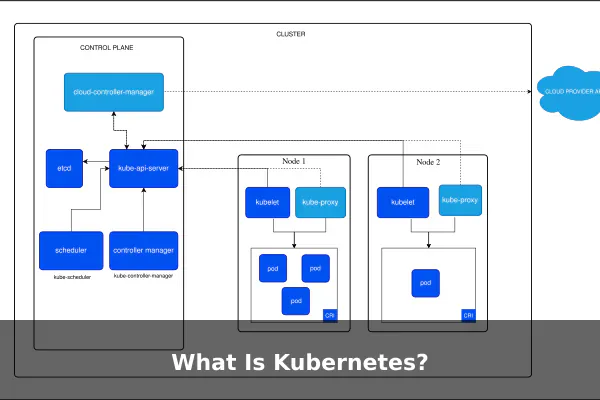
Kubernetes runs as a cluster, which is a group of machines working together. According to the Kubernetes cluster architecture documentation, every cluster has two main parts: the control plane and the worker nodes.
The Control Plane
The control plane is the brain of the cluster. It makes global decisions, such as scheduling workloads and responding to events. Its main components include the API server, which exposes the Kubernetes API; the scheduler, which decides which node should run a new workload; the controller manager, which runs background processes that keep the cluster in its desired state; and etcd, a distributed key-value store that holds cluster data.
Worker Nodes
Worker nodes are the machines, virtual or physical, that actually run the application containers. Each node runs an agent called the kubelet, which talks to the control plane and starts or stops containers as instructed. A container runtime on the node is responsible for actually executing the containers. A network proxy component handles networking rules so traffic can reach the right place.
Desired State and Reconciliation
One of the most important ideas in Kubernetes is the declarative model. You write a configuration file describing what you want, such as “run three copies of this web service.” Kubernetes stores that desired state and keeps comparing it to reality. If a container crashes or a node disappears, Kubernetes notices the gap and brings the cluster back to the desired state. This pattern is often called the reconciliation loop.
Core Kubernetes Concepts to Know
Kubernetes introduces several abstractions, called objects, that you will see in almost every conversation about it. The official concepts documentation describes them as building blocks for running and managing applications.
- Pod: The smallest deployable unit. A pod wraps one or more tightly related containers that share networking and storage.
- Deployment: A higher-level object that manages a set of identical pods, handles rolling updates, and replaces failed pods automatically.
- Service: A stable network endpoint that lets other parts of the system reach a group of pods, even as those pods come and go.
- Namespace: A logical partition inside a cluster, useful for separating teams, environments, or projects.
- ConfigMap and Secret: Objects for storing configuration values and sensitive data such as API keys, separate from container images.
- Volume and PersistentVolume: Storage abstractions that let containers keep data beyond their own short lifetimes.
- Ingress: A way to expose HTTP and HTTPS routes from outside the cluster to services inside it.
You do not need to memorize all of these on day one, but recognizing the names makes documentation and tutorials much easier to follow.
Common Uses of Kubernetes
Kubernetes is general purpose, but it tends to show up most often in a handful of patterns. The CNCF project page describes it as a system used by organizations of many sizes to run cloud-native workloads, and these are some of the most common scenarios.
Running Microservices
When an application is split into many small services that need to talk to each other, Kubernetes provides a consistent way to deploy them, give them stable network identities, and scale each one independently. This is one of the original drivers behind container orchestration.
Scaling Web Applications and APIs
Web traffic is rarely flat. Kubernetes can automatically add more pod replicas during busy periods and remove them when traffic drops, which helps keep response times steady without permanently over-provisioning servers.
Supporting CI/CD Pipelines
Many teams use Kubernetes as the target environment for continuous integration and continuous delivery. Each build produces a new container image, and deployments roll that image out gradually, with the ability to roll back if something looks wrong.
Hybrid and Multi-Cloud Deployments
Because Kubernetes runs on most major clouds and on-premises hardware, it gives teams a common operating model across environments. Workloads defined for one cluster can usually move to another with limited changes, which helps with disaster recovery and vendor flexibility.
Batch Jobs and Data Processing
Kubernetes can run short-lived jobs and scheduled tasks, not just long-running services. This makes it useful for data processing pipelines, machine learning training jobs, and routine maintenance work.
Platform Engineering
Internal platform teams often build developer portals and self-service tools on top of Kubernetes. Developers get a paved road for shipping services, while the platform team handles networking, security defaults, and observability underneath.
Key Benefits of Kubernetes
Kubernetes is widely adopted because it addresses several practical operational problems at once. The following benefits are commonly cited in the official documentation and by the Cloud Native Computing Foundation.
- Scalability: Workloads can scale horizontally by adding or removing pod replicas, and clusters can scale by adding nodes.
- Self-healing behavior: When containers crash or nodes fail, Kubernetes restarts or reschedules workloads to restore the desired state.
- Portability: The same Kubernetes manifests can typically run across different clouds and on-premises clusters, reducing lock-in to a single environment.
- Declarative configuration: Infrastructure and applications are described as code, which improves reviewability, repeatability, and version control.
- Rolling updates and rollbacks: Deployments can update applications incrementally and roll back automatically if health checks fail.
- Efficient resource use: The scheduler packs workloads onto available nodes based on CPU and memory requests, which can improve hardware utilization.
- A large ecosystem: A wide range of tools for monitoring, security, networking, and storage integrate with Kubernetes through standard interfaces.
These benefits are real but depend on thoughtful configuration. A poorly tuned cluster will not magically scale or heal itself, and teams usually invest in monitoring, testing, and operational practices to get the most out of the platform.
Kubernetes Limitations and When It May Be Too Much
Kubernetes solves hard problems, but it introduces its own. It is worth being honest about the trade-offs.
Operational Complexity
Kubernetes has many moving parts. Even with managed services, teams still need to understand concepts such as resource requests, networking policies, role-based access control, and storage classes. The learning curve is real.
Security Responsibility
Kubernetes provides security primitives, but configuring them correctly is up to the team. Misconfigured permissions or exposed dashboards can create risk, so security reviews and policies matter more, not less.
Monitoring and Observability Overhead
Because workloads move between nodes and scale dynamically, traditional host-based monitoring is not enough. Teams typically add metrics, logs, and distributed tracing tools, which is more infrastructure to maintain.
When Simpler May Be Better
Not every project needs Kubernetes. A small website, a single internal tool, or a basic background job may run perfectly well on a single server, a managed application platform, or a serverless function. Adopting Kubernetes for a single small app can add more complexity than value.
Managed Kubernetes vs Self-Managed Kubernetes
There are two broad ways to run Kubernetes, and both are common.
Self-Managed Kubernetes
In a self-managed setup, your team installs and operates the entire cluster, including the control plane and worker nodes. This offers the most control and flexibility, but it also means handling upgrades, patching, backups of cluster state, and resilience of the control plane itself. It is usually chosen by organizations with strong infrastructure teams or strict requirements about where and how their clusters run.
Managed Kubernetes Services
Major cloud providers offer managed Kubernetes services where they operate the control plane on your behalf and provide tooling for nodes, networking, and storage. You still define your workloads and manage your applications, but day-to-day operations of the underlying cluster are simpler. Specific features, pricing, and service-level commitments vary by provider and change over time, so check current vendor documentation before making decisions.
For many teams, a managed service is the practical starting point, while self-managed clusters appear in larger organizations or specialized environments.
Who Should Learn Kubernetes?
Kubernetes touches several roles in a modern software organization, and the right depth of knowledge depends on what you do.
- Software developers benefit from understanding pods, deployments, and services so they can package and ship their applications effectively.
- DevOps and site reliability engineers work with Kubernetes more directly, handling deployments, autoscaling, and incident response.
- Platform engineers often design and operate the internal Kubernetes platform that other teams build on.
- System administrators moving from traditional servers to cloud-native infrastructure will encounter Kubernetes as a core skill.
- Technical decision-makers do not need to write manifests, but a working mental model helps them evaluate proposals and trade-offs.
You do not need to master every component on day one. A clear grasp of containers, clusters, pods, deployments, and services already covers most everyday conversations.
Kubernetes in Simple Terms
If you remember nothing else, remember this: Kubernetes is a system for running and coordinating containerized applications across many machines so they can scale up, recover from failures, and roll out updates in a predictable way. It does this by letting you declare what you want, then continuously working to match reality to that description.
It is powerful but not magical. It rewards teams that invest in good practices around configuration, security, and observability, and it can be overkill for small or simple workloads. When it fits, however, Kubernetes provides a common language and a consistent platform that has become the backbone of modern cloud-native software delivery. Used thoughtfully, with guidance from the official Kubernetes documentation and the CNCF project resources, it can make complex systems easier to operate rather than harder.
Official references
- Kubernetes Documentation – Primary documentation for Kubernetes definitions, core concepts, workloads, services, storage, configuration, and operational behavior.
- Kubernetes Concepts – Best official source for explaining Kubernetes abstractions such as clusters, pods, workloads, services, and configuration objects.
- Kubernetes Cluster Architecture – Authoritative reference for control plane, node architecture, and how Kubernetes cluster components fit together.
- Kubernetes Components – Official breakdown of major Kubernetes components, useful for accurate architecture and terminology claims.
- Cloud Native Computing Foundation Kubernetes Project Page – Primary foundation page for Kubernetes project status, governance context, and concise official description.
