

Infrastructure as a Service, usually shortened to IaaS, is one of the core cloud computing models, but it is also one of the most misunderstood. Many people hear the term and assume it simply means “servers in the cloud.” That is partly true, but it leaves out the bigger idea. IaaS is really about renting the foundational building blocks of IT such as computing power, storage, and networking, instead of buying, housing, and maintaining that hardware yourself.
That distinction matters because IaaS sits at a different layer than ordinary software. It is not just another app you sign into. It is the underlying environment where websites, business systems, development tools, databases, and custom applications can run. For companies that want flexibility without building a full physical data center, Infrastructure as a Service offers a practical middle ground between owning everything and handing everything over to a software vendor.
This guide explains IaaS in plain English. You will learn what Infrastructure as a Service means, how it works behind the scenes, what is usually included, how it compares with PaaS and SaaS, and when it makes sense to choose it. The goal is not to drown you in cloud jargon, but to make the idea clear enough that you can recognize where IaaS fits in real technology decisions.
What Infrastructure as a Service Means
Infrastructure as a Service is a cloud model in which a provider delivers core computing resources over the internet. Instead of buying physical servers, network switches, storage devices, backup systems, and rack space, a business can rent those resources on demand from a cloud provider.
Think of it this way: if traditional IT means purchasing the building materials for your own server room, IaaS means leasing those materials from a provider that already has the data centers, power, cooling, hardware replacement process, and global network in place. You still decide what to run and how to configure much of the environment, but you do not need to own the physical machines underneath it.
Why the word “infrastructure” is important
The word infrastructure is what separates IaaS from everyday software. When you use a SaaS product, you mostly care about the finished application. With IaaS, you are closer to the technical foundation. You manage operating systems, install software, create server instances, define network rules, and decide how storage is allocated. That higher level of control is one of the main reasons organizations choose IaaS.
A simple definition in plain English
A plain-English definition would be this: IaaS is a way to rent virtual IT hardware from a cloud provider whenever you need it. You pay for the computing infrastructure you use, often on a pay-as-you-go basis, and you avoid the large upfront cost of buying physical equipment.
This makes IaaS especially useful for organizations that want room to grow, need to launch systems quickly, or have workloads that change over time. It is not only for giant enterprises. Startups, software teams, ecommerce stores, media companies, schools, and internal IT departments all use Infrastructure as a Service when they need flexible cloud infrastructure.
How IaaS Works Behind the Scenes
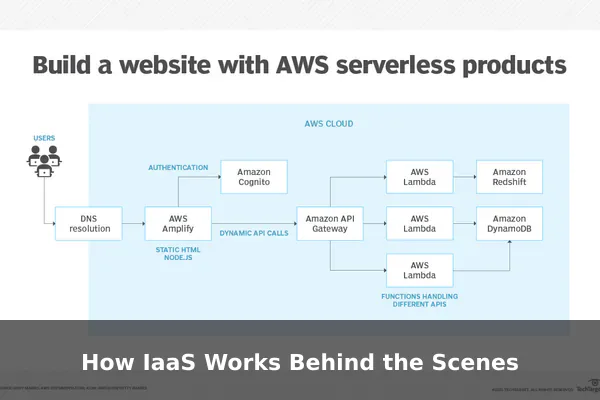
To understand how IaaS works, it helps to look beyond the marketing language. At a technical level, a cloud provider operates large data centers filled with physical servers, networking equipment, and storage systems. On top of that physical layer, the provider uses software to divide resources into flexible, reusable pools that customers can access on demand.
Virtualization turns physical hardware into flexible resources
One of the key technologies behind IaaS is virtualization. Virtualization software allows a single physical server to host multiple virtual machines, each behaving like an independent computer. That means one piece of hardware can be shared efficiently among different customers or workloads while remaining logically separate.
When you launch a cloud server in an IaaS platform, you are usually creating a virtual machine with its own CPU allocation, memory, storage, and operating system. To you, it feels like a normal server. Behind the scenes, it is part of a much larger resource pool managed by the provider.
Core resources are provisioned through software
In a traditional data center, getting a new server might require ordering hardware, waiting for delivery, installing it, cabling it, and configuring it manually. In an IaaS environment, those steps are abstracted behind a dashboard, API, or command-line tool. You can often provision resources in minutes.
Typical IaaS resources include:
- Compute for running applications, services, and workloads
- Storage for files, databases, backups, and persistent data
- Networking for connecting systems, controlling traffic, and exposing services to users
- Security controls such as firewalls, identity rules, and access permissions
- Monitoring and management tools for performance, logging, alerts, and automation
Billing usually follows usage patterns
Another important part of how Infrastructure as a Service works is the billing model. Instead of treating infrastructure as a fixed purchase, IaaS turns it into an operational expense. Customers usually pay based on what they consume, such as hours of compute usage, stored data volume, network transfer, or premium service features.
This pay-as-you-go model is powerful, but it also requires discipline. One reason IaaS feels flexible is that it is easy to scale resources up quickly. The downside is that costs can quietly grow if unused instances, oversized machines, or frequent data transfers are left unchecked.
The provider and customer share responsibility
IaaS does not mean the provider handles everything. A more accurate way to think about it is through a shared responsibility model. The cloud provider is responsible for the physical data centers, hardware maintenance, base network infrastructure, and the underlying virtualization platform. The customer is usually responsible for what runs on top of that layer, including operating system updates, app deployment, identity management choices, and much of the security configuration.
This is one of the defining traits of IaaS. It gives you more control than higher-level cloud services, but it also leaves more decisions and operational work in your hands.
What Is Included in an IaaS Environment
An IaaS platform is more than a list of virtual servers. Modern Infrastructure as a Service environments usually include a broad toolkit for building, connecting, protecting, and managing digital systems. The exact features vary by provider, but the major categories are fairly consistent.
Compute resources
Compute is the heart of IaaS. This is where you create the virtual machines or instances that run your operating systems, websites, APIs, databases, internal tools, and background processes. Providers often offer different compute sizes optimized for general workloads, memory-heavy tasks, storage-intensive jobs, or GPU-based processing.
Some platforms also provide bare-metal options, which give customers direct access to physical servers for specialized performance or compliance needs. Even then, the service still fits the IaaS model because the provider supplies the underlying infrastructure as an on-demand service.
Storage options
Storage in IaaS usually comes in several forms:
- Block storage for attaching disks to virtual machines
- Object storage for large-scale file storage, media assets, backups, and archives
- File storage for shared file systems used by applications or teams
Each type serves a different purpose. For example, an application server might use block storage for its operating system and database, while object storage might hold user uploads, log files, or backup snapshots.
Networking and traffic control
Networking is a major part of Infrastructure as a Service, even though beginners often overlook it. A provider may let you create virtual networks, subnets, IP addresses, load balancers, routing rules, and firewall policies. These tools decide how systems communicate with one another and how users reach your applications.
Networking features are crucial because they shape performance, availability, and security. A well-designed IaaS setup is not only about having enough compute power. It is also about making sure the right resources can talk to each other in the right ways, with the right restrictions.
Security and identity controls
IaaS environments usually include identity and access management tools that let administrators define who can create resources, change settings, view billing, or access production systems. There may also be encryption options, security groups, firewall rules, secrets management, and audit logging.
These controls are essential because IaaS gives users a lot of freedom. Without strong permissions and policies, that freedom can create risk. A mature IaaS deployment treats security as part of the architecture, not an afterthought.
Management, automation, and monitoring
Most IaaS providers include dashboards, APIs, templates, logs, and monitoring systems so teams can automate repetitive tasks and track system health. This matters because cloud infrastructure becomes much more useful when it can be managed programmatically.
For example, a team might define an environment in code, deploy ten servers automatically during high demand, and then shut them down when traffic drops. That kind of automation is one of the practical advantages that makes Infrastructure as a Service different from simply renting a single remote server.
IaaS vs PaaS vs SaaS
IaaS is often explained alongside PaaS and SaaS because all three are cloud service models, but they solve different problems. The easiest way to compare them is by looking at how much the provider manages for you and how much control you keep.
IaaS gives the most infrastructure control
With Infrastructure as a Service, the provider gives you the base infrastructure, but you still manage much of the software stack. You choose operating systems, configure middleware, install applications, control networking, and often handle security settings at the system level.
IaaS is a good fit when you need flexibility, custom environments, or direct access to infrastructure behavior. It is often chosen by development teams, IT departments, hosting providers, and businesses with unusual technical requirements.
PaaS removes more setup work
Platform as a Service sits one level higher. In a PaaS environment, the provider manages more of the underlying setup so developers can focus on building and deploying applications instead of managing servers. That means less infrastructure control, but also less operational burden.
Compared with IaaS, PaaS is usually faster for application development when the provider’s platform matches your needs. The tradeoff is reduced flexibility at the operating system and infrastructure level.
SaaS delivers the finished software
Software as a Service is the highest-level model for most users. The provider manages the infrastructure, platform, and application, and the customer simply uses the software through a browser or app. Email platforms, project management tools, online CRMs, and file collaboration suites are common SaaS examples.
In short, SaaS is about using software, PaaS is about building software, and IaaS is about renting the environment where software runs.
A simple way to remember the difference
- IaaS: You rent the infrastructure and manage the software stack above it.
- PaaS: You rent a ready-made application platform and focus mostly on code.
- SaaS: You use the finished application as a service.
If your organization wants the most control without owning hardware, Infrastructure as a Service is usually the closest cloud model to a traditional data center, just delivered in a more flexible way.
Main Benefits of IaaS for Businesses
The appeal of IaaS is not just technical. It also changes how businesses plan, launch, scale, and maintain digital systems. When used well, it can improve both speed and efficiency.
Lower upfront hardware costs
Buying physical infrastructure is expensive. Beyond the servers themselves, organizations also pay for space, cooling, networking equipment, redundancy, spare capacity, and replacement cycles. IaaS shifts much of that burden away from upfront capital spending and into ongoing usage-based costs.
That is especially useful for businesses that want to start small, test an idea, or avoid locking money into hardware that may become outdated before it delivers full value.
Faster deployment
With Infrastructure as a Service, teams can launch environments quickly. New servers, storage volumes, and network configurations can often be created in minutes rather than weeks. This makes IaaS attractive for product launches, seasonal demand spikes, temporary campaigns, and internal projects that need fast setup.
Scalability when demand changes
One of the strongest advantages of IaaS is scalability. If traffic increases, more resources can be added. If a project slows down, resources can often be reduced. This elasticity is far more practical than permanently buying hardware for peak demand and leaving it underused during normal periods.
Access to enterprise-grade infrastructure
Cloud providers invest heavily in data center reliability, physical security, network performance, and geographic coverage. Smaller organizations can benefit from that scale without building it themselves. In many cases, a business gains access to stronger infrastructure than it could realistically afford to maintain alone.
Better support for testing and experimentation
IaaS is ideal for teams that need temporary environments. Developers can spin up test systems, QA teams can mirror production setups, and data teams can run short-term workloads without permanent commitments. That flexibility encourages experimentation while reducing waste.
Disaster recovery and continuity options
Because resources can be distributed across regions and backed by cloud storage, IaaS can support backup strategies and recovery planning more easily than a single on-premises environment. It does not remove the need for planning, but it gives organizations more tools for resilience.
Common Drawbacks and Challenges
Infrastructure as a Service solves many problems, but it is not automatically simple or cheap. Its flexibility comes with tradeoffs, and organizations that ignore those tradeoffs often end up frustrated.
Cost sprawl is a real risk
Pay-as-you-go pricing sounds efficient, but it can become messy if resources are poorly managed. Idle virtual machines, oversized environments, frequent data transfers, and unnecessary premium services can create bills that surprise inexperienced teams.
IaaS works best when organizations track usage carefully, tag resources clearly, set budgets, and review spending regularly.
Technical management is still required
Because IaaS gives customers deeper control, it also demands more technical responsibility. Someone still needs to configure servers, patch operating systems, manage access, design network layouts, and monitor performance. If a team wants the benefits of the cloud without this kind of operational work, a higher-level model may be a better fit.
Security is shared, not transferred away
A cloud provider may secure the physical environment, but customers are still responsible for many security decisions inside their IaaS setup. Weak passwords, open storage permissions, poor access controls, or unpatched systems can still lead to breaches.
This is one of the most important realities to understand: moving to IaaS does not eliminate security work. It changes where that work happens.
Vendor dependence can grow over time
Although IaaS is more flexible than many software platforms, organizations can still become dependent on a provider’s tooling, APIs, billing structure, and service ecosystem. That does not always mean lock-in is severe, but it is worth planning for portability where practical.
Architecture can become complex
As environments grow, IaaS setups can become difficult to manage. Multiple regions, network rules, backup policies, storage classes, identity roles, and automation scripts all add complexity. Without standards and documentation, flexibility can turn into confusion.
Typical Use Cases for Infrastructure as a Service
IaaS is most valuable when a workload needs configurable infrastructure without the burden of owning physical equipment. Many of its best use cases involve changing demand, custom system requirements, or environments that need to be created quickly.
Website and application hosting
Many businesses use IaaS to host websites, APIs, ecommerce systems, and internal business applications. The reason is simple: these systems often need reliable compute, scalable storage, traffic control, and security settings that can be customized to fit the application.
Development and testing environments
Development teams often need short-lived environments for new features, staging systems, bug investigation, or performance testing. IaaS makes this practical because environments can be created and removed without long procurement cycles.
Backup, archiving, and disaster recovery
Object storage and geographically distributed infrastructure make IaaS useful for backup and recovery plans. Organizations can replicate data, store snapshots, and prepare recovery environments without building a second physical site from scratch.
Bursty or seasonal workloads
Some businesses experience uneven traffic patterns. An online store may see sharp peaks during promotions. A media platform may spike during live events. A tax or education service may have intense seasonal demand. IaaS helps these organizations expand capacity temporarily instead of overbuilding permanent infrastructure.
Custom enterprise systems
Legacy apps, specialized internal tools, and workloads with specific operating system requirements often fit IaaS better than rigid platform services. When software cannot easily move into a simplified managed environment, Infrastructure as a Service provides more room to adapt.
Data processing and compute-heavy jobs
Teams running analytics, simulations, batch processing, rendering, or machine learning support tasks may use IaaS to access substantial compute power for limited periods. Renting that capacity only when needed is often more efficient than owning it full time.
How to Decide Whether IaaS Is the Right Choice
Choosing IaaS is not about whether cloud sounds modern. It is about matching the service model to the workload, the team’s skills, and the business goal.
Questions worth asking first
- Do you need control over the operating system, network setup, or server environment?
- Will your workload grow, shrink, or change unpredictably?
- Do you have the technical skills to manage infrastructure responsibly?
- Would buying hardware create unnecessary upfront cost or slow deployment?
- Are there compliance, data residency, or architectural requirements that need custom infrastructure decisions?
If the answer to several of these questions is yes, IaaS may be a strong option.
When IaaS is usually a good fit
IaaS tends to make sense when a business wants flexibility plus control. It is especially useful for custom applications, migrations away from physical servers, test environments, variable workloads, and organizations that want cloud scalability without giving up infrastructure-level decision-making.
When a different model may be better
IaaS may not be the best choice if the main goal is simplicity. If a team does not want to manage servers, security patching, networking details, or scaling logic, PaaS or SaaS may reduce operational overhead. In other words, more control is only valuable if you actually need it.
A practical rule of thumb
If your team is asking, “What is the fastest way to use this software?” the answer may lean toward SaaS. If the question is, “What is the easiest way to deploy code?” PaaS may fit. If the question is, “What is the best way to build and control the environment itself?” that is where Infrastructure as a Service usually enters the picture.
Best Practices for Getting Value from IaaS
Adopting IaaS successfully is not only about choosing a provider. It also depends on how the environment is designed, monitored, and governed over time.
Start with a clear architecture plan
Before creating resources, define what the environment needs to do. Know which workloads are temporary, which are critical, which require backups, and which need strong access restrictions. A clear plan reduces waste and prevents accidental complexity.
Automate wherever possible
Infrastructure becomes easier to manage when setup is repeatable. Automation helps teams create consistent environments, reduce human error, and scale more predictably. It also improves disaster recovery because systems can be recreated from defined templates instead of manual memory.
Watch costs continuously
Cost control in IaaS is an ongoing practice, not a one-time task. Teams should review utilization, right-size instances, remove abandoned resources, and monitor data transfer patterns. Visibility is one of the best defenses against cloud waste.
Build security into the baseline
Access control, network segmentation, encryption, logging, and patch management should be part of the initial setup. Security is much easier to maintain when it is designed into the environment from the beginning.
Document responsibilities clearly
Because IaaS uses a shared responsibility model, teams should be explicit about who manages what. This includes operating system maintenance, backup testing, credential rotation, incident response, and compliance reviews. Cloud infrastructure becomes safer when operational ownership is obvious rather than assumed.
Conclusion
IaaS is best understood as the cloud version of core IT infrastructure: compute, storage, and networking delivered as an on-demand service. It gives organizations far more control than finished software services, while removing the need to own and maintain the physical hardware underneath. That combination makes Infrastructure as a Service a powerful option for businesses that need flexibility, scalability, and custom environments.
At the same time, IaaS is not a shortcut around responsibility. It replaces hardware ownership with service-based infrastructure, but it still requires planning, cost awareness, security discipline, and technical management. For teams that need control over their environment, that tradeoff is often worth it. For teams that mainly want simplicity, a higher-level cloud model may be the smarter choice.
The clearest way to think about IaaS is this: it is not just cloud technology in general. It is the specific layer that lets you rent the building blocks of modern computing. Once you understand that, it becomes much easier to see where IaaS fits and why it remains such an important part of the cloud landscape.
