
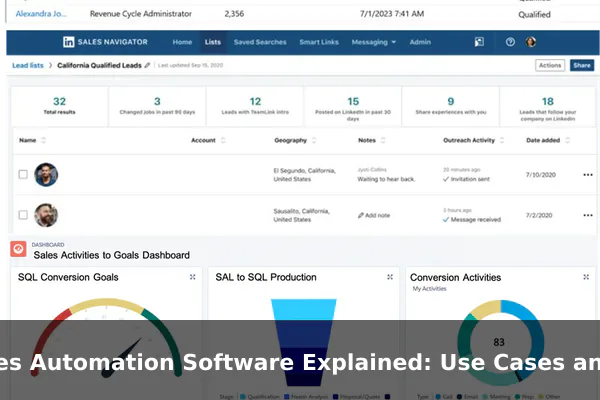
Sales automation software has quietly become one of the most practical investments a sales team can make. While the term automation can sound abstract, the reality is straightforward: these tools handle repetitive, time-consuming tasks so that sales reps can spend more time actually selling and less time updating spreadsheets, chasing reminders, or manually drafting follow-up emails.
The category is distinct from general CRM software, though the two often overlap. A CRM stores and organizes customer data. Sales automation software goes a step further — it acts on that data automatically. When a lead fills out a form, the software can assign it to the right rep, send a welcome email, schedule a follow-up task, and update the pipeline stage, all without anyone clicking a button.
This article explains how sales automation software works, where it fits across the sales funnel, what features to expect, and what real-world use looks like for teams of different sizes and industries.
What Sales Automation Software Actually Does
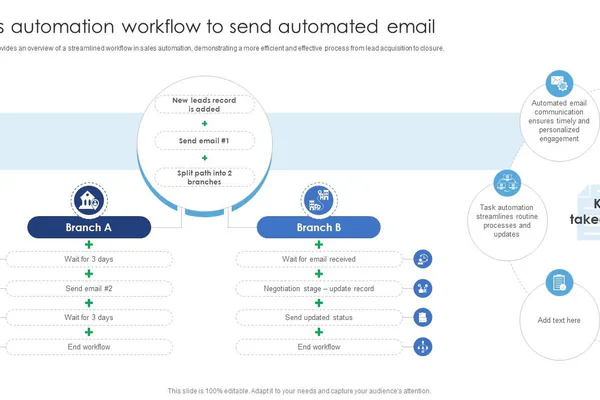
At its core, sales automation software executes predefined rules on behalf of the sales team. Instead of relying on a rep to remember every step in the process, the software watches for triggers — a form submission, a deal reaching a certain stage, a contact going cold — and responds according to the rules you have set up.
This is different from simply using templates or saved responses. Automation software runs in the background, continuously, across your entire pipeline. It can handle hundreds of contacts at once, applying the same workflow to each without delay or inconsistency.
Common tasks these tools automate include:
- Capturing leads from web forms, ads, or chat tools
- Routing new leads to the right sales rep based on territory or product line
- Sending personalized follow-up emails at timed intervals
- Logging calls and emails automatically against the right contact record
- Moving deals through pipeline stages based on rep activity or contact behavior
- Sending internal alerts when a deal goes stale or a task is overdue
The underlying goal is consistency. Sales outcomes often suffer not because reps lack skill, but because follow-up slips through the cracks or the process varies person to person. Automation enforces the process so the best version of the workflow runs every time.
How It Fits Into the Sales Process
Sales automation software does not replace the sales process — it runs inside it. Understanding where automation adds value means walking through the key stages of a typical sales funnel.
Lead Intake and Routing
The moment a prospect enters the system — through a website form, a LinkedIn ad, or a trade show scan — automation takes over. It can deduplicate the record, enrich it with firmographic data, score it based on attributes like company size or behavior, and assign it to the right rep, all within seconds of the contact arriving.
Outreach and Follow-Up
Once a lead is assigned, automated email sequences begin. A rep might not need to send the first three emails at all — the software sends them on a schedule, personalizing them with the contact’s name, company, and the specific product they showed interest in. If the contact opens an email or clicks a link, the system can escalate the priority or trigger a task for the rep to call.
Meeting Scheduling
Rather than the back-and-forth of scheduling emails, reps share calendar links generated by the automation tool. When a prospect books a slot, the system creates the calendar invite, sends confirmations and reminders, and logs the scheduled meeting against the deal automatically.
Deal Tracking and Stage Updates
As reps work through deals, automation keeps the pipeline current. If a proposal is sent, the deal stage updates. If no activity happens for seven days, the rep gets an alert. When a deal closes, the system triggers a handoff workflow to the onboarding or account management team without manual intervention.
Core Features Most Platforms Include
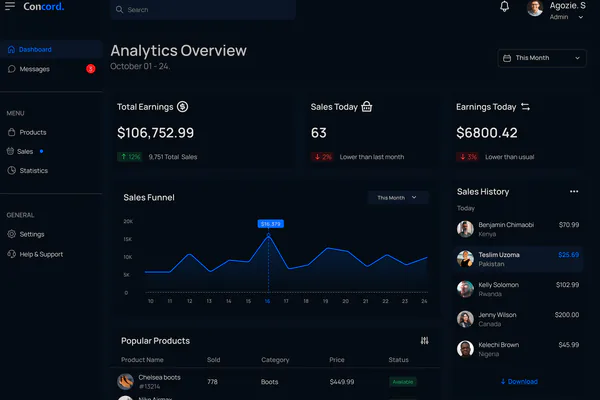
Sales automation platforms vary in depth and complexity, but most share a common set of capabilities that form the foundation of what they can do.
Workflow Rules and Triggers
The engine of any sales automation tool is its workflow builder. You define a trigger — a new lead arrives, a deal stage changes, a contact tag is added — and then a sequence of actions: send email, assign task, notify rep, update field. Most platforms offer visual editors that make building workflows accessible without coding knowledge.
Email Sequences
Pre-written email sequences are scheduled to send at specific intervals or in response to contact behavior. Sequences pause automatically if a contact replies, preventing the awkward situation of a rep continuing to follow up with someone who has already responded.
Lead Scoring
Lead scoring assigns numeric values to contacts based on their profile and activity. A contact from a target industry who has visited the pricing page twice scores higher than a random subscriber. This helps reps prioritize their time on prospects most likely to convert.
CRM Integration and Contact Enrichment
Sales automation software almost always connects with a CRM to ensure data flows in both directions. Some platforms also pull in public data about contacts automatically — job title, company revenue, technology stack — so reps start conversations with more context and spend less time on manual research.
Reporting and Analytics
Dashboards show how sequences are performing, where deals are stalling, how fast leads are being contacted, and which workflow steps generate the most engagement. This data makes it easier to refine the process over time rather than guessing what works.
Common Use Cases for Sales Teams
Knowing what the software can do in theory is useful, but the more practical question is what it actually solves for a sales team day to day. Here are the most common recurring use cases.
- Auto-assigning inbound leads so no lead sits uncontacted because no one noticed it came in
- Running drip email campaigns that warm up cold prospects without rep involvement until interest is shown
- Sending demo reminders to prospects who booked a call so fewer no-shows occur
- Triggering proposal follow-up emails automatically if no response comes after 48 or 72 hours
- Alerting managers when a high-value deal has gone inactive for too long
- Automating post-sale handoff by notifying the onboarding team and creating a task list when a deal closes
- Re-engagement campaigns for contacts who went cold months ago without a formal close or rejection
In each case, the automation removes the need for a human to remember to do something. The system remembers, executes consistently, and logs everything so the record stays accurate.
Examples of Sales Automation in Action
Abstract descriptions only go so far. Here is what sales automation looks like in practice for three different types of businesses.
Small Business: Home Services Company
A local HVAC company adds a quote request form to its website. When a homeowner submits the form, the software immediately sends a confirmation email, assigns the lead to the nearest available technician, and creates a task to call the lead within two hours. If no call is logged by end of day, the manager receives an alert. The technician never has to manually check for new leads — the system surfaces them automatically with full context.
B2B SaaS: Software Vendor with a Long Sales Cycle
A project management software company uses lead scoring to separate trial sign-ups who look like serious buyers from those who are just browsing. Contacts from companies with over 50 employees who activate core features within the first three days get moved into a high-priority sequence where a rep reaches out personally. Lower-scored contacts go into a longer nurture sequence. This means the sales team focuses energy where conversion probability is highest.
Service Business: Online Consulting Firm
A consulting firm runs discovery calls booked through its website. After each call, the rep selects an outcome — interested, not a fit, or needs more time. For contacts marked needs more time, the software automatically sends a check-in email in 30 days, then another at 60 days, without the rep having to set a reminder. The contact receives consistent follow-up and the rep’s pipeline stays clean without extra effort.
Benefits and Trade-Offs to Understand
Sales automation delivers clear advantages, but like any tool it comes with conditions and limitations worth understanding before committing to a platform.
The Upside
- Time savings — Reps recover hours each week that were previously spent on administrative tasks
- Faster response times — Automated follow-ups go out immediately, not when a rep gets around to it
- Pipeline visibility — Managers see exactly where every deal stands and which reps need support
- Consistency — Every lead gets the same quality process regardless of which rep handles it
- Scalability — A small team can manage a pipeline that would otherwise require significantly more headcount
The Trade-Offs
- Over-automation risk — Sending too many automated emails damages relationships and brand reputation
- Data quality dependency — Automation is only as good as the data it runs on; bad data produces bad outcomes at scale
- Setup investment — Building good workflows takes time upfront, and poorly designed sequences can be worse than no automation at all
- Impersonal outreach — Templates personalized with a first name only go so far; high-value deals still need genuine human engagement
How to Choose the Right Sales Automation Software
The market includes dozens of platforms, from lightweight tools built for small teams to enterprise-grade systems with deep customization. Narrowing the choice comes down to a handful of honest questions about your team and your workflow.
Team Size and Complexity
A solo salesperson or team of three needs different features than a 50-rep organization. Overly complex platforms create setup overhead that small teams rarely recoup. Look for tools that match your current scale with enough room to grow without requiring a full migration later.
Existing Technology Stack
Check which tools you already use — CRM, email provider, calendar software, marketing platform — and confirm the automation tool integrates cleanly with them. A tool that requires replacing your existing CRM to function effectively is a much larger decision than it first appears.
Ease of Setup and Maintenance
Some platforms require technical implementation or dedicated administrators. Others are built for self-service setup in a matter of days. Be realistic about who will configure and maintain the system internally, and match the tool’s complexity to that person’s technical comfort level.
Pricing Model
Pricing often scales by contact count, number of users, or feature tier. Run the numbers against your current and projected contact database size to avoid unexpected cost increases as your pipeline grows. Some platforms also charge separately for advanced features like lead scoring or contact enrichment.
When Automation Helps Most and When It Does Not
Sales automation is not the right answer for every situation. Knowing when to apply it — and when to hold back — is as important as understanding how it works.
Automation helps most when:
- Your team handles high volumes of similar leads with a repeatable, defined process
- Follow-up consistency is a known weak point causing deals to go cold unnecessarily
- Reps are spending significant time on data entry, scheduling, or reminder management
- You need faster response times without the cost of hiring more people
Automation is less effective when:
- Every deal is highly custom and requires tailored outreach from the very first touchpoint
- The process has not been defined or standardized yet — automating a broken process simply breaks things faster at higher volume
- Relationships are the primary differentiator and automated contact would feel out of place to the buyer
- The team is too small to generate the volume needed to justify the time investment in setup
The smartest approach is to standardize the process manually first, identify the steps that are most consistent and repetitive, and then automate those specific steps. Build automation on top of a working foundation rather than hoping it will create structure on its own.
Conclusion
Sales automation software is a practical layer of efficiency that fits inside a team’s existing sales process. It does not replace judgment, relationships, or strategy — but it eliminates the manual friction that slows teams down and lets opportunities fall through the cracks silently.
The best implementations start focused: automate one workflow, measure the result, and expand from there. Whether your team manages five leads a week or five thousand, the core value is the same — consistent, timely action on every contact, without depending on human memory to make it happen every time.
