
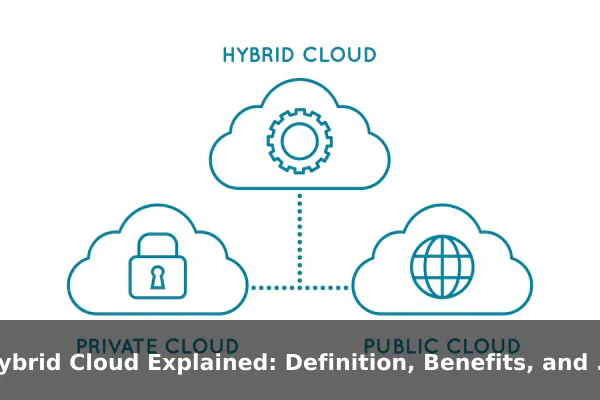
Hybrid cloud is one of those technology terms that gets used often, but it is not always explained clearly. Some people hear it and assume it simply means using a cloud service while still keeping a few old servers in the office. Others confuse it with multi-cloud, or treat it like a temporary stage during a cloud migration. In reality, hybrid cloud is a specific operating model with a practical purpose: it connects different computing environments so applications, data, and workloads can live in the place that makes the most sense.
That matters because not every system has the same needs. A company may want the scalability of public cloud platforms for busy web traffic, but still need the control of private infrastructure for regulated data, legacy applications, or low-latency internal systems. A hospital, bank, retailer, or software company may all use hybrid cloud for different reasons, yet the pattern is the same: combine environments intentionally instead of forcing every workload into a single model.
This guide explains hybrid cloud in plain English, without the usual marketing jargon. You will learn what the term actually means, how it works behind the scenes, how it differs from public cloud, private cloud, and multi-cloud, and why organizations adopt it. Most importantly, you will see real examples that make the concept easier to recognize in actual IT environments.
What Hybrid Cloud Means in Simple Terms
Hybrid cloud is an IT setup that combines at least two different computing environments, usually a private environment such as on-premises servers or a private cloud, and a public cloud service such as AWS, Microsoft Azure, or Google Cloud. These environments are connected so data, applications, and processes can work together instead of operating as isolated silos.
The core idea is simple: different workloads go to different places based on business needs. A company might keep customer account records in a tightly controlled private environment while running a public-facing website or analytics platform in the public cloud. The two sides are linked through networking, identity systems, security policies, automation tools, and data integration.
The two sides of the model
On one side, you have infrastructure that the organization controls more directly. That could be a server room in its own building, a colocated data center, or a dedicated private cloud environment. On the other side, you have resources rented from a public cloud provider, where computing power, storage, and services can scale quickly.
Hybrid cloud exists because both sides offer real advantages. Private environments give more control over hardware, compliance boundaries, and custom configurations. Public cloud platforms offer speed, elasticity, global reach, and a large menu of managed services. Combining them lets an organization use each environment where it fits best.
What makes an environment truly hybrid
Not every company that owns servers and also pays for cloud software has a hybrid cloud architecture. To count as hybrid in a meaningful sense, the environments should be integrated. That usually means there is some combination of shared identity, network connectivity, unified monitoring, coordinated security, data synchronization, or workload portability.
In other words, hybrid cloud is not just about having two places to run things. It is about making those places work as a connected system.
- A web app may run in the public cloud but call an internal database that stays on-premises.
- Backups may be stored in cloud object storage while core transactions remain in a private data center.
- Analytics jobs may copy approved data from internal systems into a cloud data platform for faster reporting.
- Disaster recovery may use cloud infrastructure as a standby environment.
This is why hybrid cloud is often described as a placement strategy. It gives organizations options instead of forcing every workload into a single home.
How Hybrid Cloud Works Behind the Scenes
Hybrid cloud may sound abstract, but its building blocks are concrete. It works through a combination of infrastructure, connectivity, software management, and operational processes. The goal is to let applications and data move safely between environments, or at least let them communicate reliably when they stay in separate locations.
Networking and secure connectivity
The first requirement is a secure connection between the private side and the public cloud side. This may be done with site-to-site VPNs, dedicated private links, software-defined networking, or a combination of those options. Without reliable connectivity, the two environments remain separate islands.
Networking also controls how traffic flows. For example, a public website hosted in the cloud may send approved requests to an internal order system. Or a cloud-based backup service may pull data from private storage at scheduled times. Network design matters because poor routing can create latency, downtime, and security gaps.
Identity, access, and policy control
A strong hybrid cloud setup also needs shared identity management. Employees, developers, systems, and automated services should not have one set of permissions on-premises and a completely unrelated set in the cloud. Organizations often use centralized identity providers, role-based access controls, single sign-on, and policy frameworks so permissions stay consistent across environments.
This is important for both security and daily operations. If teams cannot manage users, machines, and service accounts centrally, hybrid cloud becomes hard to govern. Identity is one of the hidden foundations that makes the architecture usable at scale.
Data movement and storage choices
Data is often the hardest part of hybrid cloud. Applications can sometimes move fairly easily, but large data sets are harder to relocate. A company has to decide which data stays private, which data is copied to the cloud, which data is archived there, and how synchronization will work.
Common patterns include:
- Keeping sensitive source data on-premises while sending masked or aggregated copies to the cloud for analytics.
- Using cloud storage for backup, retention, or disaster recovery.
- Running databases privately while storing unstructured files, logs, or media assets in cloud object storage.
- Synchronizing selected datasets between branch offices, data centers, and cloud services.
The technical challenge is not only moving data, but moving it with the right security, timing, format, and cost model. Large data transfers can be slow and expensive, which is why hybrid architecture often depends on thoughtful data design.
Orchestration, automation, and workload portability
Modern hybrid cloud environments usually depend on automation tools to deploy applications, configure systems, patch infrastructure, and monitor performance. Containers, Kubernetes platforms, infrastructure-as-code tools, and policy automation can help teams manage similar workloads across different locations.
That does not mean every application becomes portable instantly. Many legacy systems still depend on specific operating systems, network assumptions, or hardware integrations. But automation can reduce the operational gap between environments and make hybrid cloud manageable over time.
A simple way to think about it is this: the more consistent your tooling is, the less each environment feels like a separate universe.
A practical request flow
Imagine an online store using hybrid cloud. A customer visits the website, which runs in the public cloud so it can scale during busy sales periods. The product catalog is partly cached in the cloud for speed, but the main inventory and ERP system remain in a private environment because they are tightly integrated with warehouse systems. Payment analytics are processed in a cloud data platform, while sensitive financial records are stored internally. The customer sees one service, but behind the scenes the workload is split across environments.
That is hybrid cloud in action: one business process, multiple infrastructure homes, joined by design.
Hybrid Cloud vs Public Cloud, Private Cloud, and Multi-Cloud
These models are related, but they are not the same. Confusing them leads to poor planning, especially when companies choose tools before they understand what problem they are solving.
Hybrid cloud vs public cloud
Public cloud means computing resources are delivered over the internet by a third-party provider and shared across many customers at the infrastructure level. You rent what you need, scale on demand, and avoid owning most of the underlying hardware.
In a pure public cloud model, the majority of workloads live in that provider environment. In hybrid cloud, public cloud is only one part of the overall setup. Some workloads remain in private infrastructure for reasons such as compliance, latency, specialized hardware, or legacy application support.
Hybrid cloud vs private cloud
Private cloud is cloud-like infrastructure dedicated to one organization. It may run in the company’s own facility or in a hosted environment, but the main point is exclusivity and control. Private cloud can deliver self-service provisioning, virtualized resources, and automation without using a shared public platform.
Hybrid cloud includes a private side, but it also extends beyond it. The defining trait is the integration between private resources and public cloud resources.
Hybrid cloud vs multi-cloud
Multi-cloud means using services from more than one cloud provider. A company may use one provider for analytics, another for backups, and another for machine learning. That is multi-cloud, but it is not automatically hybrid cloud.
The term hybrid cloud focuses on mixing private infrastructure with public cloud. The term multi-cloud focuses on using multiple cloud vendors. A company can be:
- Hybrid cloud but not multi-cloud.
- Multi-cloud but not hybrid cloud.
- Both hybrid cloud and multi-cloud at the same time.
For example, a business that runs internal databases on-premises and web services in one public cloud is hybrid. A business that uses two public cloud providers but has no private environment is multi-cloud. A large enterprise that keeps regulated systems in private infrastructure while using two public cloud vendors is both.
Which model fits which need
Public cloud fits organizations that want simplicity, rapid scaling, and minimal hardware ownership. Private cloud fits cases that demand stronger isolation or specialized control. Hybrid cloud fits situations where both are necessary. Multi-cloud fits vendor diversification, specialized service selection, or regional strategy. The right choice depends less on trends and more on workload realities.
Key Benefits of a Hybrid Cloud Strategy
Organizations do not choose hybrid cloud just because it sounds modern. They choose it because certain business and technical constraints make a mixed model more practical than an all-or-nothing approach.
Flexibility in workload placement
The biggest benefit is flexibility. Teams can place each workload where it performs best, costs less, or meets policy requirements more easily. A stable internal system can stay on private infrastructure, while bursty customer traffic can scale in the public cloud.
This avoids a common mistake: forcing every application into the same environment even when their needs are completely different.
Control and compliance
Some organizations must meet strict rules for data residency, auditability, encryption control, or internal access boundaries. Hybrid cloud helps them keep sensitive data or regulated systems in a private environment while still using public cloud services for less sensitive workloads.
This does not make compliance automatic, but it gives architects more options. They can isolate critical records, reduce exposure, and design boundaries that align better with legal and industry rules.
Performance and latency
Not every workload performs well when moved far away from users, devices, or internal systems. Manufacturing systems, branch operations, hospital equipment integrations, and low-latency internal services may work better close to the business location. At the same time, internet-facing services benefit from cloud scale and geographic reach.
Hybrid cloud lets organizations balance those needs rather than choosing one at the expense of the other.
Disaster recovery and resilience
Hybrid cloud is often used to improve resilience. Instead of building a second physical data center, a company can use public cloud resources for backup copies, failover environments, or recovery testing. This can improve business continuity without duplicating every part of the private environment.
Common resilience patterns include:
- Replicating virtual machines or data snapshots to the cloud.
- Keeping cloud-based backups separate from local storage.
- Running a smaller standby environment that can expand during an outage.
- Testing recovery workflows more frequently with cloud automation.
Gradual modernization
Many businesses cannot rewrite every legacy application overnight. Hybrid cloud supports phased modernization. Older systems can remain where they are while new services, APIs, analytics pipelines, or customer-facing applications are built in the cloud.
This is one of the most practical advantages of hybrid architecture. It creates a bridge between old and new technology instead of demanding a full replacement project from day one.
Cost optimization when used carefully
Hybrid cloud can reduce cost in the right situations, but only when workload placement is intentional. Long-running predictable systems may be cheaper on owned or reserved infrastructure. Seasonal or unpredictable demand may be cheaper in the public cloud, where capacity can scale up and down.
The benefit is not that hybrid cloud is always cheaper. The benefit is that it gives organizations more levers to match cost structure to workload behavior.
Common Challenges and Tradeoffs
Hybrid cloud can be powerful, but it is not automatically simpler, cheaper, or safer. A balanced explanation has to include the tradeoffs, because many hybrid projects fail when teams focus only on the benefits.
More moving parts
Managing one environment is hard enough. Managing two or more connected environments introduces more networking, more tooling, more monitoring, more policy layers, and more failure points. Troubleshooting also becomes harder because a problem may involve cloud services, internal systems, identity providers, and external links at the same time.
Security consistency is difficult
Security in hybrid cloud is not just about building strong defenses in each environment. It is about making them work together consistently. If patching, logging, access policies, encryption standards, and incident response differ too much between environments, blind spots appear.
A company may believe its data is protected because one side is tightly controlled, while the actual risk comes from the integration layer or from overly broad permissions in the cloud.
Data gravity and transfer costs
Large datasets tend to attract applications toward them. If important data stays in one place, moving related workloads elsewhere can create delays, complexity, and cost. Cloud egress fees, replication overhead, and synchronization delays can all turn a seemingly flexible architecture into an expensive one.
This is why data location should be a first-order design decision, not an afterthought.
Governance and visibility
Hybrid cloud requires strong governance. Teams need clear ownership rules, naming standards, budget controls, backup policies, compliance checks, and lifecycle management. Without those controls, costs spread across environments and nobody has a complete picture.
Good governance does not mean slowing everything down. It means creating enough visibility that the business can scale safely.
Skills and operating maturity
Hybrid cloud asks a lot from IT teams. They need knowledge of networking, identity, security, storage, virtualization, cloud services, automation, and often containers or platform engineering. Organizations that lack those skills may end up with a hybrid architecture that is technically possible but operationally fragile.
In practice, the challenge is not just building hybrid cloud. It is running it well every day.
Real Examples of Hybrid Cloud in Use
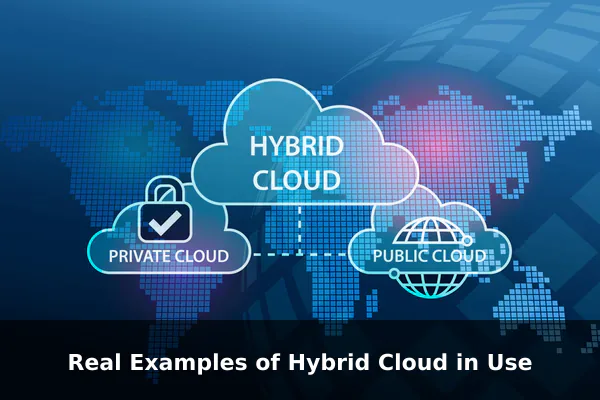
Hybrid cloud becomes much easier to understand when you look at real-world patterns. The exact technology stack may differ by industry, but the workload logic stays consistent: keep some systems private, use public cloud where it adds clear value, and connect the two deliberately.
Healthcare organizations
A hospital network may keep electronic health record systems, imaging archives, and tightly regulated patient data in a private environment with strict access controls. At the same time, it may use cloud services for appointment apps, telehealth portals, analytics dashboards, and machine learning models that help predict staffing or patient flow.
Why hybrid makes sense here:
- Sensitive records remain under tighter control.
- Patient-facing services can scale more easily.
- Analytics can run on approved datasets without redesigning core clinical systems.
- Disaster recovery can use cloud storage and standby resources.
Banking and financial services
A bank may keep core transaction processing, identity verification systems, and high-trust internal ledgers in private infrastructure. Meanwhile, customer mobile app APIs, fraud detection analytics, document archiving, and development environments may run in the public cloud.
This allows the bank to modernize digital services without taking unnecessary risks with deeply integrated core systems. It also helps teams experiment faster while preserving stricter controls around regulated workloads.
Retail and e-commerce
A retailer may run point-of-sale systems, warehouse integrations, and certain back-office applications in private environments because they depend on branch networks and legacy ERP systems. But during seasonal peaks such as holiday sales, its website, recommendation engine, inventory cache, and customer notifications may scale in the public cloud.
This is a classic hybrid cloud example because demand is uneven. The retailer does not want to buy enough private hardware for the busiest few weeks of the year, but it also does not want to rebuild every operational system at once.
Manufacturing and industrial operations
A manufacturer may keep factory control systems, local data collection, and low-latency machine integrations close to the production line. It can then send selected telemetry, maintenance data, or quality-control summaries to the public cloud for analytics, forecasting, and long-term storage.
Here, hybrid cloud solves a physical-world problem. Some systems need to stay near machines for reliability and response time, while cloud platforms are better for trend analysis across many plants.
Software development teams
A software company may keep older internal applications and source control mirrors in a private environment while using public cloud resources for CI/CD pipelines, testing labs, container platforms, feature previews, and customer-facing SaaS services. It may also back up code artifacts and logs to cloud storage while keeping certain secrets or compliance-sensitive systems private.
This gives developers fast access to modern tooling without requiring immediate retirement of every older platform.
Education and research
A university may keep student records, financial administration, and identity systems in private infrastructure while using public cloud for research computing, collaboration platforms, virtual labs, and large-scale data processing. This split is practical because administrative data and research workloads often have very different patterns.
Across all of these examples, the same principle appears again and again: hybrid cloud is less about fashion and more about placing the right workload in the right environment.
When Hybrid Cloud Makes Sense
Hybrid cloud is not automatically the best answer. It makes sense when business and technical constraints genuinely require a mixed environment.
Signs that hybrid cloud is a strong fit
- You have legacy applications that cannot be moved easily but still need to connect with newer cloud services.
- You must keep some data under tighter control because of compliance, residency, or contractual rules.
- You need cloud scalability for unpredictable demand but want certain stable workloads to remain private.
- You have branch, factory, campus, or edge systems that benefit from local processing.
- You want phased modernization instead of a risky full rewrite.
When a simpler model may be better
If an organization has few regulatory constraints, limited internal infrastructure, and mostly standard software needs, a pure public cloud model may be simpler. On the other hand, if workloads are highly specialized, isolated, and stable, a private model may be enough. Hybrid cloud is valuable when there is a real need for both, not when it is adopted out of habit.
A quick decision checklist
- Which workloads must stay private, and why?
- Which workloads benefit most from cloud elasticity or managed services?
- How will identity, networking, and security work across environments?
- Where will data live, and what will movement cost?
- Does the team have the skills to operate a more complex architecture?
If those questions have clear answers, hybrid cloud can be a strong long-term strategy rather than a temporary compromise.
Questions People Ask About Hybrid Cloud
Is hybrid cloud the same as multi-cloud?
No. Hybrid cloud combines private infrastructure with public cloud resources. Multi-cloud means using more than one cloud provider. A company can be one, the other, or both.
Is hybrid cloud more secure than public cloud?
Not by default. Hybrid cloud can improve control for sensitive workloads, but it also adds integration complexity. Security depends on architecture, identity management, logging, encryption, patching, and governance, not on the label alone.
Do small businesses need hybrid cloud?
Usually not at first. Many small businesses are better served by straightforward cloud services. Hybrid cloud becomes more relevant when there are legacy systems, special compliance demands, local hardware dependencies, or performance requirements that justify the extra complexity.
Can legacy applications stay on-premises in a hybrid setup?
Yes, and that is one of the most common reasons for adopting hybrid cloud. Older applications can stay where they are while newer APIs, analytics tools, or customer interfaces are built in the public cloud around them.
Is hybrid cloud only a temporary stage during migration?
No. For some organizations it is a transition stage, but for many others it is a permanent architecture. Some workloads may never be worth moving, while others are simply better in different environments for technical or regulatory reasons.
What is a simple example of hybrid cloud?
A business runs its website and customer app in the public cloud for scalability, but keeps its financial database and internal ERP system in a private data center. The two environments are securely connected and exchange approved data. That is a straightforward hybrid cloud example.
Conclusion
Hybrid cloud is best understood as a practical operating model, not a buzzword. It combines private infrastructure and public cloud services so organizations can match each workload to the right environment. That creates real benefits in flexibility, control, resilience, modernization, and performance, but it also introduces complexity that has to be managed carefully.
The most important takeaway is this: hybrid cloud makes sense when the business has different kinds of workloads with different needs. When designed well, it helps organizations move beyond all-or-nothing thinking and build IT systems that are both more realistic and more adaptable.
