

SaaS stands for Software as a Service, and in plain English it means you use software as an ongoing online service instead of buying a program once and installing it forever on your own computer. If you have ever opened Gmail in a browser, stored files in Dropbox, edited a document in Google Docs, or managed tasks in Notion, you have already used SaaS.
The term appears everywhere because it describes one of the most important changes in modern software. For many people, software is no longer a boxed product, a disc, or even a big one-time download. It is now something you sign into, pay for monthly or yearly, and access from almost anywhere. That shift affects how people work, how companies budget, how teams collaborate, and how software providers build and support their products.
This guide explains what SaaS means, how it works, why it became so popular, where people use it, and what tradeoffs come with it. The goal is simple: by the end, you should be able to recognize a SaaS product in daily life, explain it in a sentence, and make smarter decisions when choosing one. Unlike a general article about cloud computing or software types, this article focuses on the service model itself: the relationship between the user and the provider.
What SaaS Means in Simple Terms
SaaS is software delivered as an ongoing service over the internet. Instead of installing a program, managing updates, and storing everything locally yourself, you use an application that is hosted and maintained by another company. You usually create an account, sign in, and start working right away.
The plain-English definition
A simple way to explain SaaS is this: the software lives on the provider’s systems, and you rent access to it. Sometimes that access is free with limits, and sometimes it comes through a subscription plan. Either way, the provider handles the hard technical work in the background while you focus on using the tool.
This is why SaaS feels different from older software. With traditional software, you often had to install it on one machine, keep track of license keys, and manually update it. With SaaS, the product is already running on the provider’s side. Your job is mostly to log in and use it.
Why the phrase as a service matters
The words as a service are important because they describe more than technology. They also describe a business relationship. You are not just receiving a file or a program. You are receiving an ongoing service that includes hosting, maintenance, feature updates, account management, support, security work, and often backups.
That is what makes SaaS a unique concept. It is not only about what the software does. It is about how the software is delivered, paid for, maintained, and improved over time. A note-taking app, accounting platform, customer support tool, or design editor can all be SaaS if they are offered as managed online services.
Signs that a tool is probably SaaS
- You create an account and sign in with an email address and password.
- You pay monthly or yearly instead of buying a permanent copy.
- The software runs in a browser, or syncs with an online account.
- Updates happen automatically without a manual install.
- Your files, settings, or team data are stored on the provider’s servers.
- You can often use it from different devices with the same login.
One useful distinction is that not every web-based tool is automatically best understood as just a web app. A SaaS product may be a web app on the surface, but the bigger idea is the service layer behind it: billing, storage, updates, user permissions, collaboration features, and long-term support.
How SaaS Works Behind the Scenes
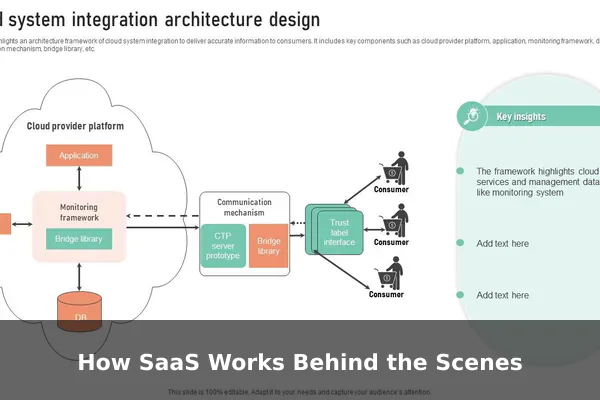
From the user’s side, SaaS usually feels simple. You open a browser or app, sign in, and start working. Behind that simple experience is a provider that runs the software, stores the data, and keeps the service available for many users at once.
Where the software actually runs
With SaaS, the application is usually hosted in remote data centers or cloud infrastructure operated by the provider or its infrastructure partners. That means the core software is not living only on your laptop. When you click a button, upload a file, or send a message, your request travels over the internet to systems that process it and send back the result.
This is why SaaS can feel instant and flexible. You are connecting to a live service instead of relying entirely on a locally installed program. It also explains why internet access matters so much for many SaaS tools, even though some offer limited offline features.
What the provider manages for you
The SaaS provider usually takes care of technical responsibilities that older software buyers had to manage themselves. These often include:
- Server hosting and system uptime
- Security patches and software updates
- Data storage and backups
- User authentication and access control
- Performance improvements and bug fixes
- New feature releases
- Support documentation and customer service
This is a major reason businesses like SaaS. It reduces the need to maintain complex software in-house, especially for tools that are not part of the company’s core product.
What the user still controls
SaaS does not mean the user has no responsibility. You still choose plans, manage user accounts, set permissions, organize data, configure workflows, and decide how deeply the tool fits into your team. In other words, the provider runs the platform, but you still run your usage of it.
A simple step-by-step view
- You open the SaaS product in a browser or companion app.
- You log in with your account.
- The service checks your identity and permissions.
- Your actions are processed on the provider’s systems.
- Your data is stored and synced to your account.
- The provider keeps improving the product without requiring you to reinstall it.
That flow is what makes SaaS feel modern and low-friction. The technical load shifts away from the customer and toward the provider.
Common SaaS Examples People Already Use
SaaS is everywhere, which is why many people use it long before they learn the name. The easiest way to understand the concept is to look at familiar examples across work, school, business, and personal life.
Communication and productivity tools
Email platforms such as Gmail and Outlook on the web are classic examples of SaaS. You do not host the mail system yourself. You sign in and use a service. The same logic applies to collaboration tools such as Google Docs, Microsoft 365 online apps, Slack, Zoom, Trello, Asana, and Notion. The provider keeps the product available, updates features, and stores your account data.
These tools became popular because they let multiple people work in the same environment without setting up heavy local infrastructure. A team can communicate, share files, edit documents, and track work from different places using the same centralized service.
Storage and creative tools
Cloud file storage services such as Dropbox, Google Drive, and Box are SaaS products because they provide ongoing access to hosted software and managed storage. Design tools such as Canva and browser-based creative platforms also fit the model. Even if they feel like regular applications, the service relationship is what defines them.
Many creative SaaS products now blur the line between browser software and desktop software by offering both. You may install a helper app, but the account, subscription, cloud storage, and updates still make the overall product SaaS.
Business systems behind the scenes
Some of the most important SaaS tools are less visible to casual users because they run inside companies. These include:
- CRM platforms for tracking customers and sales
- Accounting and invoicing tools
- HR and payroll systems
- Help desk and customer support software
- Marketing automation platforms
- E-commerce store management tools
- Analytics dashboards and reporting platforms
For a business, SaaS often replaces the need to buy, install, and maintain separate software systems on internal servers. That makes it especially attractive to smaller teams that want professional tools without large IT overhead.
Personal everyday examples
SaaS is not only for companies. Individuals use it for email, calendars, online learning, budgeting, cloud photo storage, streaming management dashboards, note-taking, and even resume building. Once you start looking for the pattern, you notice that a large share of modern digital life is built on subscription-based software services.
Why SaaS Became So Popular
SaaS did not become common by accident. It solved several long-standing problems with older software distribution. It gave providers a more continuous way to serve customers, and it gave users a simpler way to access tools.
Lower barrier to getting started
One of the biggest reasons for SaaS growth is convenience. Instead of going through a long installation process, people can create an account and begin immediately. This matters for individuals, but it matters even more for businesses. A new employee can often be added to a SaaS tool in minutes rather than waiting for manual setup on a specific device.
The pricing model also reduces friction. Many SaaS products offer free trials, free plans, or monthly subscriptions. That makes them easier to test than expensive one-time software purchases.
Automatic updates and continuous improvement
Traditional software often depended on users installing patches or buying major version upgrades. SaaS changed that expectation. Providers can roll out improvements continuously, fix bugs quickly, and release new features to everyone on the same platform. Users benefit from a product that keeps evolving without requiring constant manual effort.
From the provider’s perspective, this also reduces fragmentation. Instead of supporting many outdated versions in the wild, the company can focus on maintaining a current service.
Better collaboration and access
SaaS fits how people work today. Teams are distributed across offices, homes, coworking spaces, and travel schedules. A tool that runs through a shared online account is naturally easier for collaboration than software trapped on one machine. Shared documents, comments, permissions, dashboards, and live updates all work better in a centralized service environment.
Easier scaling for growing organizations
When a company grows from five people to fifty or from fifty to five hundred, SaaS often scales more smoothly than locally managed software. The business can usually add users, upgrade plans, expand storage, or unlock advanced features without rebuilding its technical foundation from scratch.
This flexibility is one reason SaaS became such a strong fit for startups and growing teams. It allows fast operational growth without heavy infrastructure decisions at every step.
Predictable recurring revenue for providers
There is also a business reason behind the popularity. SaaS gives software providers recurring revenue rather than relying only on one-time purchases. That can support ongoing development, support teams, hosting costs, and product improvements. While users may focus on convenience, providers are also motivated by a model that rewards retention and long-term value.
The Main Pros and Cons of SaaS
SaaS is popular for good reasons, but it is not automatically the best fit in every situation. A balanced view is essential, especially if you are choosing tools for a business.
Main advantages of SaaS
- Fast setup: Most tools are ready to use with minimal technical work.
- Lower upfront cost: Subscriptions usually spread out costs instead of requiring a large purchase.
- Automatic updates: New features, bug fixes, and security improvements arrive without manual installs.
- Anywhere access: Users can often work from multiple devices and locations.
- Built-in collaboration: Shared access, comments, permissions, and cloud storage are common.
- Scalability: Plans can often grow with your needs.
- Less maintenance burden: The provider handles hosting and much of the technical upkeep.
For many teams, those benefits are enough to make SaaS the default choice. It reduces operational friction and lets people focus on outcomes rather than system maintenance.
Main drawbacks of SaaS
- Recurring cost: A monthly fee can look small but become expensive over years or across many users.
- Internet dependence: If connectivity is poor, the experience can suffer.
- Vendor dependence: You rely on the provider for uptime, roadmap decisions, and long-term product availability.
- Data concerns: Your files and business information live on someone else’s systems.
- Feature limits: Some SaaS tools are less customizable than self-hosted or locally controlled alternatives.
- Price changes: Providers can raise rates, change plans, or move features into higher tiers.
- Migration difficulty: Leaving a mature SaaS platform can be time-consuming if your workflows depend on it.
These drawbacks do not mean SaaS is a bad model. They mean the convenience comes with tradeoffs. A wise user thinks not only about how easy the tool is today, but also about control, cost, and flexibility over time.
When SaaS is especially strong
SaaS is often an excellent fit when you need quick deployment, shared access, predictable support, and a tool that is not worth maintaining yourself. It is especially effective for email, collaboration, customer management, project tracking, invoicing, marketing, and other functions that benefit from always-on access and frequent updates.
When caution makes sense
Extra caution may be needed when software handles highly sensitive data, must work reliably without internet access, requires deep customization, or would be very costly to leave later. In those cases, the best choice depends on your technical needs, compliance expectations, and tolerance for vendor lock-in.
SaaS vs Traditional Software
One of the clearest ways to understand SaaS is to compare it with traditional installed software. This comparison matters because many people assume all software works the same way. It does not.
The core difference
Traditional software is usually bought, installed, and run mainly on your own computer or internal systems. SaaS is usually accessed as an online service managed by the provider. That difference affects pricing, control, support, updates, and day-to-day use.
Key comparison points
- Installation: Traditional software often requires manual installation. SaaS usually starts with account creation and sign-in.
- Updates: Traditional software may need manual updates or version purchases. SaaS updates happen automatically.
- Access: Traditional software may be tied to specific machines. SaaS usually works across devices through your account.
- Payment model: Traditional software often uses one-time purchases or perpetual licenses. SaaS commonly uses subscriptions.
- Maintenance: Traditional software puts more upkeep on the user or company. SaaS shifts more upkeep to the provider.
- Data location: Traditional software often stores more data locally. SaaS usually stores more data in the provider’s environment.
SaaS is not just a cheaper version of software
It is tempting to reduce the difference to payment alone, but that misses the point. SaaS is not simply software paid monthly. It is software wrapped in ongoing service operations. The provider is responsible for delivery, availability, account systems, and continuous improvement.
That is why SaaS can feel more convenient than traditional software, but also why it can create more dependence on the provider. You gain ease of use and lose some direct control. Whether that trade is worth it depends on your needs.
Where web apps fit into the picture
Many SaaS products are used through the web, but SaaS and web apps are not identical ideas. A web app describes how the interface is accessed. SaaS describes how the software is delivered as a managed service. A product can be both, but SaaS adds the business model and service layer that a simple technical label does not fully explain.
What to Check Before Choosing a SaaS Tool
Choosing a SaaS product should not be based only on a nice homepage or a free trial. Because these tools often become part of your daily workflow, a careful evaluation saves time, money, and future headaches.
Pricing and plan structure
Start by checking how the product charges. Is pricing per user, per month, by storage, by usage, or by feature tier? A low entry price can become expensive once you add team members or need premium features. Always compare the real cost at your expected scale, not just the advertised starting number.
Security and trust
If the tool handles sensitive data, look at its security practices, access controls, sign-in protections, and company reputation. You do not need to be a security expert to ask practical questions:
- Can you enable strong login protection?
- Can different users have different permission levels?
- Does the provider explain how it protects customer data?
- Is there a clear policy for backups and incident response?
For business use, trust is not optional. A convenient tool is not worth much if your data handling standards are weak.
Data export and lock-in risk
One of the smartest questions to ask is simple: What happens if I want to leave? Good SaaS tools make it reasonably possible to export your data, move key records, or integrate with other systems. Weak data portability can turn a convenient tool into a long-term trap.
Usability and team adoption
A tool can be powerful on paper but frustrating in real use. Test the interface, onboarding flow, search features, reporting, and mobile experience if relevant. Also consider how fast a new team member could learn it. A slightly less advanced product may create more value if people actually enjoy using it.
Integrations and workflow fit
Most teams do not use one tool in isolation. Check whether the SaaS product connects well with email, calendars, storage platforms, payment systems, analytics tools, or communication apps you already rely on. A tool that fits smoothly into your workflow often beats a standalone tool with more features.
A practical evaluation checklist
- Define the exact problem you want the software to solve.
- Estimate the true monthly or yearly cost at your expected usage level.
- Test the product with real tasks, not just a guided demo.
- Review security, permissions, and account controls.
- Confirm data export options and cancellation terms.
- Check support quality, documentation, and response channels.
- Compare at least one alternative before committing.
That process sounds simple, but it prevents many common buying mistakes.
Why Understanding SaaS Matters Today
Understanding SaaS matters because it changes how people think about software. In the past, many users saw software as a product they purchased and owned. Today, a huge portion of software is better understood as an ongoing digital service.
It changes expectations about ownership
When you use SaaS, you are usually paying for access, not permanent ownership in the old sense. That affects how you budget, how you compare tools, and how you plan for the future. It also changes what value means. The question is no longer only what the software can do today, but whether the service will remain useful, reliable, and fairly priced over time.
It shapes modern work and business operations
From startups to large companies, SaaS now powers communication, sales, finance, support, collaboration, analytics, and creative work. Many businesses are effectively built on stacks of SaaS tools. If you understand how the model works, you can evaluate those tools more intelligently and avoid common assumptions such as thinking every subscription is automatically wasteful or every local install is automatically more secure.
It helps everyday users make better decisions
Even outside business, SaaS affects personal productivity and digital life. Many people subscribe to note-taking apps, storage tools, learning platforms, or design services without fully recognizing the pattern. Once you understand SaaS, you become better at judging recurring costs, convenience, account reliance, and the long-term value of the tools you use.
Most importantly, recognizing SaaS helps you ask the right questions. Who controls the software? Who stores the data? Who handles updates? What happens if pricing changes? Those are practical questions, and they matter more now than ever.
Conclusion
SaaS Explained: A Plain-English Guide to Software as a Service comes down to one central idea: software is increasingly delivered as a managed online service rather than a one-time installed product. That model makes software easier to start using, easier to update, and often easier to share across teams and devices. It also introduces recurring costs, provider dependence, and important questions about data and control.
If you remember one thing, remember this: SaaS is not just software on the internet. It is software offered as an ongoing service relationship. Once you see that clearly, the term becomes much easier to understand. Whether you are choosing a work tool, evaluating a business platform, or simply trying to make sense of modern technology, understanding SaaS gives you a more accurate picture of how today’s software world really works.
