

If you have spent any time reading about app development, cloud platforms, or mobile software, you have almost certainly seen the term SDK. It shows up in Android documentation, payment integration guides, game engine tutorials, and cloud service dashboards. Yet despite how often it appears, many developers — especially those early in their careers — are not entirely sure what an SDK is or how it differs from the APIs and libraries they already use daily.
An SDK, or Software Development Kit, is a packaged collection of tools, code libraries, documentation, and sample resources that makes it easier to build software for a specific platform, service, or device. Think of it as a ready-made construction kit: instead of sourcing every component yourself, you receive everything you need in one well-labeled box. This article explains what SDKs are, what they include, how they compare with APIs, and when using one is the right decision for your project.
What an SDK Actually Is
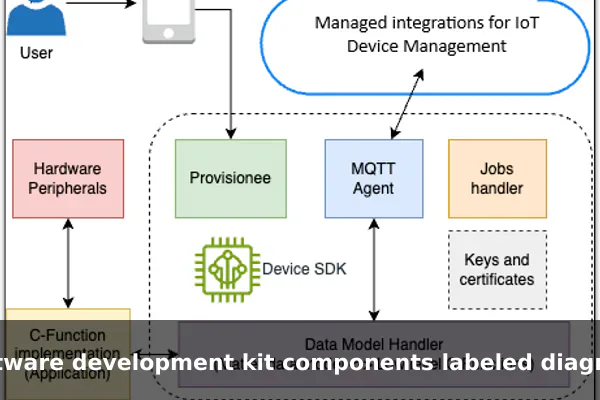
A Software Development Kit is a set of pre-built tools and resources provided by a platform or service provider so that developers can build applications that work with their product. The platform could be a mobile operating system like Android or iOS, a cloud provider like AWS or Google Cloud, a payment service like Stripe, or even a game console from a hardware manufacturer.
The core idea is that the SDK saves developers from starting from scratch. Without an SDK, integrating with a complex platform would mean reading raw technical specifications, writing low-level code to communicate with that platform, and handling every edge case manually. With an SDK, most of that groundwork is already done. The provider has packaged the hard parts into tools that developers can use directly inside their own projects without needing to understand the underlying system internals.
SDKs are not a single thing — they are a bundle of things. That is what separates an SDK from a single library or a single API endpoint. An SDK is a complete toolkit, while a library or API is one tool that may live inside that toolkit.
What Is Usually Included in an SDK
Because SDKs are bundles, their exact contents vary depending on the platform and its complexity. However, most SDKs share a common set of components that you will recognize across providers.
Core Libraries
Libraries are pre-written blocks of code that handle specific tasks. In a mobile SDK, a library might manage camera access or push notifications. In a payment SDK, it might handle card tokenization and secure transmission. Developers call these libraries from their own code rather than writing the same logic repeatedly in every project.
APIs
Almost every SDK includes one or more APIs (Application Programming Interfaces). These are the defined communication channels that let your application talk to the platform or service. The API specifies what requests you can make and what responses you will receive back from the platform.
Documentation
Good SDKs come with thorough written documentation: setup guides, reference pages that describe each function and its parameters, and tutorials that walk through common tasks step by step. Documentation is one of the most critical parts of any SDK — a powerful toolkit with poor documentation is nearly unusable in practice.
Code Samples and Templates
Sample projects show developers how the SDK is meant to be used inside a real application. A payment SDK might include a working checkout screen. A maps SDK might include a sample app that displays a user’s location on a map. These samples dramatically reduce the time needed to understand how the different SDK pieces connect together.
Testing and Debugging Tools
Many SDKs include emulators, simulators, or sandbox environments so developers can test their integrations without touching real data or spending real money. Debugging utilities help identify exactly where something has gone wrong in the integration before shipping to users.
Together, these components form a complete development environment for a specific platform. A developer who installs an SDK gets everything in one place rather than searching for separate tools, documentation, and examples scattered across different websites.
How SDKs Help Developers Work Faster
The main value of an SDK is the time and effort it saves across the entire development process. Here are the most practical benefits teams see in real projects.
- Faster setup: Installing one SDK package is significantly faster than manually sourcing and configuring multiple separate tools and libraries for the same platform.
- Fewer repeated tasks: Common operations — authentication, error handling, data formatting — are already handled by the SDK’s libraries, so developers do not rewrite the same code in every new project.
- Reliable integrations: Code provided by the platform vendor is maintained and tested against their own systems. It is far less likely to break due to subtle platform changes than hand-rolled integration code.
- Access to platform features: Device-specific features like GPS, camera, biometrics, or push notifications require low-level system access. The SDK abstracts that complexity so developers can use these features with just a few lines of code.
- Official support: When something breaks, developers using the official SDK can consult the provider’s support team, community forums, and versioned change logs — resources that are not available for custom integration code.
For teams working against deadlines, these savings add up quickly. A mobile app that needs payment processing, analytics, and location features can integrate three SDKs in hours rather than building all three integrations from scratch over several weeks.
SDK vs API: The Difference in Simple Terms
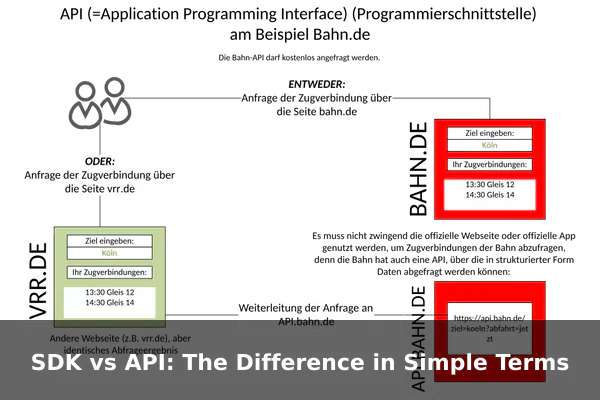
This is one of the most common points of confusion for developers new to integrations. The short answer is: an API is usually one component inside an SDK. The two terms describe different things at different levels of scope, and understanding the distinction makes both concepts easier to apply.
An API is a contract — a defined interface that describes how software components talk to each other. It specifies the requests you can send and the responses you will receive. An API on its own does not come with documentation, sample code, or testing tools; it is simply a communication specification that your code must implement manually.
An SDK is a full toolkit that often includes an API, but also wraps it with libraries, documentation, samples, and other utilities. You use the API inside your code to communicate with the platform; you use the SDK to make working with that API faster, safer, and more productive.
A Side-by-Side Comparison
- API: A communication interface. Defines what requests to make and what responses to expect. No extra tools included.
- SDK: A complete toolkit. Includes libraries, an API (usually), documentation, samples, and testing utilities bundled together.
- API analogy: A restaurant menu — it tells you what you can order but does not give you ingredients, recipes, or cooking equipment.
- SDK analogy: A full meal-kit delivery — it gives you the recipe, the pre-measured ingredients, the right pans, and step-by-step cooking instructions.
In practice, most developers use both together. They install an SDK and then call the API endpoints that the SDK exposes through its library functions. The SDK does the heavy lifting; the API is the underlying communication layer the SDK wraps for you.
Common Types of SDKs You Will See
SDKs exist for almost every major platform and service category in modern software. Here are the types developers encounter most often.
Mobile SDKs
Android Studio ships with the Android SDK, which includes everything needed to build Android apps: platform libraries, build tools, an emulator, and full documentation. Apple provides the iOS SDK inside Xcode for building iPhone and iPad apps. These are the foundational SDKs for mobile development and are essentially required to target these platforms.
Cloud SDKs
Major cloud providers package their services into SDKs for each popular programming language. The AWS SDK for Python (Boto3), the Google Cloud SDK, and the Azure SDK let developers interact with cloud storage, databases, machine learning services, and networking directly from their application code.
Payment SDKs
Services like Stripe, PayPal, and Square offer SDKs that handle the complex, security-critical parts of payment processing. A developer can add a working checkout flow to a mobile or web app in minutes using these SDKs without ever handling raw payment card data directly.
Analytics SDKs
Firebase, Mixpanel, and Amplitude distribute analytics SDKs that automatically track user behavior inside applications. These SDKs capture events, sessions, crashes, and conversions and send the data to a reporting dashboard with minimal configuration from the developer.
Game SDKs
Game console manufacturers provide SDKs to approved developers that expose the console’s graphics hardware, input systems, online services, and achievement APIs. Game engines like Unity and Unreal Engine also ship their own SDKs for building extensions, custom shaders, and platform plugins.
When You Should Use an SDK
Not every integration requires a full SDK. Here are the situations where reaching for one makes the most sense.
- Building for a specific platform ecosystem: If you are building an Android app, the Android SDK is not optional — it is the required set of tools for that platform. The same applies to iOS and most game consoles.
- Integrating a third-party service: When adding payments, analytics, maps, or authentication to your app, the provider’s official SDK is the fastest and most secure path. It handles edge cases that the raw API does not expose clearly in its documentation.
- Working with hardware: Device SDKs abstract driver-level complexity when your app needs to interact with cameras, sensors, Bluetooth peripherals, or IoT hardware.
- Needing official support: If your integration is business-critical and you need vendor assistance when things break, the official SDK gives you access to support channels and a documented escalation path.
- Reducing long-term maintenance: Using an SDK means the platform provider handles updates when their underlying platform changes. Your code calls the SDK; the SDK absorbs the platform differences across versions.
If you only need a small subset of a service’s functionality and the REST API is simple and stable, calling the raw API directly might be a lighter, more flexible approach. But for most real-world applications integrating serious third-party platforms, the SDK is the practical and professionally responsible choice.
Things to Check Before Choosing an SDK
Not all SDKs are created equal. Before adding one to your project, take time to evaluate these key factors to avoid technical debt later.
Documentation Quality
Read the getting-started guide and scan the reference documentation before writing a single line of integration code. Poor or outdated documentation is a red flag that will cost you hours of debugging time on top of every development task.
Language and Framework Support
Confirm the SDK officially supports your programming language and, if relevant, your framework. An SDK built primarily for JavaScript may lack a proper TypeScript-compatible version, and an SDK designed for React Native may not work with a Flutter project.
Maintenance and Activity
Check the SDK’s repository to see when it was last updated and whether reported issues are actively addressed. An SDK that has not received a meaningful update in two years may not support the latest version of your platform, operating system, or language runtime.
Security and Compliance
For SDKs that handle user data, payment details, or authentication tokens, verify that the SDK follows current security standards such as TLS enforcement and secure storage practices, and that the provider has a responsible disclosure process for vulnerabilities.
Performance Impact
Some SDKs add significant weight to an application. Mobile analytics SDKs in particular can increase your app’s binary size and extend startup time. Measure the impact against your performance budget before committing to an SDK in a latency-sensitive context.
Licensing Terms
Check the SDK’s license carefully, especially for commercial use. Some SDKs are free for personal or open-source projects but require a paid subscription for business applications. Others carry open-source licenses that impose distribution conditions on applications that include them.
Key Takeaways About SDKs
An SDK — Software Development Kit — is a packaged bundle of tools, libraries, documentation, sample code, and testing utilities that helps developers build software for a specific platform or service. It is more than a library and broader than a single API; it is the complete toolkit for working productively with a given platform.
SDKs save time by handling the complex, repetitive, and platform-specific parts of software development so that developers can focus on building the features that deliver value to users. They are used everywhere in modern software: in mobile apps, cloud services, payment integrations, analytics platforms, and games of every scale.
The most important distinction to keep clear is the one between an SDK and an API. An API is a communication interface — one component that defines how software talks to a service. An SDK is the larger kit that typically includes an API, along with documentation, libraries, and everything else a developer needs to use it effectively without reinventing the wheel.
When evaluating an SDK, prioritize documentation quality, active maintenance, language support, and security posture. A well-chosen SDK can cut integration time from weeks down to hours. A poorly maintained one can become a liability the moment the platform beneath it changes and the SDK fails to keep pace. Understanding what SDKs are and how to evaluate them is one of the most practical skills any developer — at any level — can build into their professional toolkit.
