
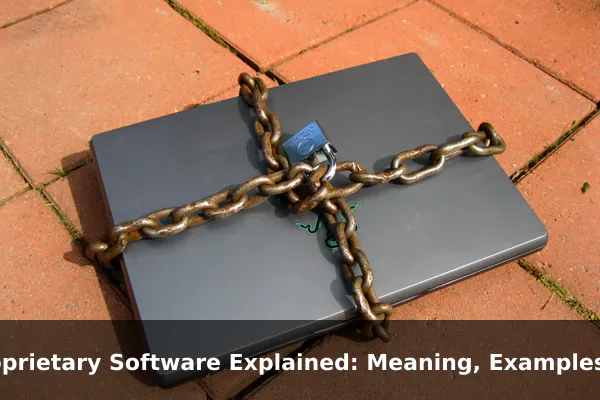
Proprietary software surrounds us in daily life, yet most people never stop to think about what the term actually means or why it matters. From the operating system running on your laptop to the productivity suite your company pays for every year, chances are you interact with proprietary software dozens of times each day. Understanding what makes software “proprietary” helps you make smarter choices about the tools you use, the money you spend, and the risks you accept.
This article explains proprietary software in plain language — what it means, how it works, where you encounter it, and what trade-offs come with it. Whether you are a business owner evaluating software subscriptions or a curious individual comparing tools, knowing how proprietary licensing shapes your relationship with software gives you a meaningful advantage.
What Proprietary Software Means
Proprietary software is software whose source code is owned exclusively by a company or individual, and whose use, distribution, and modification are legally restricted by a license agreement. The word proprietary comes from property — the software belongs to its creator, and you are only allowed to use it under the terms they set.
When you purchase or subscribe to proprietary software, you do not actually own the software itself. You buy a license — a legal right to use it under specific conditions. Those conditions typically include:
- How many devices you can install it on
- Whether you can share it with others
- What you can and cannot do with it
- How long your access lasts
The source code — the human-readable instructions that tell the software what to do — is kept secret. Only the vendor’s own developers can read, modify, or distribute it. This is the fundamental characteristic that separates proprietary software from open-source alternatives.
The Role of End User License Agreements (EULAs)
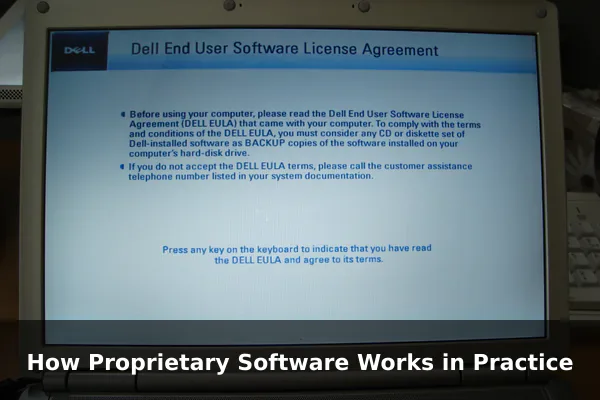
Every piece of proprietary software comes with an End User License Agreement, commonly called a EULA. This is the legal contract you accept (usually by clicking “I Agree”) when installing or using the software. EULAs define your rights as a user, and they almost always prohibit reverse engineering, copying, or redistributing the software. Reading a EULA carefully before committing to software — especially for a business — can prevent costly surprises later.
How Proprietary Software Works in Practice
Understanding the mechanics of proprietary software helps demystify why it costs what it costs, and why the vendor holds so much control over your experience.
Closed Source Code
The defining technical feature is that the source code is closed. You receive only the compiled binary — the version of the software translated into machine language that your computer can run, but that humans cannot meaningfully read or edit. This means you cannot inspect how the software handles your data, alter its behavior, or fix bugs yourself. You depend entirely on the vendor to do those things.
Licensing and Payment Models
Proprietary software typically uses one of several payment structures:
- One-time purchase: You pay once for a specific version, such as older editions of Microsoft Office or Adobe Photoshop
- Subscription: You pay monthly or annually for continued access, such as Microsoft 365 or Adobe Creative Cloud
- Per-seat licensing: Businesses pay based on how many users or devices need access
- Freemium: Basic features are free while advanced features require payment, as seen with Zoom or Dropbox
Updates and Support
Vendors control the update cycle entirely. They decide when new features arrive, when security patches are released, and when older versions are no longer supported. For enterprise customers, this often comes bundled with dedicated technical support through help desks, account managers, or service-level agreements (SLAs) that guarantee response times.
Common Examples of Proprietary Software
Proprietary software is everywhere. Here are recognizable examples across different categories that most users will immediately recognize.
Operating Systems
- Microsoft Windows — The most widely used desktop operating system globally, owned and controlled by Microsoft
- Apple macOS — Apple’s operating system for Mac computers, tightly integrated with Apple hardware
- Apple iOS and iPadOS — The operating systems that power iPhones and iPads
Productivity and Office Tools
- Microsoft 365 — Word, Excel, PowerPoint, Outlook, and Teams bundled under a subscription
- Google Workspace — Gmail, Google Docs, Sheets, and Drive in commercially licensed tiers for businesses
Creative and Design Software
- Adobe Creative Cloud — Photoshop, Illustrator, Premiere Pro, and dozens of other professional creative tools
- Final Cut Pro — Apple’s professional video editing software for Mac
- AutoCAD — Autodesk’s industry-standard design and drafting platform
Enterprise and Business Platforms
- Salesforce — A leading customer relationship management (CRM) platform
- SAP ERP — Enterprise resource planning software used by large corporations worldwide
- QuickBooks — Widely used accounting software for small and medium businesses
Many popular mobile apps — including social media platforms, streaming services, and games — are also proprietary software. Spotify, Netflix, Instagram, and most major gaming titles operate under proprietary licenses that restrict redistribution or modification.
Proprietary Software vs Open-Source Software
The clearest way to understand proprietary software is to compare it with its main alternative: open-source software. The two models differ in fundamental ways that affect cost, flexibility, transparency, and long-term risk.
Source Code Transparency
With open-source software — such as Linux, Firefox, LibreOffice, or WordPress — anyone can read, copy, modify, and distribute the source code within the terms of open-source licenses. This transparency lets security researchers audit the code for vulnerabilities, developers adapt it for specific needs, and communities build on it freely. Proprietary software offers no such transparency. You trust the vendor to build a secure, reliable product, but you cannot independently verify it.
Cost Structure
Open-source software is often free to download and use, though businesses frequently pay for commercial support, hosting, or enterprise versions. Proprietary software almost always involves licensing fees that can add up significantly — especially for enterprise deployments with hundreds or thousands of users. The total cost of ownership over several years can be substantial.
Customization and Flexibility
Open-source software can be forked, modified, or extended to fit unique requirements. Proprietary software cannot be modified — you use it as the vendor intended, with whatever configuration options they choose to provide. For businesses with specialized workflows, this inflexibility can be a serious obstacle that no workaround fully resolves.
Advantages of Proprietary Software
Despite its restrictions, proprietary software remains dominant in many markets. There are genuine, practical reasons why organizations continue to choose it.
Polished, Consistent User Experience
Vendors invest heavily in user interface design, usability testing, and product polish. Proprietary software typically delivers a more refined, cohesive experience than open-source equivalents — important for mainstream users and teams that prioritize ease of use over technical flexibility.
Centralized, Reliable Support
With proprietary software, there is a clear entity to contact when something goes wrong. Enterprise customers often get dedicated account teams, guaranteed SLAs, and professional onboarding assistance. This is valuable in regulated industries or high-stakes environments where downtime is costly and accountability matters.
Integrated Ecosystems
Products from a single vendor often work seamlessly together. Microsoft’s Office apps integrate tightly with Teams, Azure, and Outlook. Apple’s hardware and software ecosystem delivers smooth handoffs between iPhone, Mac, iPad, and Apple Watch. These integrations reduce friction and save time that would otherwise be spent on manual compatibility work.
Predictable Update Cadence and Vendor Accountability
Vendors maintain clear roadmaps and release schedules, allowing IT departments to plan updates, test compatibility in advance, and deploy patches systematically. If proprietary software causes data loss, has a security vulnerability, or fails to perform as advertised, you have legal recourse against the vendor — a form of accountability that open-source projects generally do not offer.
Disadvantages and Risks to Consider
No software model is without trade-offs. Proprietary software comes with a distinct set of limitations that can create real problems over time, especially as organizations scale or their needs evolve.
Licensing Costs and Hidden Fees
Subscription fees accumulate quickly. A small business paying for Microsoft 365, Adobe Creative Cloud, Salesforce, and a few additional tools can spend thousands of dollars annually before accounting for hardware. As organizations scale, per-seat licensing costs scale proportionally — sometimes dramatically — making budget forecasting a constant challenge.
Vendor Lock-In
One of the most significant risks of proprietary software is becoming deeply dependent on a single vendor’s ecosystem. Your data may be stored in proprietary formats that are difficult to export. Your workflows may be built around features unique to one platform. Switching vendors later becomes painful, expensive, and disruptive to operations.
Limited Customization and Privacy Concerns
You use proprietary software on the vendor’s terms. If you need a feature the vendor has not built, you wait — or find a workaround. Additionally, because the source code is hidden, you cannot independently verify how the software handles your data. Vendors may collect usage telemetry, share information with partners, or store data in jurisdictions with different privacy laws. Users must trust the vendor’s privacy policy, a document that can change at any time.
End-of-Life Risk
When a proprietary software vendor discontinues a product, users are stranded. All the workflows, data, and institutional knowledge built around that software become a liability overnight. Unlike open-source software — which communities can fork and continue maintaining indefinitely — proprietary software can simply disappear when it is no longer commercially viable for the vendor.
When Proprietary Software Makes Sense
Despite its drawbacks, there are clear scenarios where proprietary software is the right choice for individuals and organizations alike.
Regulated Industries and Compliance Requirements
Healthcare, finance, and legal sectors often have strict compliance obligations. Many proprietary vendors offer certified compliance with standards like HIPAA, SOC 2, ISO 27001, and GDPR, and they maintain audit trails and formal documentation to support regulatory reviews. The vendor’s accountability and structured support model can simplify compliance processes significantly.
Teams Without Strong Technical Resources
Managing and maintaining open-source software requires real technical capability. Small businesses or non-technical teams often benefit from the managed experience of proprietary software — where updates, security patches, and infrastructure are handled entirely by the vendor rather than an internal IT team that may not have the capacity for it.
Workflows That Demand Ecosystem Compatibility
If your clients, partners, or customers all rely on Microsoft Office or Adobe tools, there are strong practical reasons to align with the same platforms. File format compatibility, real-time collaboration, and professional expectations can all favor proprietary choices in client-facing environments.
Key Questions to Ask Before Choosing Proprietary Software
Before committing to proprietary software — especially for a business — work through these practical questions to avoid regrets later:
- What does it actually cost long-term? Calculate total cost of ownership over three to five years, including subscription fees, per-seat scaling costs, and add-ons that may start as free but become paid.
- Who owns your data, and can you export it? Understand what format your data is stored in and what happens to it if you cancel or the vendor shuts down.
- What are the lock-in risks? Map out how difficult it would be to migrate to a different solution in two or three years if the vendor raises prices or changes direction.
- How does the vendor handle security incidents? Review their track record on vulnerability disclosure, patch speed, and breach notification.
- Is there a viable open-source alternative? Tools like LibreOffice, GIMP, Nextcloud, and Odoo now cover many use cases that proprietary software once dominated.
- What support do you actually need? If you have strong internal technical expertise, paying a premium for vendor support may not be necessary or cost-effective.
- Can you pilot before committing? Most proprietary software offers free trials. Use them thoroughly, with real workflows, before signing a long-term contract.
Making an Informed Choice
Proprietary software is neither inherently good nor bad — it is a model with clear strengths and significant trade-offs. It offers polished experiences, centralized support, and integrated ecosystems that open-source alternatives often cannot match out of the box. At the same time, it carries licensing costs, vendor lock-in, limited transparency, and the risk of being left behind when a vendor changes direction or discontinues a product.
The most important thing is to choose deliberately. Understand what you are agreeing to when you accept a EULA, know where your data lives, and plan for the day when you might want to switch. Whether you ultimately choose proprietary software, open-source software, or a practical mix of both, informed decisions lead to better outcomes — for your budget, your privacy, and your long-term flexibility.
