

Software development used to come with a familiar frustration: an application that worked perfectly on a developer’s machine would behave entirely differently once deployed to a server or shared with a teammate. Different operating systems, missing libraries, mismatched dependency versions — these inconsistencies wasted hours of debugging and delayed releases. Containerization was built to solve exactly that problem.
A container packages an application together with everything it needs to run — its code, runtime, libraries, and configuration — into a single, portable unit. Whether it runs on a developer’s laptop, a test server, or a cloud platform, the behavior stays the same. That consistency is what made containers one of the most widely adopted technologies in modern software delivery. This guide explains what containers are, how they work, how they compare to virtual machines, and where they fit in today’s development workflows.
What Containerization Means in Practice
Containerization is the process of packaging software and its dependencies into a standardized unit called a container. Think of it like a shipping container in international trade: it holds everything the contents need to be useful, it stays sealed so nothing gets mixed up, and it can move from a ship to a truck to a warehouse without being unpacked and repacked every time.
In software terms, a container holds:
- The application code
- The runtime environment (for example, Node.js, Python, or Java)
- Libraries and packages the app depends on
- Configuration files
What a container does not include is a full operating system. That is one of its key advantages. Because containers share the host machine’s OS kernel, they are lightweight and fast to start — often in seconds or less.
How Software Containers Actually Work
Images vs. Running Containers
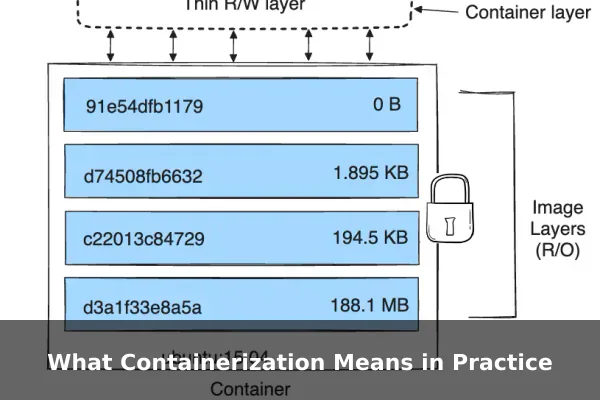
The starting point is a container image. An image is a read-only template that defines everything inside the container — the file system, the application code, the libraries, and the startup instructions. Think of it as a blueprint or a recipe.
When you run an image, the container runtime creates a live instance from it. That running instance is the container itself. One image can spawn many containers simultaneously, all isolated from each other and from the host system.
Isolation Through the OS Kernel
Containers use features built into the Linux kernel — specifically namespaces and control groups (cgroups) — to isolate processes. Namespaces give each container its own view of the system: its own process list, network interface, and file system. Control groups limit how much CPU, memory, and disk I/O a container can use, preventing one container from starving others of resources.
Because all containers on a host share the same OS kernel, they add very little overhead. This is what makes containers far more efficient than running separate virtual machines for each application.
Layered Images and Storage Efficiency
Container images are built in layers. Each instruction in a build file adds a new layer on top of the previous ones. If two containers share the same base layer — for example, a common Linux distribution layer — the host stores that layer only once. This reduces storage usage and speeds up image downloads significantly across teams and deployment pipelines.
Containers vs. Virtual Machines
This is one of the most common points of confusion, and it is worth addressing clearly. A virtual machine (VM) emulates an entire physical computer, including its own full operating system, kernel, and system processes. Each VM sits on top of a hypervisor, which manages multiple VMs on a single physical host.
A container does not emulate hardware or carry its own OS. It shares the host’s kernel and isolates only at the application layer. Here is how the two compare across the most important dimensions:
- Startup speed: Containers start in seconds or milliseconds. VMs can take minutes because they need to boot an entire OS.
- Resource usage: Containers use less CPU and memory since they share the OS kernel. VMs carry the full overhead of a separate OS instance per machine.
- Image size: Container images are typically megabytes. VM images are often gigabytes.
- Isolation level: VMs offer stronger isolation because each has its own kernel. Containers share the kernel, which creates a slightly smaller security boundary.
- Portability: Both are portable, but containers are more consistent across environments because they include all app-level dependencies without OS-level variation.
In practice, containers and VMs are not competing technologies — they are often used together. Many cloud deployments run containers inside VMs to get both the flexibility of containers and the stronger security boundaries of virtual machines.
Why Developers and Businesses Use Containers
Consistency Across Environments
The phrase “it works on my machine” is a cliché in software development for a reason. Dependency mismatches and environment differences cause real delays. Containers eliminate that problem by bundling the exact runtime environment an app needs, wherever it runs — development, staging, or production.
Faster Deployment and Horizontal Scaling
Because containers are lightweight and start quickly, deployments become faster and more predictable. Scaling an application up means spinning up additional container instances, which takes seconds. Scaling back down is equally fast, keeping infrastructure costs aligned with actual demand.
Microservices and CI/CD Workflows
Modern applications are increasingly built as microservices — small, independent components that handle specific functions. Containers are a natural fit: each microservice can run in its own container with its own dependencies, without conflicting with others. Teams can update or scale individual services without touching the rest of the application.
Continuous integration and delivery pipelines also benefit directly. A CI system can build a container image, run automated tests inside it, and push the tested image to production — all with high confidence that the tested behavior will match what runs in production.
Popular Container Tools and Platforms
Docker
Docker is the most widely used tool for building and running containers. It provides a command-line interface, a standardized format for defining container images (called a Dockerfile), and a runtime for running containers locally. Docker also popularized the container image format that became an industry standard. Docker Hub, its public registry, hosts thousands of pre-built images for popular runtimes, databases, and services that teams can pull and use immediately.
Kubernetes
As container use grew at scale, a new challenge emerged: how do you manage hundreds or thousands of containers running across many machines? Kubernetes (often shortened to K8s) is an open-source orchestration platform that automates the deployment, scaling, networking, and management of containerized applications. It introduces concepts like pods (groups of containers), services (stable network endpoints), and deployments (rules for how many instances to run and how to update them). Kubernetes is the dominant tool for production-scale container operations.
Container Registries
A container registry is a storage and distribution system for container images. Docker Hub is the most well-known public registry. Private registries — including Amazon ECR, Google Artifact Registry, and GitHub Container Registry — allow organizations to store and manage proprietary images securely. Teams push built images to a registry and pull them during deployment.
Common Use Cases for Containerization
Containers show up across many types of software work. Some of the most common scenarios include:
- Local development environments: Developers run databases, caches, and other services in containers locally without installing them directly on their machines. One command spins up a full local stack that matches the production environment.
- Cloud-native deployment: AWS, Google Cloud, and Azure all offer managed container services. Most modern cloud architectures use containers as the primary deployment unit.
- Application modernization: Older monolithic applications can be gradually broken apart and containerized, making them easier to maintain, update, and scale.
- Multi-service applications: A web server, API layer, database, and cache can all run on the same host in separate containers — each isolated, each independently deployable.
- Reproducible testing: Each test run starts from a fresh, clean container, ensuring tests are not affected by leftover state from previous runs.
Limits, Risks, and Best Practices
Security Boundaries
Because containers share the host kernel, a kernel-level vulnerability can potentially affect all containers on that host. Container escape attacks — where code inside a container gains access to the host system — are a documented class of risk. Running containers with least-privilege settings, avoiding root access inside containers, and using read-only file systems where possible all reduce this exposure significantly.
Storage Persistence
Containers are designed to be ephemeral. When a container stops, its internal file system is wiped unless data has been saved to an external volume. Applications that need to persist data — such as databases or file upload services — require explicit volume management to survive container restarts.
Orchestration Complexity
Kubernetes is powerful but comes with significant operational complexity. Small teams or simple applications may not benefit from full orchestration. Docker Compose, which manages multi-container setups locally, is often the right starting point before moving to Kubernetes for production scale.
Practical Best Practices
- Keep images small by using minimal base images and removing packages that are not needed at runtime
- Run one primary process per container where possible to keep behavior predictable
- Never store secrets inside container images — use environment variables or dedicated secret managers
- Tag images with meaningful version identifiers rather than relying on the generic latest tag
- Monitor container resource usage to catch memory leaks or runaway processes before they affect other services
When Containerization Makes Sense
Containers are a strong fit when your team deploys to multiple environments and needs consistent behavior across all of them, when you are building or migrating to a microservices architecture, when fast and reliable CI/CD pipelines are a priority, or when your application needs to scale horizontally under variable load.
They may add unnecessary complexity when you have a simple, single-server application with no scaling requirements, when your team lacks experience with container tooling and the learning curve would slow delivery, or when you are running a stateful application that is difficult to redesign around ephemeral storage.
For straightforward deployments, traditional virtual machines or managed hosting services remain practical choices. Containers deliver the most value when the benefits of consistency, portability, and speed clearly outweigh the overhead of learning and managing the tooling.
Containerization has become a foundational layer of how modern software is built and shipped. By understanding what containers are, how they differ from virtual machines, and where they fit in a delivery pipeline, developers and technical decision-makers can choose the right tools for the right jobs — and deploy software with far more confidence and control than was possible before.
