
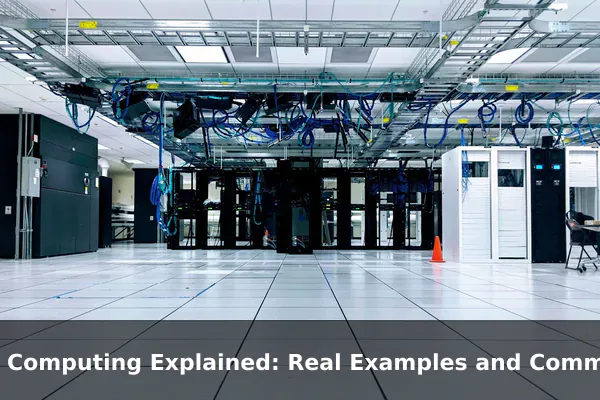
Edge computing is a way of processing data near the place where that data is created instead of sending everything to a distant cloud server first.
That small architectural change has a big practical effect. Cameras stream video every second, factory machines report sensor data continuously, vehicles react to road conditions instantly, and store systems process purchases in real time. When all of that information must travel across the internet before anything useful can happen, systems can become slower, more expensive to run, and less dependable when connectivity drops.
This is why edge computing has become an important part of modern technology. It is not just another trend word. It is a real design approach used to reduce latency, lower bandwidth usage, support faster decisions, and keep critical services running closer to the source. In this guide, you will learn what edge computing actually means, how it compares with cloud computing, and where it shows up in real products and business systems.
What Edge Computing Actually Means
A plain-English definition
Edge computing means data is processed at or near the edge of the network, which usually means close to the device, machine, sensor, or user producing that data. Instead of sending raw information all the way to a centralized data center first, some analysis, filtering, or decision-making happens locally.
Think of it like this: if a security camera detects motion, it may not need to upload every second of video to the cloud before deciding whether a person is present. An edge-enabled system can analyze the video feed locally, identify an important event, and then send only the relevant clip or alert. That saves time and reduces unnecessary network traffic.
The building blocks of an edge setup
Edge computing can involve several layers, depending on the system:
- Edge devices: cameras, sensors, robots, smart speakers, point-of-sale terminals, medical wearables, and connected vehicles.
- Edge gateways: local devices that collect data from many endpoints, translate protocols, and perform initial processing.
- Edge servers: nearby servers in a store, factory, office, telecom site, or micro data center that run workloads closer to the user than a central cloud region.
- Cloud platforms: centralized systems used for long-term storage, large-scale analytics, model training, fleet management, and cross-site coordination.
In other words, edge computing is rarely a single device doing everything alone. It is usually a local processing layer inside a broader architecture.
What happens at the edge
Different kinds of work can happen at the edge. A system might filter noise from sensor data, compress video, run an AI model, trigger an alarm, cache content, or continue operating during an internet outage. Not every workload belongs there, but the workloads that benefit most are usually the ones that need fast response, local awareness, or network efficiency.
This is the central idea behind edge computing explained in practical terms: move time-sensitive and data-heavy tasks closer to where the action happens, while leaving large-scale coordination and deep historical analysis to the cloud.
How Edge Computing Differs From Cloud Computing
Edge and cloud are not enemies
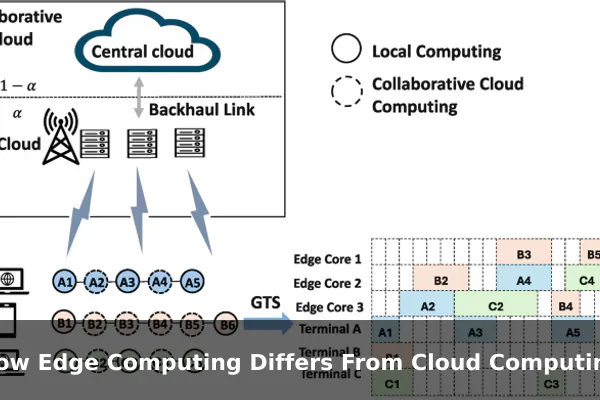
One of the most common misunderstandings is that edge computing replaces cloud computing. In reality, most modern systems use both. The edge handles immediate local work, while the cloud handles centralized work across many locations, users, or devices.
A good way to picture the difference is to compare a local kitchen and a regional warehouse. The kitchen prepares meals quickly for people nearby. The warehouse stores inventory, manages supply, and serves many kitchens at once. Both matter, but they solve different problems.
The main differences that matter
- Latency: edge computing reduces the time it takes for a system to respond because data travels a much shorter distance.
- Bandwidth: edge systems can process or discard unnecessary data locally, so less information needs to be sent over wide-area networks.
- Reliability: a local system can keep working even when internet connectivity is weak or unavailable.
- Control: organizations can keep sensitive or regulated data closer to the source instead of moving everything to a remote environment.
- Scalability: cloud platforms remain better for global coordination, long-term storage, and workloads that need virtually unlimited centralized compute.
A simple example of the difference
Imagine a factory with hundreds of cameras inspecting products on a conveyor belt. In a cloud-only model, every video stream is uploaded to a remote server for analysis. That consumes a huge amount of bandwidth and may introduce delay before a defect is caught. In an edge model, a local device or nearby server analyzes the stream in real time and immediately removes defective items. The cloud still has value because it can store trends, compare results across factories, and retrain machine learning models.
So the real comparison is not edge or cloud. It is edge for immediate action and cloud for broader insight. That distinction is what makes edge computing useful rather than just fashionable.
Why Companies Use Edge Computing
Faster response times
The most obvious reason companies adopt edge computing is speed. When a machine must stop to avoid damage, a vehicle must react to nearby movement, or a checkout terminal must stay responsive, milliseconds matter. Sending data to a distant server and waiting for a reply can be too slow for these situations.
Edge computing helps by allowing the first decision to happen locally. That does not eliminate all delay, but it can reduce enough of it to make real-time systems practical.
Lower data transfer and storage costs
Many devices produce far more data than organizations actually need to keep. A camera might record continuously, but only a small fraction of its footage may contain useful events. A vibration sensor might report every second, even though only unusual patterns need long-term review. Edge computing can summarize, filter, compress, or discard data before it reaches the cloud.
This reduces:
- network congestion
- cloud bandwidth charges
- central storage requirements
- processing overhead for unimportant raw data
For businesses that manage thousands of devices, these savings can be significant.
Better resilience in the real world
Not every location has excellent connectivity. Ships, farms, factories, warehouses, mines, oil fields, trains, and remote clinics often deal with unstable networks. An edge system can continue operating locally, then sync important data later when the connection improves.
This offline resilience is a major advantage. A system that only works when the cloud is always reachable may look efficient on paper but fail in the places where reliability matters most.
Improved privacy and data handling
Some organizations prefer not to move all raw data off-site, especially when it involves faces, medical information, industrial secrets, or customer behavior. Edge computing can help by processing sensitive data locally and sending only the result, alert, or anonymized summary upstream.
It is important to be precise here: edge computing does not automatically make a system private or secure. But it can support privacy goals by limiting how much raw data leaves the local environment.
Support for real-time AI and automation
As AI models become smaller and more efficient, more inference workloads can run at the edge. That means a device can classify an image, detect anomalies, translate speech, or predict equipment failure without waiting on a remote cloud call for every decision.
This matters in operations where local action is the value. A smart camera that recognizes trespassing, a machine that detects vibration problems, or a delivery locker that verifies identity all benefit from edge-based intelligence.
Real Examples of Edge Computing in Daily Life
Smart cameras and video doorbells
Many smart cameras use on-device or nearby processing to detect motion, people, packages, or unusual activity. Instead of sending raw video to the cloud for every frame, the system can decide locally when an event matters. This makes alerts faster and reduces the amount of video that needs to be uploaded and stored.
Video doorbells are a familiar consumer example of edge computing because they often need to react immediately, even when home internet conditions are less than perfect.
Self-checkout and retail kiosks
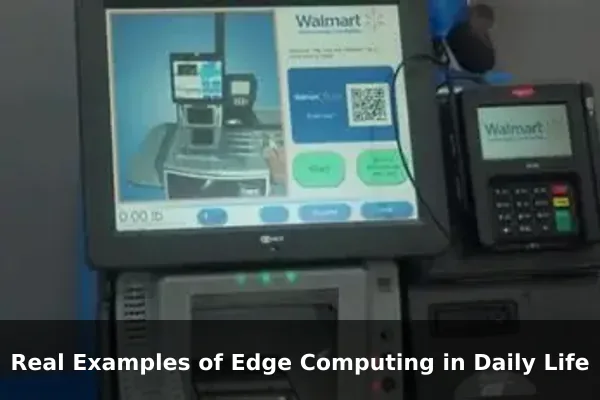
Self-checkout systems must scan products, calculate totals, and stay responsive while customers move quickly. If every small interaction depended entirely on a remote server, lines would slow down and stores would lose efficiency. Many retail environments therefore use local computing for transaction handling, barcode recognition, weight verification, and device control, while syncing data to central systems afterward.
Interactive kiosks work the same way. They often cache content, manage screens locally, and keep functioning even if the network connection briefly fails.
Connected cars and driver-assistance systems
A connected car cannot wait for a faraway data center to decide whether to apply brakes, detect lane markings, or react to a nearby object. Those decisions must happen inside the vehicle or extremely close to it. This is edge computing in one of its clearest forms: local processing for immediate safety and control.
The cloud still supports navigation updates, diagnostics, fleet analytics, and software distribution, but the most urgent decisions stay near the vehicle itself.
Wearable health devices
Smartwatches, heart monitors, and fitness devices increasingly analyze signals on the device or on a paired local system. They can detect unusual heart patterns, estimate activity levels, or alert the user in near real time. That local processing improves responsiveness and may reduce how much sensitive raw health data needs to be transmitted elsewhere.
Not every wearable is a full edge platform, but many modern health devices use edge principles in practice.
Smart home assistants and appliances
Voice assistants, thermostats, smart displays, and connected appliances often combine edge and cloud features. Some voice recognition steps may happen locally for wake-word detection. A thermostat may make immediate temperature decisions in the home, while longer-term learning and account features run in the cloud. A robot vacuum may map rooms and avoid obstacles on-device because it needs instant local awareness.
These products help make edge computing feel less abstract. People use it every day without thinking about the architecture behind it.
Common Edge Computing Use Cases Across Industries
Manufacturing and industrial automation
Factories are one of the strongest matches for edge computing. Machines produce constant streams of operational data, and many decisions must happen immediately. Common industrial edge use cases include:
- predictive maintenance based on vibration, heat, or sound patterns
- quality inspection using computer vision on production lines
- robot coordination and machine control
- safety monitoring in hazardous environments
- local dashboards for plant managers and technicians
In these environments, edge computing reduces delay and helps operations continue even if external connectivity is interrupted.
Healthcare and medical monitoring
Hospitals, clinics, ambulances, and remote care systems increasingly use edge computing for timely decision-making. Medical devices may need to monitor patients continuously and trigger fast alerts when readings change. A local edge layer can help process signals in real time before forwarding summaries or records to larger systems.
Use cases include bedside monitoring, remote patient tracking, wearable diagnostics, imaging workflows, and emergency response systems where every second matters.
Retail and in-store analytics
Retailers use edge computing for much more than self-checkout. Stores may analyze foot traffic through cameras, manage digital signage, coordinate inventory scanners, and support smart shelves that detect stock levels. Because these systems operate inside physical stores, local processing often provides better speed and lower network dependence.
Retail edge computing can also support personalized promotions, queue detection, fraud prevention, and local device management across many branches.
Transportation and logistics
Logistics networks depend on fast local awareness. Trucks, trains, ports, delivery hubs, and warehouses generate location, condition, and routing data continuously. Edge computing helps systems track temperature-sensitive goods, optimize local warehouse workflows, monitor vehicle conditions, and respond quickly to operational changes.
For example, a refrigerated transport system may detect a temperature problem locally and trigger an alert immediately rather than waiting for a central server to analyze the issue later.
Telecom, 5G, and content delivery
Telecom providers place compute resources closer to users to support low-latency applications. This is especially useful for multiplayer gaming, augmented reality, video optimization, industrial automation, and smart city workloads. Content delivery networks also use edge-like principles by caching data close to end users so websites, video, and digital services load faster.
Not every edge deployment looks identical, but the shared idea remains the same: bring compute and data handling closer to where demand happens.
Smart cities and utilities
Cities use sensors, cameras, meters, and connected infrastructure to manage traffic, public safety, lighting, waste, and energy systems. Sending every sensor reading or video frame to a central platform first can be impractical. Edge computing allows local intersections, substations, or control points to process data quickly and respond to immediate conditions.
Examples include traffic signal optimization, power grid monitoring, leak detection, environmental sensing, and public transport coordination.
Challenges and Limits of Edge Computing
Security becomes more distributed
Centralized systems are already difficult to secure. Distributed systems with hundreds or thousands of edge nodes can be even harder. Each device, gateway, or local server becomes a potential attack surface. Organizations need strong identity controls, encrypted communication, secure boot processes, access policies, and reliable patching strategies.
This is one of the biggest tradeoffs in edge computing. You gain speed and resilience, but you also increase the number of places that must be managed correctly.
Hardware sprawl and operational complexity
Cloud resources can often be scaled from a dashboard. Edge resources live in the real world. They may be installed in stores, plants, roadside cabinets, clinics, or branch offices. That means physical hardware maintenance, remote monitoring, replacement planning, and local support logistics all matter.
When organizations expand edge deployments quickly without strong management tools, the result can be a fragmented environment that is expensive to maintain.
Local compute power is limited
Edge devices do not usually have the same capacity as major cloud infrastructure. They may have smaller processors, limited storage, lower power budgets, or environmental constraints. This means architects must decide which tasks truly need to happen locally and which should be handed off to central systems.
Edge computing works best when the workload is chosen carefully. If teams try to force every workload to the edge, they may end up with higher complexity and worse results.
Software updates and consistency are harder
Updating one cloud application is very different from updating thousands of distributed devices in the field. Edge systems need dependable deployment pipelines, rollback plans, observability, and version control across many physical locations. Without that discipline, inconsistencies appear quickly.
- One store may run a newer model than another.
- A factory gateway may miss a security patch.
- A vehicle fleet may have mixed software behavior during a rollout.
This is manageable, but it requires mature operations.
Integration still matters
Edge computing does not remove the need for cloud integration, enterprise systems, analytics pipelines, or governance. It adds another layer that must fit into the wider architecture. Businesses still need to think about how local events are stored, how models are updated, how compliance is handled, and how data is synchronized between local and central systems.
In short, edge computing solves certain problems very well, but it is not a shortcut around good system design.
When Edge Computing Makes Sense
Strong signals that edge is a good fit
Edge computing makes the most sense when one or more of the following conditions apply:
- Real-time response is critical. The system must act in milliseconds or seconds, not after a long network round trip.
- Devices generate high data volume. Uploading all raw data would be wasteful or too expensive.
- Connectivity is inconsistent. The system must continue operating even when internet access drops.
- Data is privacy-sensitive. Local processing can reduce how much raw information leaves the site or device.
- Local context matters. Decisions depend on immediate surroundings, device state, or physical conditions.
When cloud-only may be enough
Not every application needs edge computing. If a workload is not time-sensitive, if data volumes are modest, if connectivity is stable, and if centralized analysis is the main goal, cloud-only architecture may be simpler and cheaper. For example, a business reporting dashboard or a batch analytics task usually does not benefit from local real-time processing.
This is an important point for anyone trying to understand common edge computing use cases. The question is not whether edge is modern. The question is whether local processing creates measurable value for the workload you actually have.
A simple decision framework
If you are evaluating whether edge computing fits a project, ask these questions:
- What happens if the network is slow or unavailable?
- How much raw data is produced every minute or hour?
- Does the system need to make decisions immediately?
- Would local filtering or AI inference reduce cost or improve reliability?
- Can the organization securely manage distributed hardware and software?
If the answer to several of those questions is yes, edge computing is probably worth serious consideration.
Edge Computing FAQs
Does edge computing replace the cloud?
No. In most real deployments, edge and cloud work together. The edge handles immediate local tasks, while the cloud supports centralized coordination, historical analytics, backups, and large-scale services.
Is edge computing the same as IoT?
No. The Internet of Things refers to networks of connected devices. Edge computing is an architectural approach that can be used with IoT systems. Many IoT deployments benefit from edge processing, but not every IoT device performs meaningful local computation.
Is edge computing only for large enterprises?
No. Large enterprises use it heavily, but smaller businesses use edge ideas too. A retail kiosk, a local camera analytics system, a branch-office server, or a smart manufacturing cell can all be examples of edge computing at a smaller scale.
Can AI run at the edge?
Yes. Many AI inference workloads now run on edge devices or nearby local servers. Examples include object detection in cameras, anomaly detection in machines, speech recognition, predictive maintenance, and driver-assistance functions. Training large AI models still usually happens in the cloud or in centralized environments, but inference increasingly happens at the edge.
What is an edge device?
An edge device is any device near the source of data that can collect, process, or act on information locally. That could be a camera, sensor hub, router, industrial controller, smart speaker, medical wearable, or in-vehicle computer.
Why is latency such a big deal in edge computing?
Latency is the time it takes for data to travel and for a system to respond. In applications like automation, safety, video analytics, and interactive services, even small delays can reduce quality or create risk. Edge computing lowers latency by reducing the physical and network distance between the event and the decision.
Conclusion
Edge computing is best understood as a practical response to a practical problem: some data needs to be handled close to where it is created. When systems must react quickly, work through unreliable connectivity, reduce bandwidth usage, or keep sensitive processing local, edge architecture often performs better than a cloud-only approach.
The most useful way to think about edge computing explained in real terms is this: it is not about replacing the cloud, and it is not only for futuristic devices. It already appears in smart cameras, connected vehicles, retail systems, healthcare monitoring, industrial automation, and city infrastructure. As more devices generate more data, the common use cases for edge computing will continue to grow wherever fast local decisions matter most.
