
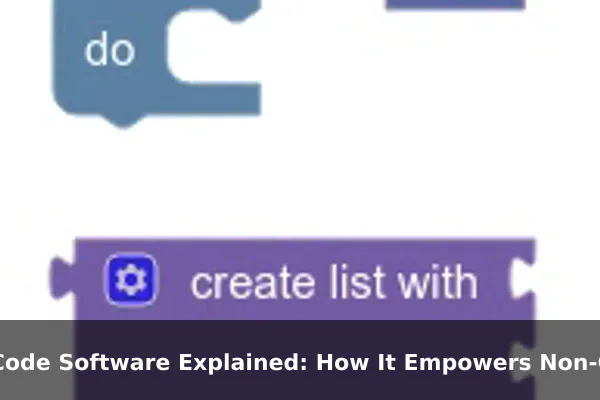
Technology has historically been the domain of trained developers and engineers. Writing software meant mastering programming languages, understanding complex logic, and spending months — sometimes years — learning the craft. That barrier kept most people on the sidelines, dependent on technical teams to build even the simplest digital tools.
No-code software is changing that dynamic. Today, someone with zero programming experience can build a working web app, automate a business process, or launch an internal dashboard in an afternoon. No-code platforms put the power of software creation into the hands of anyone who can think clearly about a problem — no syntax, no compilers, no debugging sessions at 2 a.m.
This guide explains what no-code software is, how it actually works, what you can realistically build with it, and where its limits lie — so you can decide whether it’s the right fit for your goals.
What No-Code Software Actually Means
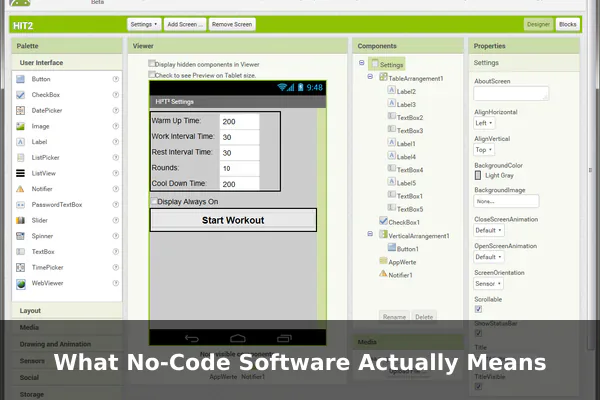
No-code software refers to platforms and tools that allow users to build digital applications, workflows, and websites using visual interfaces instead of written code. Rather than typing instructions in a programming language, you interact with pre-built components, drag-and-drop elements, and point-and-click configuration menus.
The term is fairly literal: the end user never writes a single line of code. The platform handles all underlying logic and structure automatically based on the visual decisions you make through the interface.
How It Differs From Traditional Development
In traditional software development, a developer writes code that a computer interprets and executes. Every feature, form field, and database interaction must be explicitly defined in that code. It gives developers extraordinary control, but it requires deep expertise and significant time investment.
No-code platforms abstract all of that away. Instead of writing conditional logic in code, you configure visual rule panels. Instead of defining database schemas, you fill in a spreadsheet-style interface. The platform converts your visual decisions into working software behind the scenes — you see the result without touching the mechanism.
Is No-Code the Same as Website Builders?
No-code includes website builders like Wix and Squarespace, but it extends far beyond them. Modern no-code platforms cover full app development, workflow automation, database management, e-commerce, and internal business tools — all without requiring code.
How No-Code Platforms Work Behind the Scenes
Even though users never see the code, no-code platforms generate real, functional software. Understanding the basic mechanics helps you use these tools more effectively and troubleshoot when things don’t behave as expected.
Visual Interfaces and Building Blocks
No-code platforms present a library of pre-built components — buttons, forms, tables, charts, navigation menus, and more. You drag these onto a canvas and configure their behavior through property panels. The platform translates those configurations into functional logic that runs when users interact with your app.
Databases and Data Management
Most no-code tools include built-in database features that look like structured spreadsheets. You define the fields and record types your app needs, and the platform manages the actual database and handles queries automatically. You never write a SQL statement, but a real database is operating underneath.
Workflows and Automations
Many no-code platforms include visual workflow builders — tools that let you define sequences of automated actions triggered by events. For example: when a form is submitted, add a row to a database, send a confirmation email, and notify a team in Slack. You configure each step visually without writing any integration code.
Integrations With External Services
No-code tools connect to external services through pre-built connectors. Platforms like Zapier and Make specialize entirely in linking hundreds of apps — Gmail, Stripe, Google Sheets, Salesforce — without the user needing to understand APIs. Other no-code platforms like Bubble or Webflow include their own native integration systems for seamless data exchange.
Why No-Code Appeals to Non-Coders
The rise of no-code reflects a genuine shift in how businesses and individuals approach problem-solving with software. The benefits go well beyond simply avoiding code.
- Speed: Building a working prototype can take hours rather than weeks, enabling faster decisions and shorter feedback loops.
- Lower cost: Hiring a developer is expensive. No-code lets small businesses, solopreneurs, and internal teams build functional solutions without a dedicated development budget.
- Accessibility: These tools are designed for people who understand their problem domain, not computer science. Business logic matters more than technical syntax.
- Easy iteration: Changing a no-code app is far simpler than rewriting code. Teams can experiment rapidly and adjust without long development cycles.
- Reduced developer dependency: For simple internal tools or automations, non-technical staff can handle builds independently, freeing developers for genuinely complex work.
Common Things People Build With No-Code Tools
No-code platforms are flexible enough to support a wide range of real-world applications across industries and team sizes.
Websites and Landing Pages
Creating a professional website remains one of the most common no-code applications. Tools like Webflow, Framer, and Carrd allow anyone to design and publish polished, responsive websites without writing HTML or CSS.
Web and Mobile Apps
Platforms like Bubble, Glide, and Adalo let users build full-featured applications — complete with user accounts, databases, and interactive features — that function comparably to traditionally developed apps.
Internal Business Tools and Dashboards
Teams use platforms like AppSheet or Softr to build internal dashboards that pull live data from spreadsheets or databases and display it in a usable interface, without any developer involvement.
Workflow Automations
Automation delivers some of the highest return for no-code investment. Tools like Zapier and Make connect dozens of apps and automate repetitive tasks — syncing data, triggering notifications, generating reports — saving hours of manual effort each week.
Forms, Surveys, and Data Collection
Platforms like Typeform and Airtable allow non-technical users to build sophisticated data collection workflows with conditional logic, automated follow-ups, and structured storage — no spreadsheet juggling required.
No-Code vs Low-Code vs Custom Development
Understanding where no-code sits relative to the alternatives helps you choose the right approach for each situation.
- No-code: Entirely visual, no programming knowledge required. Best for non-technical users building standard use cases — websites, forms, automations, and simple apps.
- Low-code: Visual-first with the option to add code where needed. Targets technical users who want speed without sacrificing customization. Handles more complex requirements than pure no-code.
- Custom development: Fully hand-coded. Required for complex, high-performance, or highly unique software. Offers maximum flexibility but demands the most time, cost, and expertise.
The right choice depends on complexity, budget, and how specialized your requirements are. No-code wins for speed and accessibility. Custom development wins for power and uniqueness. Low-code occupies the practical middle ground between them.
The Real Limits of No-Code Software
No-code platforms are genuinely capable, but they are not unlimited. Recognizing their constraints upfront prevents frustration and keeps expectations realistic.
Customization Ceiling
No-code platforms offer a fixed set of features and configurations. Once you reach the edge of what the platform supports, you have no way to extend it without introducing code or switching tools entirely. Unusual requirements often expose this ceiling quickly.
Scalability and Performance
No-code apps handle small to medium workloads well, but can struggle under enterprise-scale demand. Performance tuning is limited when you cannot access or optimize the underlying code — a critical consideration for apps expecting heavy traffic or large data volumes.
Vendor Lock-In
Your no-code app lives on the platform’s infrastructure. If that platform changes pricing, alters terms, or closes down, migrating your app is often difficult or impossible. Unlike custom code, there is no portable source you fully own and can take elsewhere.
Security and Compliance Constraints
Applications handling sensitive data — medical records, financial information, or personal data governed by privacy regulations — may find that no-code platforms lack the granular security controls required for compliance. Always verify a platform’s certifications and data handling practices before building anything sensitive.
How to Choose the Right No-Code Tool
With dozens of no-code platforms available, selecting the right one significantly affects how smoothly your project progresses. Consider these factors before committing.
- Define your output type: Are you building a website, automating a workflow, or creating an internal app? Different platforms specialize in different results.
- Check integrations: Does the platform connect to the tools you already use? An automation tool that doesn’t support your existing systems offers little practical value.
- Evaluate ease of use: Use the free tier before paying. A platform that matches your mental model will produce better results than a more powerful but confusing alternative.
- Understand pricing at scale: Many platforms charge based on usage — number of records, automations per month, or active users. Map the pricing model to your expected workload before committing.
- Review community and support: Active user communities, thorough documentation, and responsive support become essential when you encounter platform limitations. Popular tools like Bubble and Webflow have rich tutorial ecosystems.
Getting Started Without Feeling Overwhelmed
The biggest barrier to no-code adoption isn’t the technology — it’s knowing where to begin. The variety of platforms and features can feel paralyzing without a clear starting point.
Start With One Specific Problem
Don’t attempt to build your entire business system on day one. Pick one concrete, contained problem — a form that collects data and triggers a notification, a simple tracking dashboard, a landing page — and solve only that. A focused first project builds confidence and teaches platform fundamentals without the weight of a complex build.
Use Templates as Your Starting Point
Every major no-code platform offers templates — pre-built starting points for common use cases. Start with the template closest to your goal and customize it from there. This is significantly faster than building from a blank canvas and teaches you how the platform structures its logic in practical terms.
Validate the Platform Before Going Deep
Before investing weeks in a no-code project, quickly confirm the platform can handle your most critical requirement. Build a small proof of concept with that one feature first. If the platform handles it well, proceed. If not, you’ve discovered the limitation before it costs you significant time.
No-code software has fundamentally lowered the cost of turning ideas into working digital tools. For non-technical users, entrepreneurs, small teams, and business analysts, it represents a genuine shift in what’s achievable without a development background. The platforms are mature, the communities are active, and the barrier to entry has never been lower.
The key is matching the right platform to the right problem — and starting small enough to actually ship something. Whether you want to automate a repetitive manual task, build a simple internal app, or launch a side project without hiring a developer, no-code offers a practical, accessible path forward.
