
Every time you log into an app, place an online order, or stream a video, database software is working silently in the background. It stores your account details, processes your actions, and returns the right information in milliseconds. Without it, virtually every digital service we rely on today would fall apart.
Database software is a system that stores, organizes, and manages collections of data in a structured way. It solves a fundamental problem that plain files and spreadsheets cannot: handling large volumes of information reliably, with many users or systems accessing it at the same time. This guide explains how it works, what makes it reliable, and how to choose the right type for your needs.
What Database Software Actually Does
Database software — more formally called a Database Management System (DBMS) — acts as the layer between an application and raw data. It controls how information is written, read, updated, and protected. When you submit a form, search for a product, or check your bank balance, the DBMS processes those requests and returns the correct result instantly.
Databases vs. Spreadsheets
A spreadsheet works well for small, personal data tasks, but it breaks down quickly at scale. It cannot handle thousands of simultaneous users, enforce strict data validation rules, or maintain consistency when many people edit it at once. Database software is purpose-built to solve all of these problems — reliably and at any scale.
How Data Is Stored Inside a Database
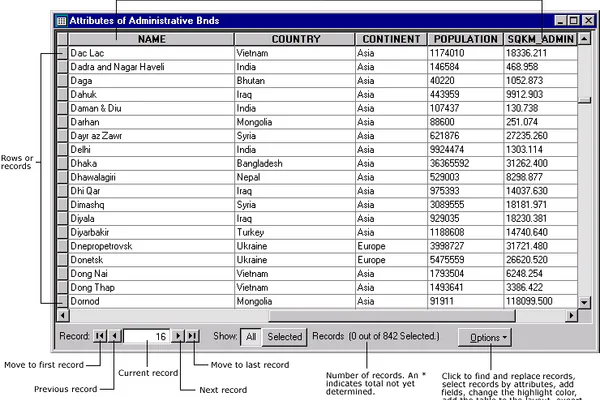
In the most common database type — the relational database — data is organized into tables made up of rows and columns.
- Fields (columns) define the type of information stored, such as “Name,” “Email,” or “Order Date.”
- Records (rows) represent individual entries, like the details for one customer or one product.
Schemas and Indexes
A schema is the blueprint of a database — it defines what tables exist, what fields each table contains, and what type of data each field accepts (text, numbers, dates, etc.). Schemas prevent invalid data from being saved in the first place.
Indexes speed up searches by creating a sorted reference structure, similar to a book’s index. Instead of scanning every row to find a match, the database jumps directly to the right location — making queries dramatically faster on large datasets.
How Database Software Manages Data Operations
CRUD Operations
Every interaction with a database falls into one of four basic operations, collectively known as CRUD:
- Create – Adding new records, such as registering a new user account
- Read – Retrieving existing data, such as loading a product listing page
- Update – Modifying records, such as changing a shipping address
- Delete – Removing records, such as cancelling a subscription
Transactions and ACID Properties
When multiple operations must succeed or fail together — like transferring money between two bank accounts — databases use transactions. The rules that govern this reliability are called ACID properties:
- Atomicity – All steps succeed completely, or none of them do
- Consistency – Data always remains in a valid state
- Isolation – Concurrent operations don’t interfere with each other
- Durability – Once committed, changes are permanent even if the system crashes
ACID compliance is what makes database software trustworthy for critical systems like banking, healthcare, and e-commerce checkouts.
Main Types of Database Software

Relational Databases
Relational databases store data in structured tables with defined relationships between them. They use SQL (Structured Query Language) to query and manipulate data. Popular examples include MySQL, PostgreSQL, and Microsoft SQL Server. They are the standard choice when your data has a consistent structure and relationships matter — such as customers linked to orders, which link to individual products.
NoSQL Databases
NoSQL databases are designed for unstructured, semi-structured, or rapidly evolving data. Common types include:
- Document stores (e.g., MongoDB) – store flexible, JSON-like documents
- Key-value stores (e.g., Redis) – store simple paired data, like a dictionary
- Wide-column stores (e.g., Cassandra) – optimized for massive write volumes at scale
- Graph databases (e.g., Neo4j) – model complex relationships between connected entities
In-Memory and Cloud Databases
In-memory databases store data in RAM rather than on disk, making them extremely fast. Redis is a popular example, widely used for caching and real-time features. Cloud databases — like Amazon RDS, Google Cloud Spanner, or Azure SQL — are hosted and managed by cloud providers, eliminating hardware management and offering elastic scaling on demand.
Key Features That Make Databases Reliable
A good database is more than a storage container. These built-in features are what separate enterprise-grade database software from basic alternatives:
- Security and access control: Role-based permissions determine who can read, write, or delete data. Encryption protects information both at rest and in transit.
- Backup and recovery: Automated backups allow systems to restore data after hardware failure, accidental deletion, or a cyberattack.
- Replication: Data is copied across multiple servers so that if one fails, another takes over immediately — ensuring continuous availability.
- Performance optimization: Query optimizers, index tuning, and caching layers keep response times fast even as data grows into the billions of records.
Where Database Software Is Used in Real Life
Database software powers nearly every industry and digital experience:
- E-commerce: Product catalogs, shopping carts, inventory levels, and order histories are all managed in real time by databases running behind the storefront.
- Banking: Every account balance, transaction record, and loan detail is stored in highly secured databases with strict ACID compliance.
- Healthcare: Patient records, prescriptions, and diagnostic results are managed in regulated databases that meet strict privacy and security standards.
- Social media: Platforms use relational databases for user accounts, NoSQL for content feeds and posts, and in-memory databases for real-time notifications.
- Business operations: CRM systems, ERP platforms, and HR tools all rely on databases to store and retrieve their core operational data efficiently.
How to Choose the Right Database Software
With dozens of options available, the right database depends on several practical factors:
- Data structure: Consistent, well-defined data fits a relational database. Flexible or frequently changing data works better with NoSQL.
- Scale: Expecting rapid growth? Cloud databases handle scaling without requiring you to manage physical servers or infrastructure.
- Speed requirements: Applications needing real-time responses at very high frequency benefit from in-memory databases like Redis.
- Budget: Open-source options like PostgreSQL and MongoDB are free and widely supported. Managed cloud databases cost more but significantly reduce operational burden.
- Team expertise: Choose a database your team already knows, or one with strong documentation and an active developer community.
For most beginners building web applications, starting with PostgreSQL or MySQL is a reliable, well-documented default that covers a wide range of use cases without unnecessary complexity.
Conclusion
Database software is the invisible backbone of the digital world. From the moment you open an app to the second your information appears on screen, a database is doing the heavy lifting. Understanding how it stores, organizes, and manages data helps you make smarter decisions — whether you’re building an application, evaluating tools for your business, or simply trying to understand how modern technology works. The fundamentals are more approachable than they look, and knowing them gives you a real advantage in any technology conversation.
