

Software teams today ship updates faster than ever — sometimes dozens of times a day. Behind that speed is a way of working called DevOps. If you have seen the term in job listings, tech news, or company strategy documents and were not quite sure what it actually means, you are not alone. DevOps gets used so often that its real meaning can get lost in the noise.
At its core, DevOps is about removing the wall between the people who write software and the people who keep it running. It is a combination of culture, process, and tooling that helps teams deliver software more reliably and more frequently. This article breaks down what DevOps is, how it works in practice, why teams adopt it, and what separates it from related ideas like Agile or cloud computing.
What DevOps Means in Simple Terms
DevOps is a portmanteau of development and operations. It describes an approach where software developers and IT operations teams work together across the full lifecycle of an application — from writing code all the way through deployment and monitoring in production.
Before DevOps, these two groups typically operated as separate departments with different goals, different tools, and different definitions of success. Developers wanted to ship new features fast. Operations wanted to keep systems stable. Those two goals frequently clashed. DevOps is, in large part, a direct response to that conflict.
It is important to understand that DevOps is not a product you buy or a single tool you install. It is a philosophy and a set of practices that, when combined with the right tooling and team culture, results in faster and more reliable software delivery.
How Software Delivery Worked Before DevOps
To understand why DevOps matters, it helps to look at what came before it. For much of software history, teams used a model often called waterfall or traditional software development, where each phase of a project had to be complete before the next one could begin.
- Developers would write code for weeks or months, then hand it off to a QA team for testing.
- Once testing was complete, the code was passed to an operations team to deploy to production servers.
- If something broke in production, the blame was often passed back and forth between departments.
This handoff model created serious bottlenecks. Releases were infrequent — sometimes only a few times a year. Bugs discovered late in the process were expensive to fix. And because teams worked in silos, no single group had a complete view of how the software was actually performing for real users. The result was slow releases, unhappy customers, and significant organizational friction.
How DevOps Works Step by Step
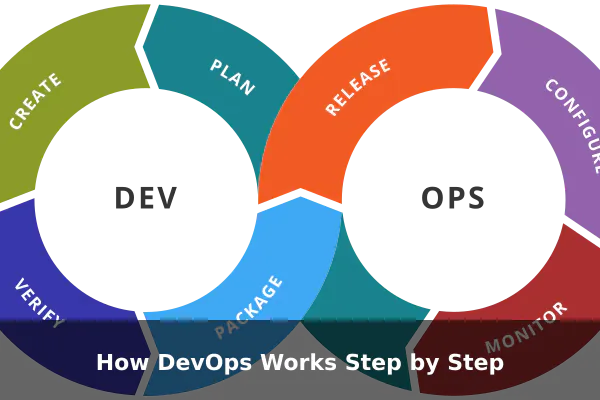
DevOps replaces the old handoff model with a continuous loop. You will often see this represented as an infinity symbol or a circular diagram with phases flowing into each other. Here is how it typically works in a real team:
- Plan: Teams define what they are building and why. Developers and operations engineers are involved from the start, so everyone understands the goals and constraints upfront.
- Code: Developers write code in small increments rather than massive batches. Smaller changes are easier to test, easier to review, and easier to reverse if something breaks.
- Build: Automated systems compile the code and verify that it assembles correctly. This happens continuously, often with every individual code commit.
- Test: Automated test suites run against each new build to catch bugs before they reach users. Testing is fast and frequent, not a one-time gate at the end of a project.
- Deploy: Tested code is released to production through automated pipelines that significantly reduce the risk of human error during deployment.
- Operate: Operations engineers — or the same team wearing both hats — monitor performance, manage infrastructure, and respond to incidents.
- Monitor and Improve: Data collected from production flows back into the planning phase, helping teams understand what is working and what needs attention next.
This loop runs continuously. In high-performing teams, the entire cycle can complete in hours or even minutes for small, well-scoped changes.
Core Practices Behind DevOps
DevOps is defined less by specific tools and more by a set of practices that teams adopt together. The most important ones include:
Continuous Integration and Continuous Delivery
CI/CD is often considered the technical backbone of DevOps. Continuous Integration means every code change is automatically built and tested as soon as it is committed. Continuous Delivery means that passing code is automatically prepared for release, ready to deploy at any time. Together, they eliminate the long, painful manual integration steps that used to delay releases for weeks.
Infrastructure as Code
Instead of manually configuring servers, DevOps teams define infrastructure — servers, networks, databases — as code files. This makes environments reproducible, version-controlled, and far less prone to the classic problem where something works in one environment but fails in another.
Automation First
Wherever practical, manual steps are replaced with automated ones. Automated testing, automated deployments, automated rollbacks — automation reduces human error and frees engineers to focus on higher-value problem-solving rather than repetitive operational tasks.
Monitoring and Observability
DevOps teams instrument their applications to collect data constantly. Metrics, logs, and traces give teams real-time visibility into system health. When something goes wrong, the team can diagnose and fix the issue far faster than in a traditional operations model where visibility is limited.
Shared Ownership
Perhaps the most culturally significant practice: developers take responsibility for what happens in production, and operations engineers get involved in how software is designed from the beginning. Shared ownership means fewer blame-passing moments and faster resolution when problems arise.
Why Teams Use DevOps
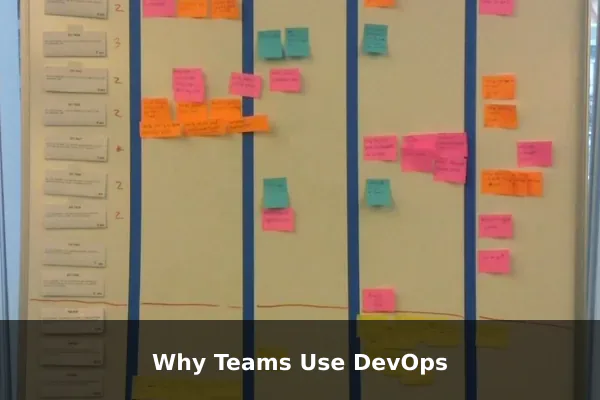
The adoption of DevOps has grown steadily because the outcomes it produces are measurable and significant. Teams that implement DevOps practices consistently report benefits across multiple dimensions:
- Faster release cycles: Features and fixes reach users more quickly, giving companies a meaningful competitive edge in fast-moving markets.
- Fewer production incidents: Automated testing and small, incremental changes mean fewer bugs reach real users in the first place.
- Faster recovery: When something does fail, well-monitored systems help teams detect and resolve problems quickly — sometimes before users even notice an issue.
- Better team morale: Engineers spend less time on manual, repetitive tasks and more time solving interesting problems that require real skill.
- Improved customer satisfaction: Reliable, frequently updated software keeps users happier than infrequent releases filled with accumulated bugs.
Research from the annual State of DevOps Report, produced by the DevOps Research and Assessment group, has consistently shown that high-performing DevOps teams deploy code significantly more often and recover from failures far faster than lower-performing peers operating under traditional models.
Common DevOps Tools and Roles
While DevOps is not a tool, specific tools are used to enable its practices. It helps to understand them in categories rather than as a single fixed stack:
Version Control
Git is the near-universal standard for tracking code changes. Platforms like GitHub, GitLab, and Bitbucket add team collaboration features on top of it.
CI/CD Platforms
Tools like Jenkins, GitHub Actions, GitLab CI, and CircleCI automate the build, test, and deploy pipeline so code moves through stages without manual intervention.
Infrastructure and Configuration
Terraform, Ansible, and Puppet are popular tools for defining and managing infrastructure as code, making environments consistent and reproducible across development, staging, and production.
Monitoring and Alerting
Prometheus, Grafana, and Datadog give teams real-time visibility into how their systems are performing, enabling fast detection of anomalies and degraded performance.
As for roles, DevOps Engineer is a common job title but it can mean different things in different organizations. In some companies it describes someone who builds and maintains CI/CD pipelines and infrastructure. In others it describes a generalist who bridges development and operations teams. The underlying expectation is consistent: a person who understands both the software and the systems it runs on.
What DevOps Is Often Confused With
Because DevOps borrows ideas from several movements and overlaps with many modern tech concepts, confusion is common. Here are the most important distinctions:
DevOps vs Agile
Agile is a software development methodology focused on iterative development and team collaboration. DevOps extends those ideas into the operations and delivery layers. You can be Agile without practicing DevOps, and you can adopt DevOps without strictly following an Agile framework. Most mature software organizations do both in combination.
DevOps vs Site Reliability Engineering
Site Reliability Engineering (SRE) is Google’s approach to operations, which applies software engineering principles to reliability problems at scale. SRE is often described as one specific implementation of DevOps principles. Both emphasize automation, reliability, and shared responsibility — but SRE has a more defined structure and explicit metrics like Service Level Objectives and error budgets.
DevOps vs Cloud Computing
Cloud computing provides the infrastructure that many DevOps practices run on, but the two are not the same thing. You can practice DevOps on on-premise servers. You can also use cloud services without any DevOps practices in place. They are highly complementary but not synonymous concepts.
DevOps vs Simple Automation
Automation is a tool DevOps uses — not what DevOps is. Teams that automate their deployments but still operate in silos with blame-driven culture have not adopted DevOps. They have only sped up their old broken process without fixing the underlying dysfunction.
When DevOps Works Best and What Gets in the Way
DevOps delivers its biggest benefits when certain organizational conditions are in place. Without them, even the best tooling will underdeliver:
- Leadership support: Culture change is difficult. DevOps adoption stalls when management treats it as a purely technical project rather than an organizational shift that requires their active involvement.
- Team trust: Shared ownership only works when engineers feel safe to surface problems and admit mistakes without fear of punishment or blame.
- Measurable processes: Teams need clear metrics — deployment frequency, change failure rate, mean time to recovery — to know whether their practices are actually improving over time.
- Gradual adoption: Organizations that attempt total transformation overnight usually struggle. Starting with CI/CD or a single pilot team and expanding from there tends to produce more durable results.
The most commonly overlooked obstacle is not technology — it is culture. Organizations with entrenched departmental silos, risk-averse leadership, or deeply manual processes often find that the tools are the straightforward part. Getting people to genuinely work differently, share responsibility, and trust each other across former boundaries is where most DevOps initiatives succeed or fail.
Conclusion
DevOps is one of the most significant shifts in how software is built and delivered over the past two decades. It combines cultural change with practical automation and tooling to create a continuous loop of planning, building, testing, deploying, and improving. Teams that do it well ship faster, cause fewer incidents, and recover more quickly when problems do occur.
Understanding DevOps is valuable well beyond engineering. For product managers, business leaders, and anyone involved in how technology products reach customers, the core idea is worth knowing: build collaboratively, ship continuously, and let data from real production guide every improvement cycle.
